NOTE: Liebert 1-wire sensors and the local display, the RPC BDM, come with their own cables.
Field installation of an RPC2 communications module
Locate the communications card bay on the rack PDU and insert the RPC2 communications module into the card bay.
Secure it with the captive thumb screws.
2.2 RPC2 Communications Module Ports
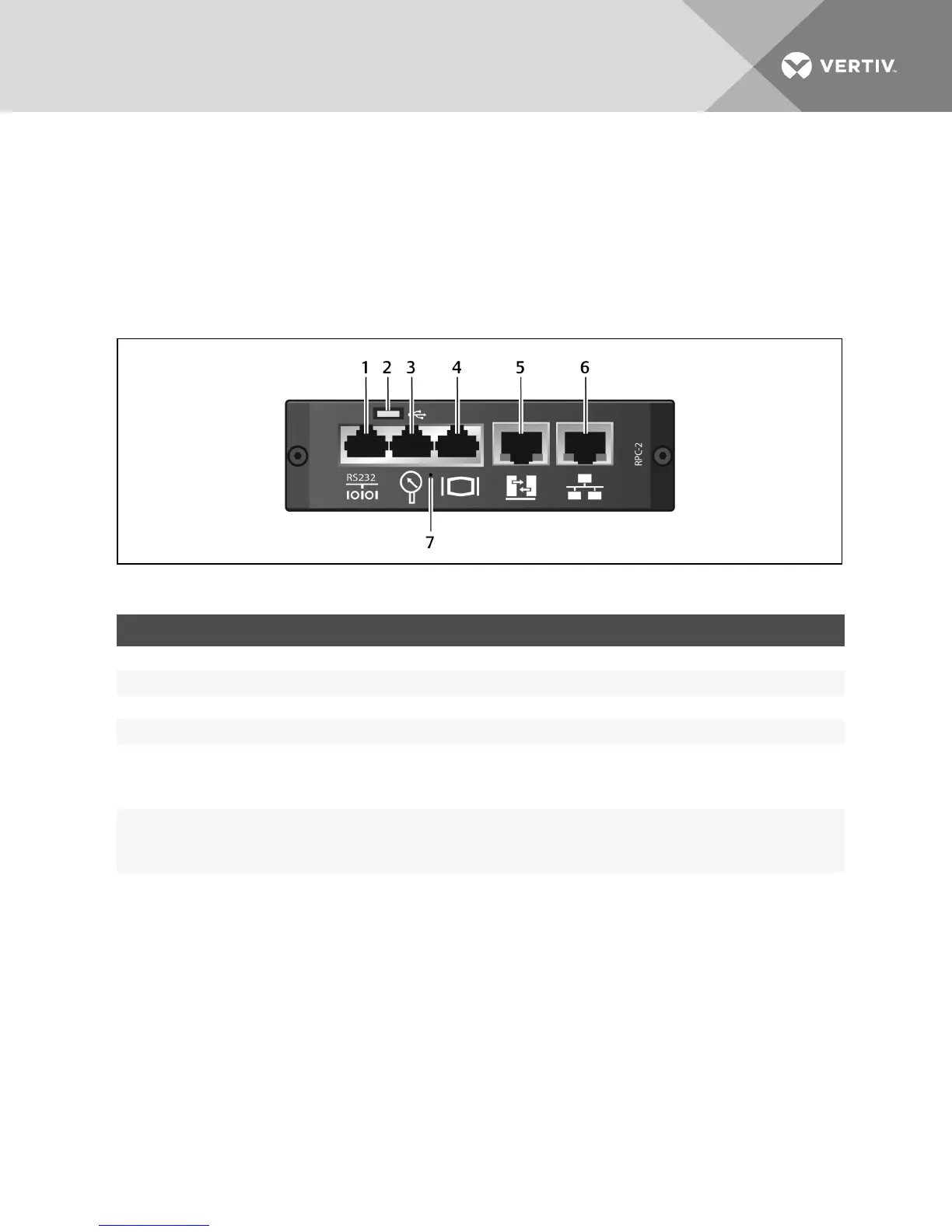
The module has six ports designated by icons. The following figure shows each port with its icon underneath it.
Figure 2.2 RPC2 Communications Module Ports
ITEM PORT DESCRIPTION
1 Serial Used for RS232 serial communication using the Command Line Interface (CLI).
2 USBMicro-AB Used for USBapplications.
3 Sensor Used to plug in optional sensor accessories.
4 Display Used to plug in the RPC BDM (Basic Display Module).
5 Link
Used for:
• Local configuration through interconnection to a computer.
• Creating a rack PDUarray by interconnecting additional rack PDUs.
6 Network
Used for:
• Plugging in the Local Area Network (LAN) via an Ethernet cable (not included).
• Creating a rack PDUarray by interconneting additional rack PDUs.
7 Reset button access hole Used to reboot or reset the module to its factory default settings.
Table 2.2 RPC Communications Module Ports Descriptions
To connect the module to your network:
Connect one end of an Ethernet cable (not included) to the network port and the other end to the network.
2.3 Monitoring and Configuration Overview
The following sections outline how rack PDUs are configured and managed.
2.3.1 Vertiv™ Rack PDU monitoring structure
Vertiv™rack PDUs are managed at three levels:
• Rack PDU Level - provides aggregate input power monitoring of rack PDUs.
• Branch Level - provides status information of a branch circuit breaker and aggregate power monitoring of
branch receptacles.
Vertiv | RPC2™ Communications Module Installer/User Guide | 4



 To Next Page