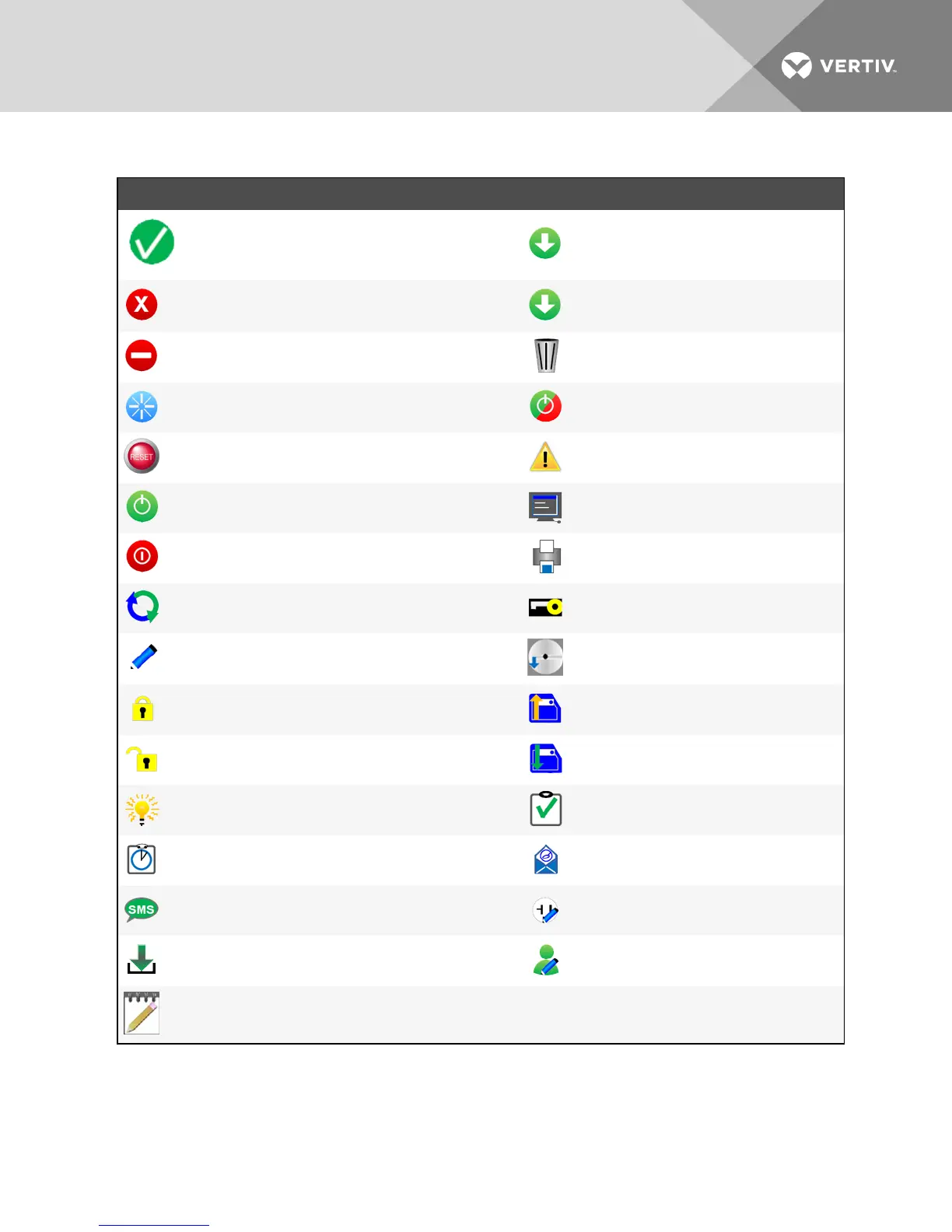
ICON DESCRIPTION ICON DESCRIPTION
Save
System OK
Normal Operation
Download
Cancel
Alarm
Unacknowledged Change
Export
Abnormal Operation Flush
Reset Selected Energy (at PDUlevel)
Reset Energy (at branch and receptacle level)
Mixed State of Receptacles
Reset All Energy (PDUlevel) Warning
Enable Receptacle Power Open CLI
Disable Receptacle Power Print
Cycle Receptacle Power Reboot
Edit
Edit Group
Reset to Factory Default Settings
Lock Receptacle Restore Configuration
Unlock Receptacle Save Configuration
Blink Receptacle LED Verify SNMPv3 Change
Synchronize Time Now Verify Email
Verify SMS Edit Group-Receptacle
Start Firmware Update Edit User
Device Acknowledgment Required
Table 3.2 RPC2 Communications Module Icon Descriptions
3.3 Summary Tab
The Summary tab window displays aggregate information about the MPH2™ rack PDUstatus, including: Recent Events,
Primary Sensor and PDUstatus. The side navigation tree displays the rack PDU's overall status and system information. The
Vertiv | RPC2™ Communications Module Installer/User Guide | 10



 To Next Page