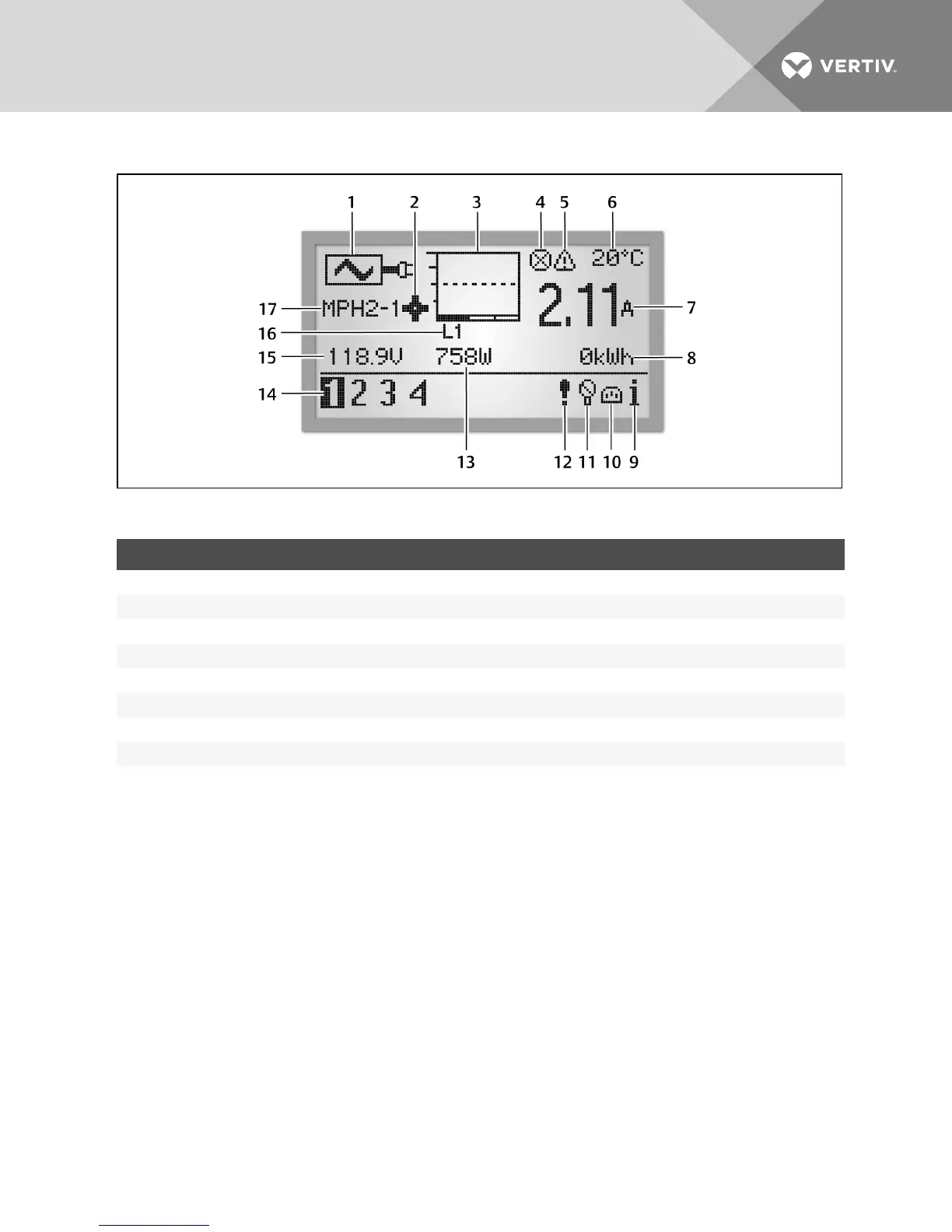
Figure 4.5 PDULevel View
ITEM DESCRIPTION ITEM DESCRIPTION
1 Input-level metered information icon 9 Information icon
2 Configuration wheel 10 Receptacle icon
3 Bar graph of input current 11 Sensor icon
4 Active alarm 12 Alarm icon
5 Active warning 13 Real Power (Watts)
6 Temperature 14 Unit identification
7 Current 15 Voltage
8 Energy 16 Voltage phase
17 Unit identifier
Table 4.4 PDU Level View Descriptions
NOTE: On the PDU level, the BDM device displays temperature in Celsius or Fahrenheit if a temperature sensor is
attached.
NOTE: The unit identification always shows 1 if connected to a single rack PDU, or shows all units (up to four) if
connected to a rack PDU array.
Vertiv | RPC2™ Communications Module Installer/User Guide | 39



 To Next Page