EasyManua.ls Logo

Verve PANTERA - Installing the Handlebar

Default Icon
53 pages
Print Icon
To Next Page IconTo Next Page
To Previous Page IconTo Previous Page
Loading...
1.
2.
6.3.
4.
The handlebar setup is quite easy an operation although it requires the habitual care. An improperly tightened
retaining screw might in fact compromise your safety. So make sure all the screws are tightly closed before
starting to drive.
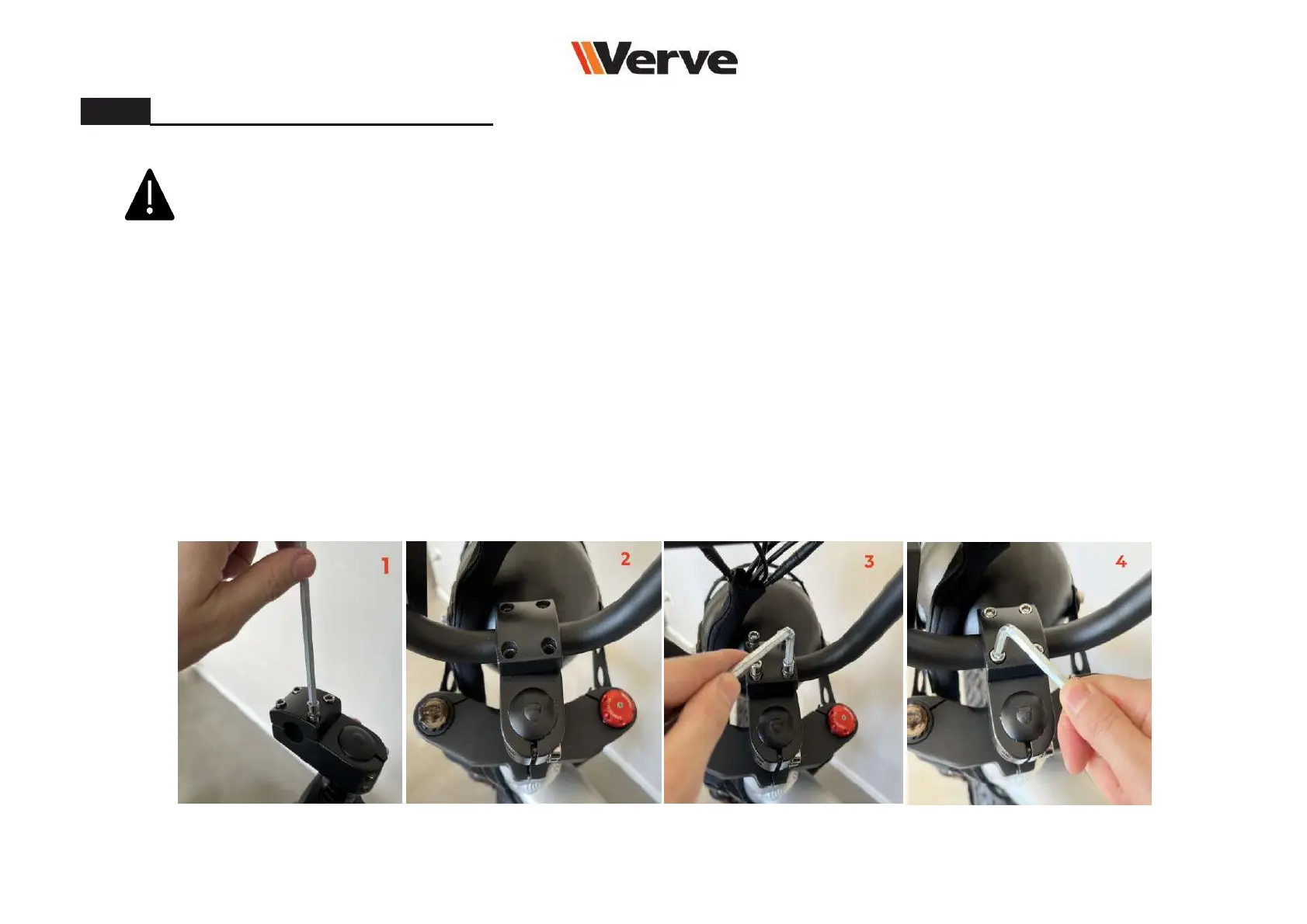
Use the 5mm Allen key to loosen the bolts of the handlebar clamp (Fig. 1)
Cross tighten the bolts of the handlebar clamp. Make sure the clamp is tight and correctly placed on the handlebar
(Fig. 4)
Place back the upper clamp and slightly tighten the bolts with the 5mm Allen key. You can now adjust the angle of the
handlebar so as to enjoy a maximum riding comfort (Fig. 3)
3.
After removing the clamp, insert the handlebar in the specific slot (Fig. 2)
Please follow these steps:
Installing the handlebar
15

Related product manuals