Visionary, Network Audio Video
DUETE-2/DuetD-2 USER MANUAL
INSTALLATION AND CONNECTIONS (SYSTEM
E
XAMPLES
)
O
NE SOURCE TO ONE DISPLAY
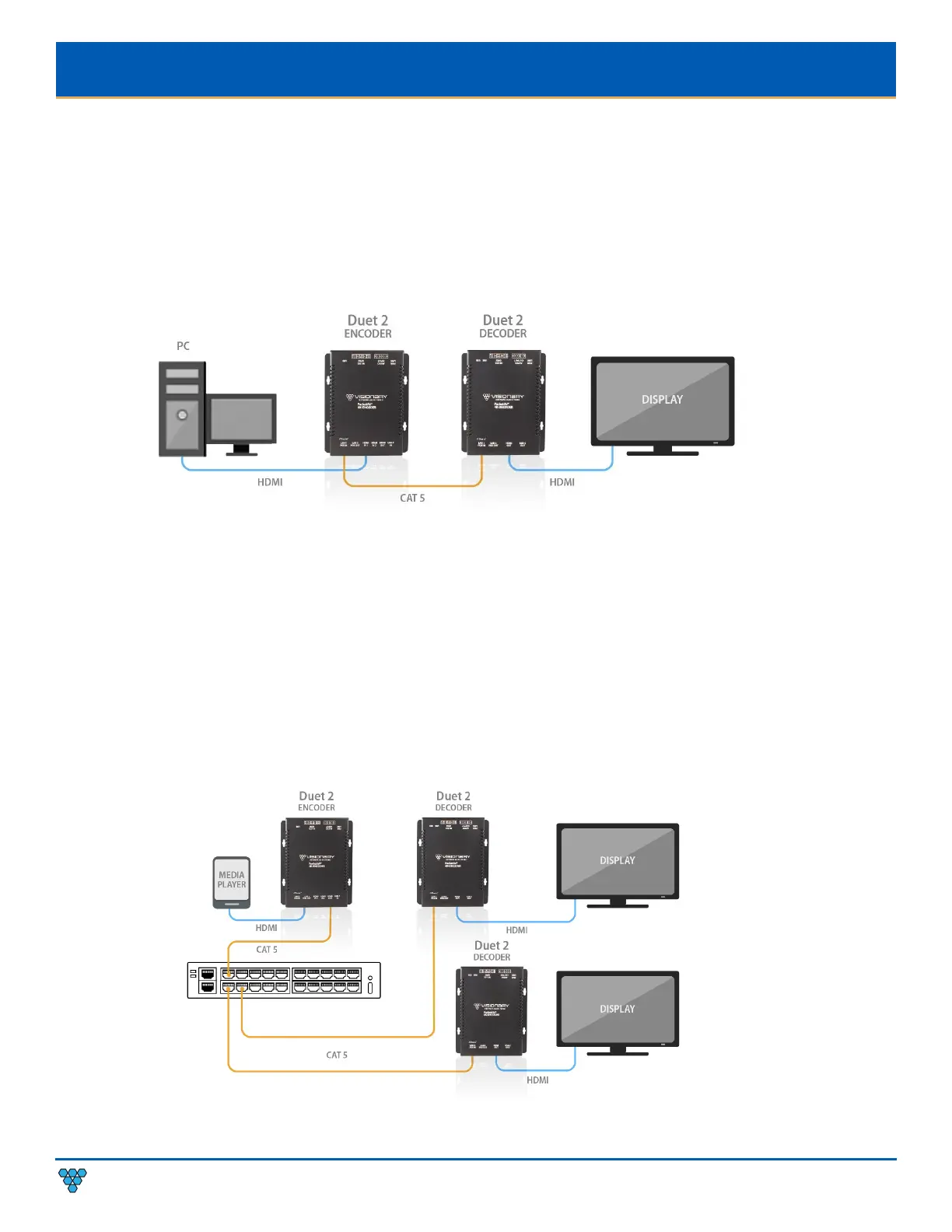
In this basic installation scenario, sending video from a single source to a single display, a single encoder and decoder (point-to-
point) can be linked directly together or over a network. If linked directly, the CAT 5e (or better) cable linking the devices should not
run more than 100m (328ft).
The devices do not connect automatically and must first be configured through embedded web interfaces. This step requires a
connection to a network. Once the devices are linked on the network, they can be connected directly. See section Configuration.
Figure 4. One Source to One Display Diagram
O
NE SOURCE TO MANY DISPLAYS
Sending video from a single source to multiple displays requires a network switch. A single encoder can be linked to multiple
decoders (point-to-multipoint) over a network. Implementing a one-to-many installations dramatically decreases the amount of
equipment required at the source location.
The encoder and each decoder can be located no more than 100m (328ft) from the switch.
Figure 5. One Source to Many Displays Diagram



 To Next Page