Visionary, Network Audio Video
DUETE-2/DuetD-2 USER MANUAL
INSTALLATION AND CONNECTIONS (SYSTEM
E
XAMPLES
)
INSTALLING ON A DEDICATED NETWORK
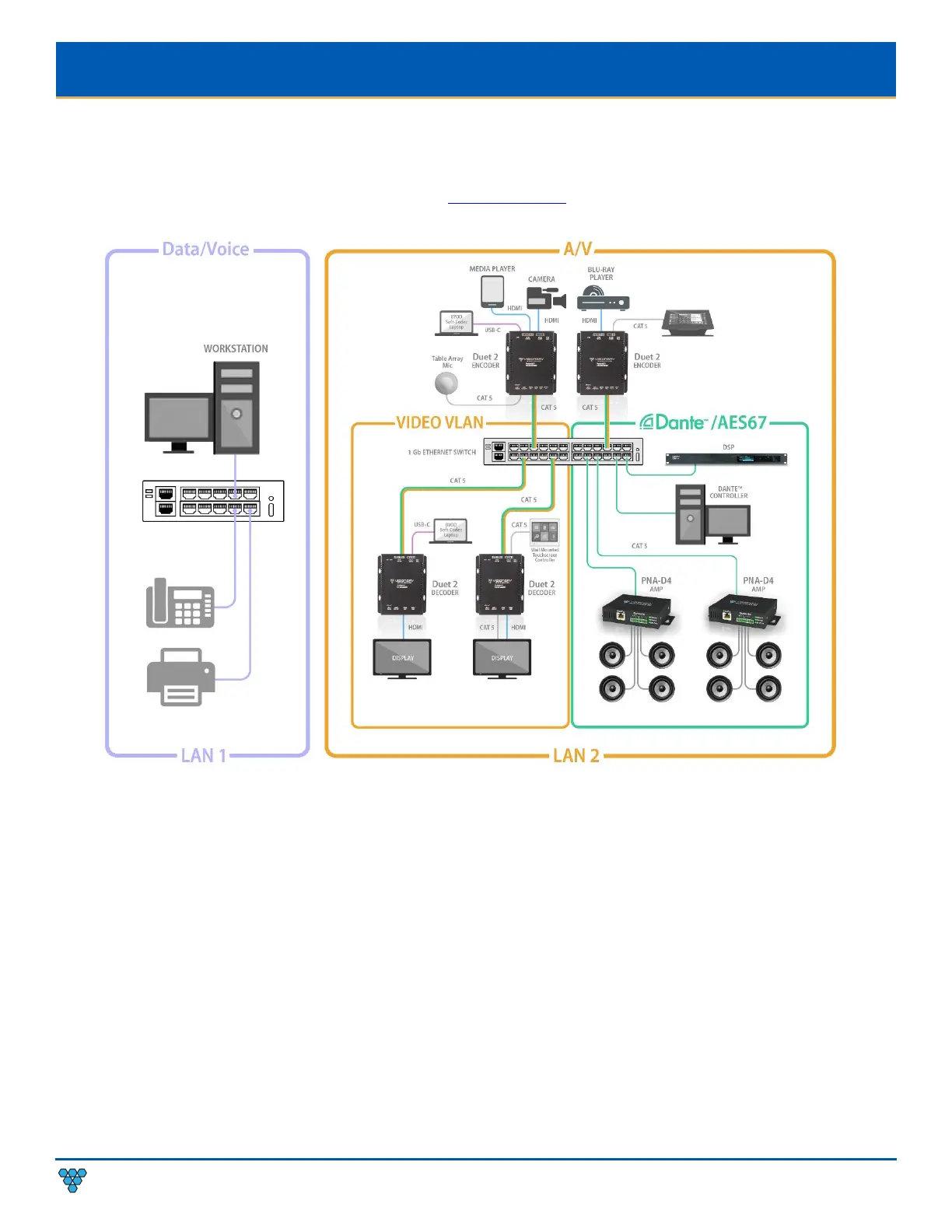
Figure 2 illustrates how Duet-2 endpoints can be installed on a dedicated network. A dedicated network is recommended for
transmitting AV over IP. We offer various models of preconfigured switches for resale to our partners. These switches are shipped
pre-configured for AV over IP from the factory. Please contact sales@vsicam.com
for more information.
Figure 2. Dedicated Network Diagram
SINGLE SWITCH NETWORKING
Single switch networking can be used when there are no more than 100m (328ft) from the central distribution point. Any network
switch should have a backplane capacity of at least (2 x 1000-Mbps x N) where N is the number of ports on the switch passing the
video traffic. For example, a 24-port switch where all available ports may be used to pass video traffic should have a (2 x 1000 x 24) =
48Gbps backplane.
MULTIPLE SWITCH NETWORKING
The maximum distance between devices is 100m (328ft) over CAT 5e (or better) cable. This distance can be extended in increments
of 100m (328ft) by using a gigabit switch as a repeater between devices. Copper to fiber adapters can extend the maximum distance
between devices up to 10km through the use of fiber.
When using multiple switches, we recommend at least 10Gbps bi-directional connections between switches.
• (Link Bandwidth)/(800Mbps) = Number of simultaneous streams across link for 4K and (Link
Bandwidth)/(200Mbps)
= Number
of simultaneous streams across link for 1080p.



 To Next Page