Visionary, Network Audio Video
DUETE-2/DuetD-2 USER MANUAL
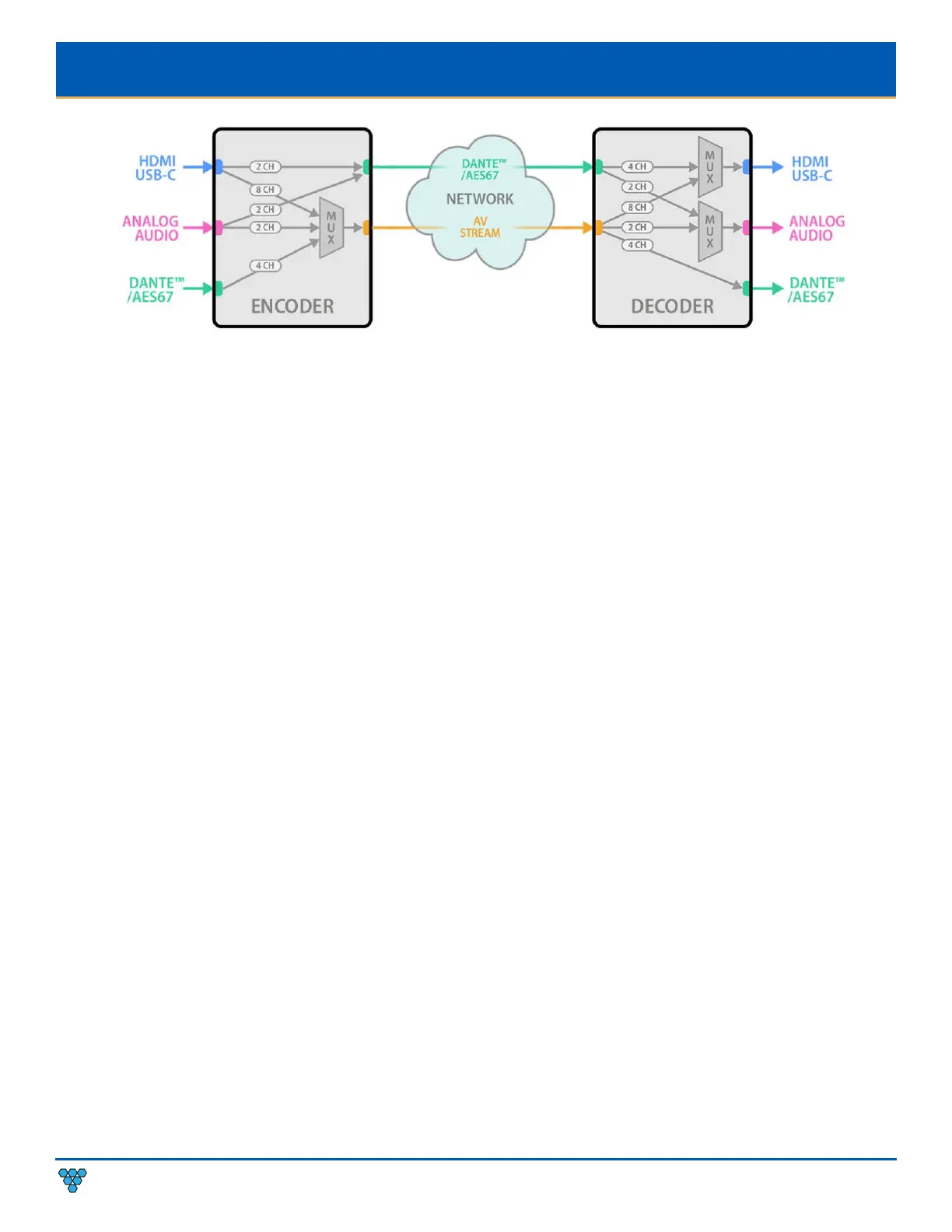
Figure 11. Duet-2 Audio Workflow Diagram
A
DVANCED CONFIGURATION
VIDEO SOURCE TIMEOUT (DECODERS ONLY)
VIDEO.SOURCE_TIMEOUT – When there is no source available, time out TRUE will cause the decoder to switch to the splash screen
after approximately 10 seconds.
VIDEO POWER SAVE (DECODERS ONLY)
VIDEO.POWER_SAVE – After the time out, turn off the HDMI output.
HDCP FORCE ON
Encoder: Force the encoder to accept only HDCP sources.
Decoder: Force the decoder to HDCP encrypt the output.
HDCP Force On determines whether a unit forces HDCP for all sources or sinks (TRUE) or allows non-encrypted to go through natively
(FALSE). When FALSE switching can be slow if you need to renegotiate the HDMI link.
HDCP FORCE OFF (ENCODER ONLY)
Tells the source device that the encoder will not accept HDCP encrypted content. It cannot be used to remove HDCP from sources.
INPUT SOURCE SELECTION AND PRIORITY (ENCODER ONLY)
DuetE-2 encoders support multi-input select between AUTO, HDMI1, HDMI2, and USB-C for both the AV stream and HDMI OUT (Loop
Out). The input selection for the AV stream and HDMI OUT are configured separately. This gives the user the ability to select an input
source for the AV stream, then select a different source for the HDMI OUT. Example: HDMI1 selected for AV stream and USB-C
selected for the HDMI OUT.
When the input select is set to AUTO, use STREAM.VIDEO_PRIORITY to set the priority for the AV stream source. Use
VIDEO.HDMI_OUT_PRIORITY to set the priority for the HDMI OUT. Auto select will choose the source based on priority. If the priority
is set to HDMI1 HDMI2 USB-C, the DuetE-2 will select HDMI1 as its source, if there is no source connected to HDMI1 the DuetE-2 will
then automatically switch to the next input in the priority selection. In this example, the DuetE-2 would automatically switch to
HDMI2 if HDMI1 is not connected.



 To Next Page