DUETE-2/DuetD-2 USER MANUAL
Visionary, Network Audio Video
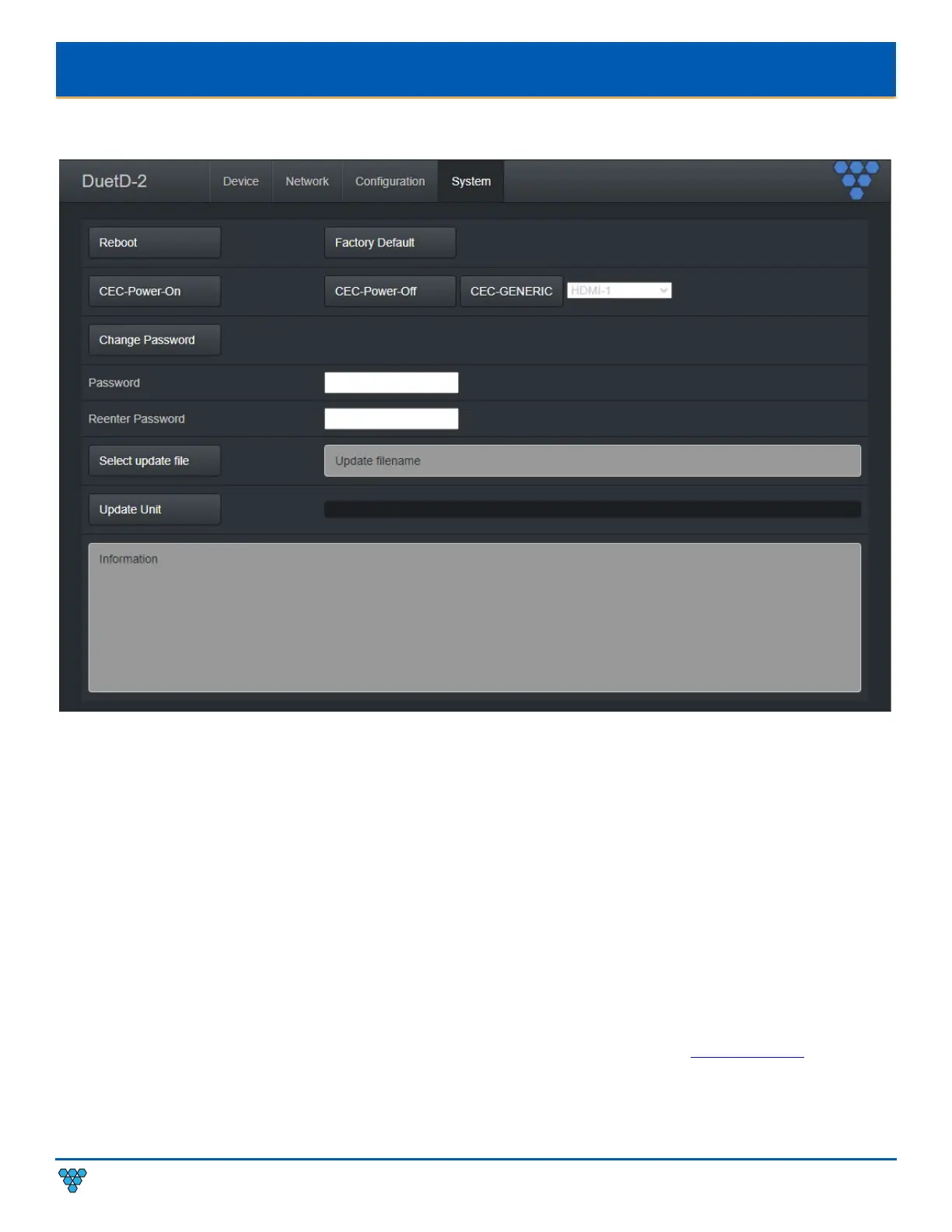
DUETD-2 DECODER SYSTEM TAB
Reboot – This button reboots the unit.
Factory Default – This button factory defaults the unit. See section Troubleshooting.
CEC-Power-On – Used to tun a device on using CEC control commands. See section CEC Over IP (Decoder Only).
CEC-Power-Off – Used to tun a device off using CEC control commands. See section CEC Over IP (Decoder Only).
CEC-GENERIC – Used to change a device input/source (HDMI -1, HDMI-2, HDMI-3, TOGGLE MUTE) using CEC control commands. See
section CEC Over IP (Decoder Only).
Change Password – This button changes the unit’s web interface login password to values entered below (default is admin).
• Password – enter new password
• Reenter Password – reenter new password
Important: Make sure you write the new password down. If it is lost or forgotten, you will need to call Visionary Solutions
support to assist in a console factory default of the unit.
Set update file – Browse to a new firmware file supplied by Visionary Solutions or downloaded from www.vsicam.com.
Update Unit – This button will initiate a firmware update per the specified file above.
Information – Real-time status messages displayed during a reboot, firmware update, or factory default action.



 To Next Page