15
Quantum Plus installation and user manual
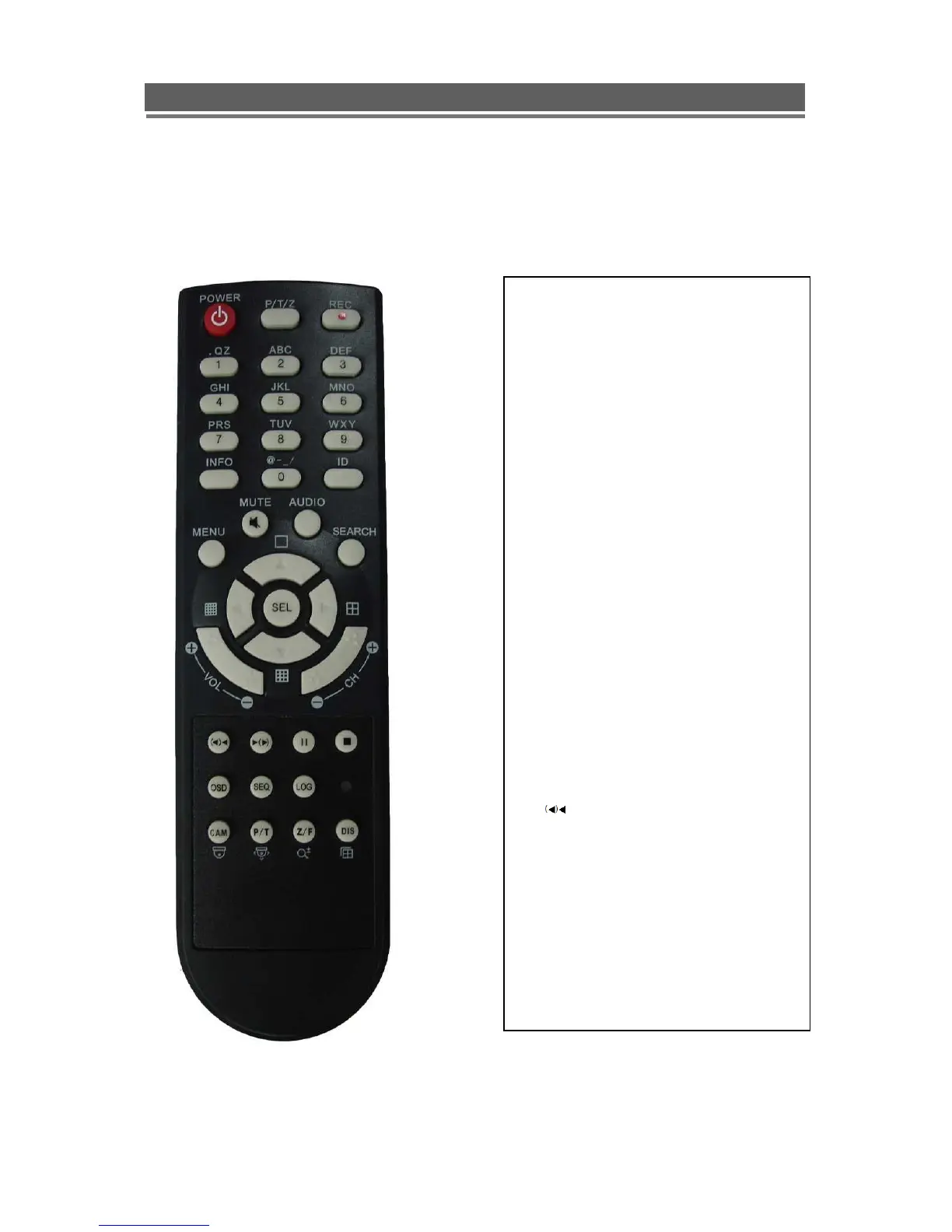
REMOTE CONTROL
1. Power: Power ON/OFF
2. REC: Start & Stop Recording
3. (1 to 9) Numbers and letters
4. P/T/Z: Entering PTZ menu directly
5. OSD: On Screen Display ON/OFF
6. SEQ: Sequence operation
7. LOG: Direct access Log list
8. INFO: Direct access system Info.
9. ID: Reserved.
10.MUTE: Audio Mute
11.AUDIO: Switches through Audio
channels
12. MENU: Entering system menu
13. SEARCH: Entering search
14. ARROW & SPLIT: Left, Right, Up and
Down. Also, Screen split options
15. VOL”+,-“ : Up, down volume
16. CH “+,-“ : Up, down channel(s)
17. ▶(▶) : Play(or fast forward)
18. : Reverse play
19 II: Pause
20. █: Stop playback
21. Cam: Changing PTZ icon
22. P/T: Pan &Tilt
23. Z/F: Zoom/ & Focus
24. DIS: Channel Division



 To Next Page