TROUBLE SHOOTING
6 CHAPTER 3
Protective
Operation
Output is
shut OFF
and motor
coasts to a
stop
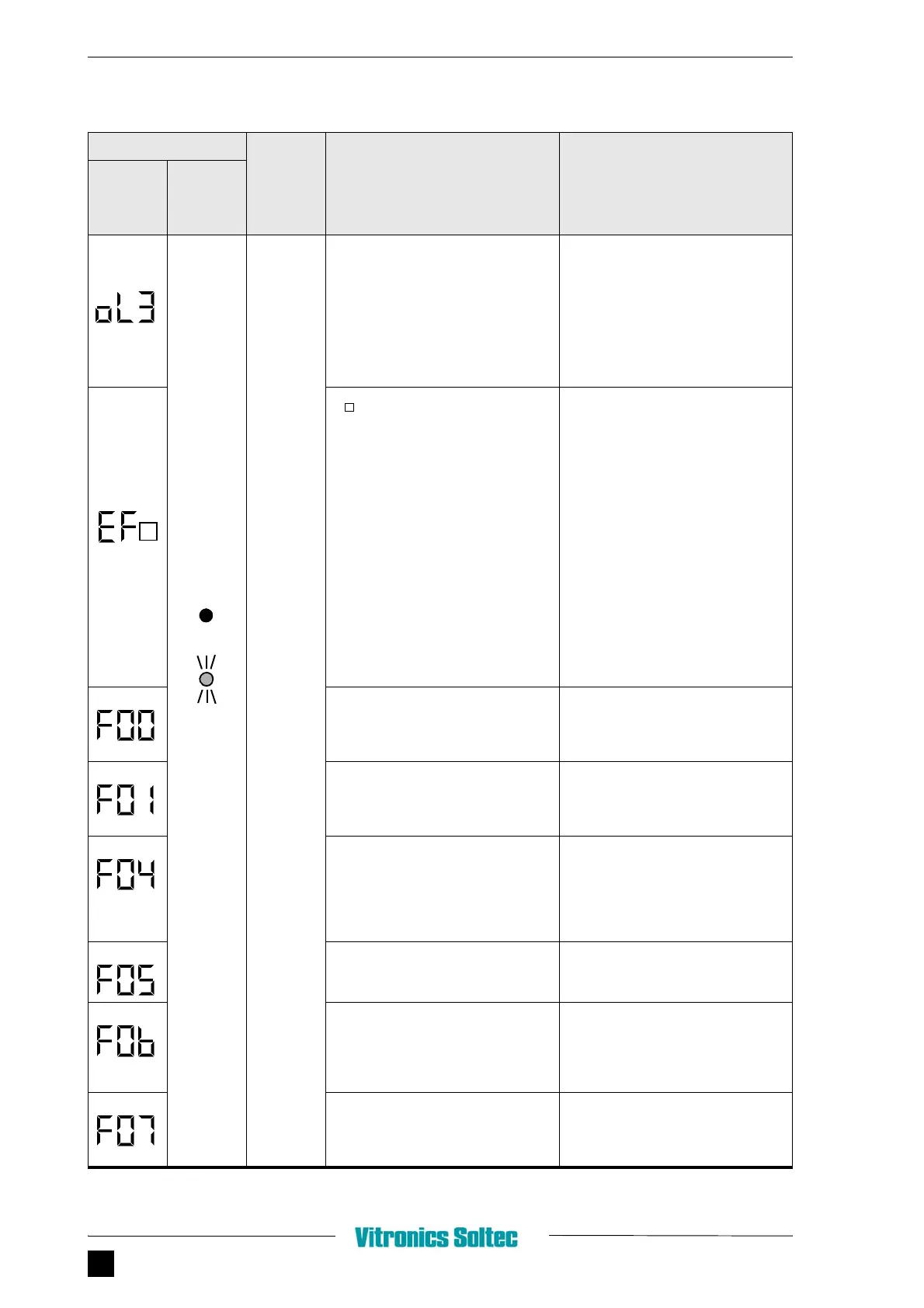
OL3 (overtorque detection)
When V/f mode is selected, inverter
output current exceeds the overtorque
detection level (n098). When Vector mode
is selected, output current or output
torque exceeds overtorque detection level
(n097 and n098). If overtorque is detected,
inverter operates according to the setting
at n096)
Check the driven machine and correct the
cause of the fault, or increase the value of
n098 up to the highest allowable value for
the machine
EF (external fault)
Received an external fault signal.
FF0: External fault command from
MEMOBUS
EF1: External fault input from control
circuit terminal S1
FF2: External fault input from control
circuit terminal S2
EF3: External fault input from control
circuit terminal S3
EF4: External fault input from control
circuit terminal S4
FF5: External fault input from control
circuit terminal S5
FF6: External fault input from control
circuit terminal S6
FF7: External fault input from control
circuit terminal S7
Check external circuit (sequence)
CPF-00 (CPF control circuit fault)
Communication with digital operator is
disabled even 5 Sec. after power is ON
Turn OFF power and check the mounting
Of digital operator, then turn ON power
again. If fault remains, replace the digital
operator or the inverter
CPF-01
Communication fault occurs for 5 sec. or
more after communication started with
digital operator
Turn OFF power and check the mounting
Of digital operator, then turn ON power
again. If fault remains, replace the digital
operator or the inverter
CPF-04
EEPROM fault of inverter control circuit
• Save all the constant data, then
initialize the constants (refer to page
19 or initialization of constants)
• Turn OFF power, then ON again. If
the fault remains, replace the
inverter
CPF-05
A/D converter fault of inverter control
circuit
Turn OFF power, and ON again. If fault
remains, replace the inverter
CPF-06
• Optional card connection fault
• Non-applicable option card is
connected
• Turn OFF power and properly
connect the card, then turn ON
power.
• Check the inverter software NO
(n 179)
CPF-07
Digital operator control circuit (EEPROM,
A/D converter fault
Turn OFF power once and check the
mounting of digital operator, then turn
ON power again. If fault remains, replace
the digital operator or the inverter
ALARM DISPLAY
INVERTER
STATUS
EXPLANATION CAUSES AND
CORRECTIVE ACTIONS
DIGITAL
OPERATOR
RUN
(GREEN)
ALARM
(RED)


 To Next Page