Introduction
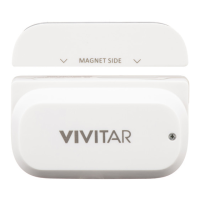
Thank you for purchasing your Vivitar Smart Home Security Wi-Fi Door Sensor, the WT-06.
Everything you need to control your Wireless Wi-Fi Door Sensor is included with your Smart
Door Sensor and the accompanying online Vivitar Smart Home Security application.
You can use the app to control what is going on inside and outside your home via any mobile
device from anywhere. In addition, you can use the Vivitar Smart Home Security app to control
your IP cameras, lighting, electrical outlets and more.
Please read this manual carefully first to get the most out of your Vivitar Smart Home Security
Wi-Fi Door Sensor.
Features
• Sends alerts to your smartphone when it detects that your doors or windows have been
opened or closed.
• App records activation times and dates
• Label and manage several sensors with the free Vivitar Smart Home Security app
• Minimum energy consumption: works with 2 AAA batteries
• Integrated Wi-Fi – simple Wi-Fi connection set up with the app
• Automatic Wi-Fi network settings from the app
• Combine your Wi-Fi Door Sensor with other Vivitar Smart Home Security devices


 To Next Page