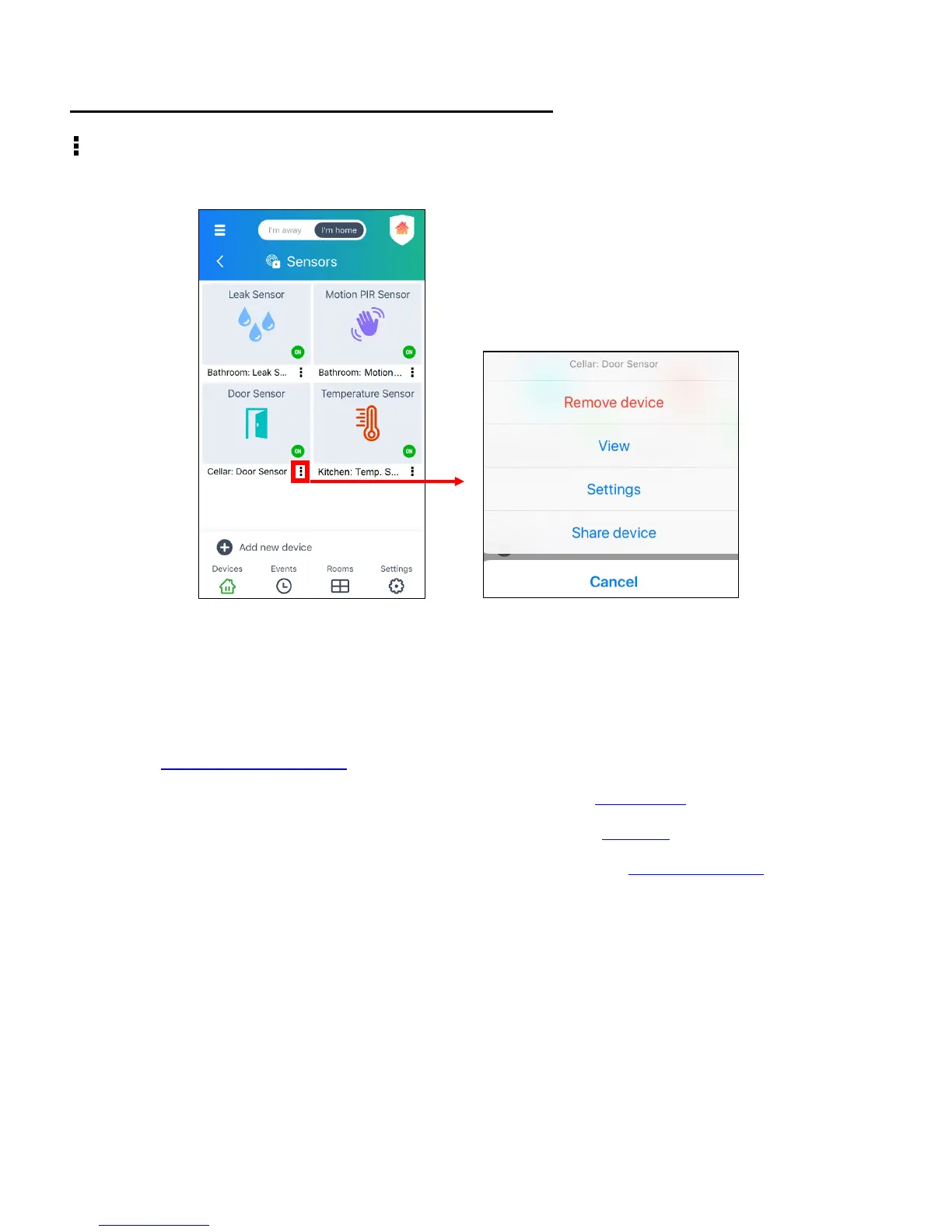
‘SENSORS’ SCREEN: DEVICE MENU OPTIONS
Tap the Menu icon of a specific device from the list of sensors to view a window with the
following options:
• Remove Device: Tap to remove your device. A confirmation window appears. If you
would like to remove the device, tap Remove to confirm. If you do not want to remove the
device, tap Cancel. If you would like to reconnect your device after removing it, please
see Reconnecting Devices for more information.
• View: Tap to open the device’s ‘Dashboard’ screen. See Dashboard for more information.
• Settings: Tap to open the device’s ‘Settings’ screen. See Settings for more information.
• Share Device: Tap to open the device’s ‘Share’ screen. See Sharing Devices for more
information.
NOTE: If your device is offline, the View menu option is not available. Please reconnect your
device to view your device’s Dashboard screen.


 To Next Page