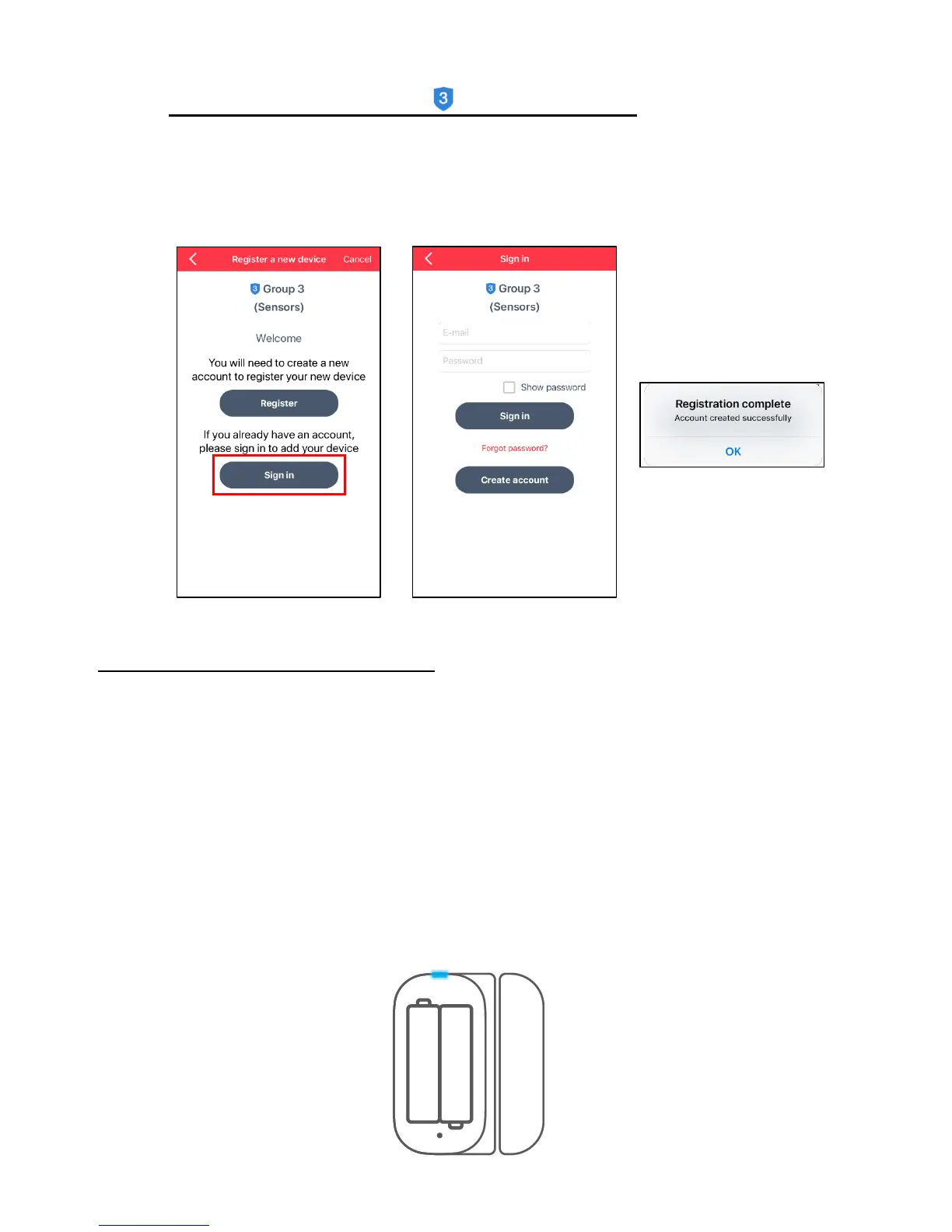
b) Sign in to Existing Account - Group 3 – Sensors:
- To sign in to your existing Smart Home Security account, tap Sign In from the
‘Register a new device’ screen.
- Enter your email, your account password and then tap Sign In.
NOTE: If you have forgotten your password, tap ‘Forgot password?’.
7. ADD NEW DEVICE: CONNECT TO APP
The ‘Add new device’ connect instruction screen then appears.
PREPARE YOUR DEVICE
• Loosen the screw on the battery cover by using the supplied screwdriver to open the
battery compartment.
• Insert 2 new AAA batteries. Make sure the batteries are placed correctly as per the
polarity symbols shown inside the battery compartment.
• Do not close the battery compartment. Check that the blue LED indicator light is blinking.
• When you see the Wi-Fi indicator light flashing, tap Continue.


 To Next Page