77
E. Modifying the ventilation mode
This operation can be carried out using the VMI+ application and on the control unit.
1. Modifying the ventilation mode via the VMI+ application
To access this function, open the VMI+ application, and pair your VMI
®
CUBE unit with the
application. Refer to the previous paragraph Modify preheating settings with VMI+ and repeat
step 1 Log in to the application, step 2 Pairing and step 3 Machine identifier when logging in for
the first time.
Step 4: Modify the ventilation mode
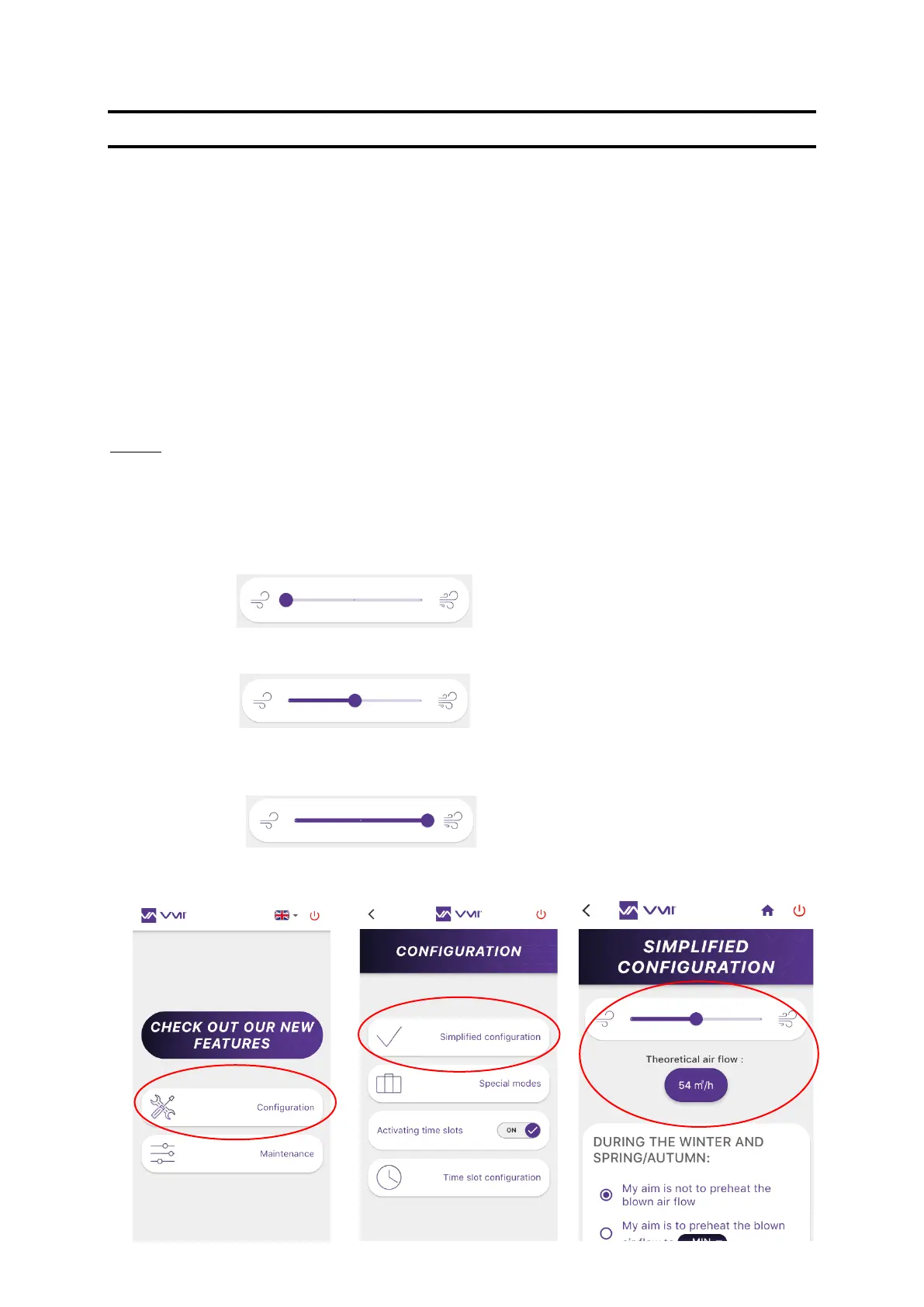
• Select the CONFIGURATION button and then SIMPLIFIED CONFIGURATION.
• Then adjust the cursor to match your preferences. The new theoretical flow rate is
automatically calculated and displayed.
o If the cursor is on the left, the VMI
®
unit is set
to low speed. The air is renewed at a rate of
0.36 volume/h.
o If the cursor is positioned in the middle, the
VMI
®
unit is set to medium speed. The air is
renewed at a rate of 0.45 volume/h.
o If the cursor is positioned on the right, the
VMI
®
unit is set to high speed. The air is
renewed at a rate of 0.55 volume/h.


 To Next Page