85
Every 6 months, remove the dust from the ventilation openings and the air extraction grilles with
a clean, dry cloth and a small brush.
D. How to obtain operating data for the VMI
®
system
You can download operating data via the VMI+ mobile application for use analysing the
behaviour of the VMI
®
unit.
Open the VMI+ application and pair your VMI
®
CUBE unit with the application. Refer to the
previous paragraph Modify preheating settings with VMI+ and repeat step 1 Log in to the
application, step 2 Pairing and step 3 Machine identifier when logging in for the first time.
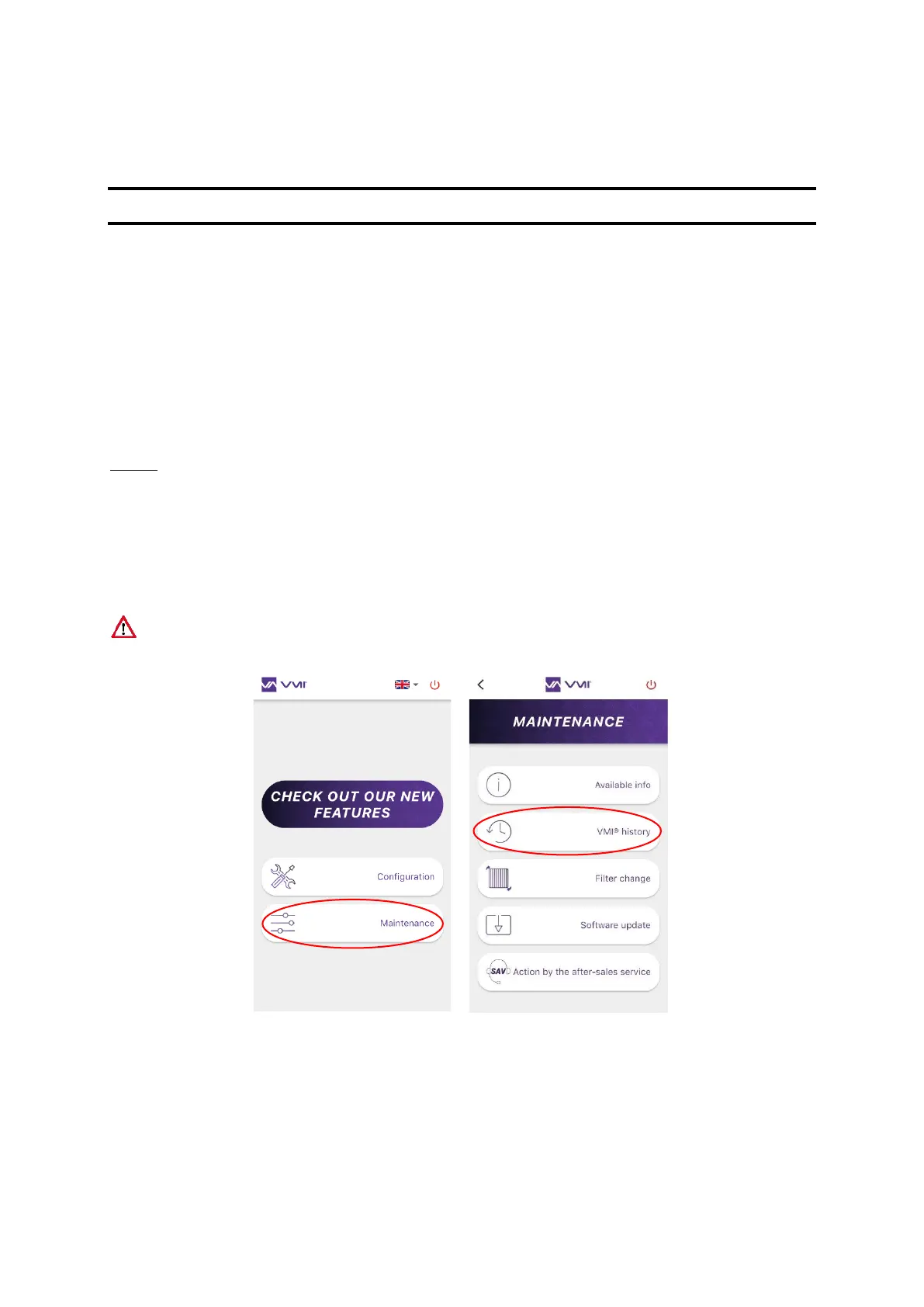
Step 4: Access history
• Select the MAINTENANCE button,
• then select the VMI
®
HISTORY.
• Fill out your email address and then press SEND. The data file will be expanded and, after
a few minutes, you will receive an email with a link to recover the file.
Note: You must be sufficiently close to the VMI
®
unit throughout this operation.


 To Next Page