88
OPERATING FAULTS
Safety instructions: Before starting works, make sure you have read the safety instructions:
If the solution to the breakdown or the fault is not shown as an "Operation that can be carried
out by the user" in this manual or does not appear in the manual, please contact a technician.
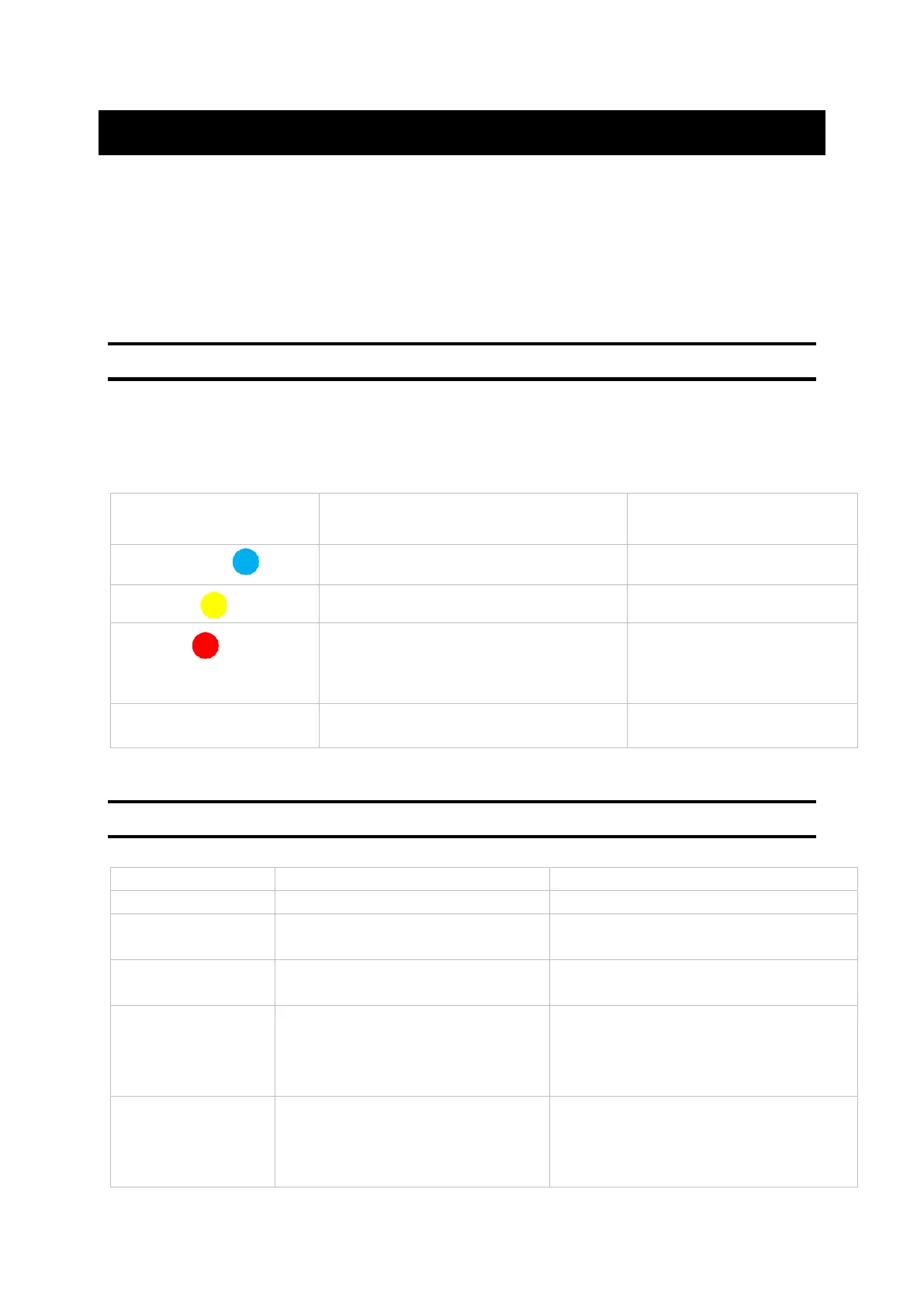
A. LED colour indications for the control unit
The VMI
®
CUBE system and the control unit have an indicator that changes colour according to
the operational status. If the colour is not BLUE or flashes, refer to the table below:
The control unit batteries are flat.
The machine has detected a failure.
Check the error code shown
on the control unit.
Contact the technical
department.
The VMI
®
unit is operating correctly.
B. Table of the main faults
The VMI
®
unit is requesting action.
See the table of colour indications.
Error code on
control unit
Set temperature is too low
Increase the preheat temperature
Flow rates at
openings are too
low
Incorrect product configuration
Unbalanced system
Leak in the system
Check installation settings.
Check the lengths of network
branches.
Improve system sealing.
Air flow network crushed or
excessive load loss
Incorrect product configuration
Clogged filter
Check the system.
Check installation settings.
Change the filter.


 To Next Page