73
C. Activating/deactivating preheating and modifying the preheating
temperature for the VMI
®
unit
This operation can be carried out using the VMI+ application and on the control unit.
1. Changing preheating settings using VMI+
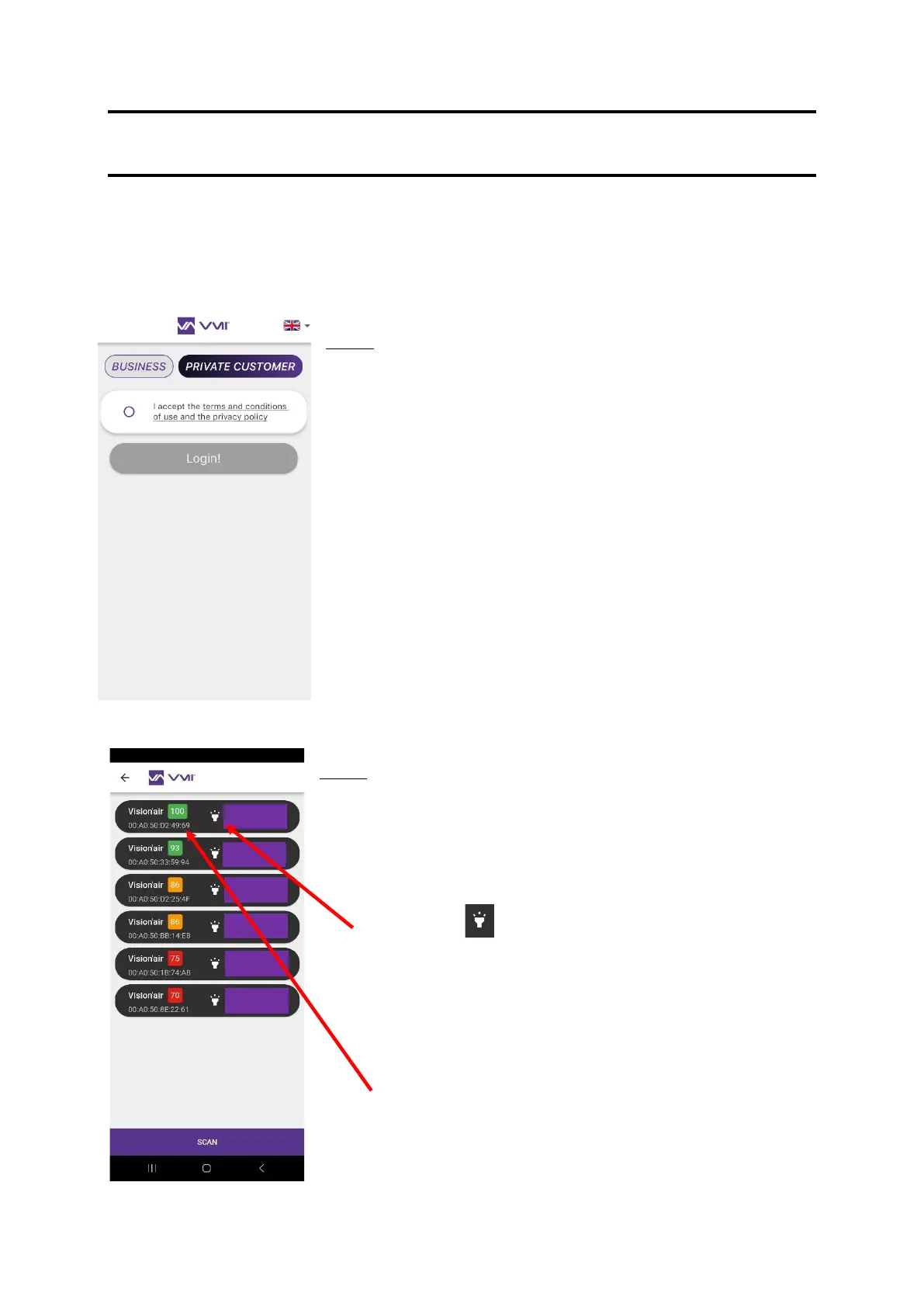
Step 1: Log in to the application
• Once you have downloaded the VMI+ mobile application, you
can open it.
• Select the PRIVATE CUSTOMER tab.
• Accept the TERMS AND CONDITIONS OF USE and the
PRIVACY POLICY.
• Press LOGIN.
Step 2: Pairing
• A VMI
®
CUBE pairing page will open.
• Select the VMI
®
CUBE to be configured. Two identification
methods are available:
o Press the icon. The VMI light halo will flash in green
for a few seconds visually indicating which VMI
®
CUBE is
ready for configuration.
o If you cannot see the halo, place the smartphone as near
to the VMI unit as possible. Press the SCAN button on the
VMI+ application and the VMI to be configured
corresponds to the unit with the number closest to 100.
• Click on the PAIR button for the VMI identified.


 To Next Page