79
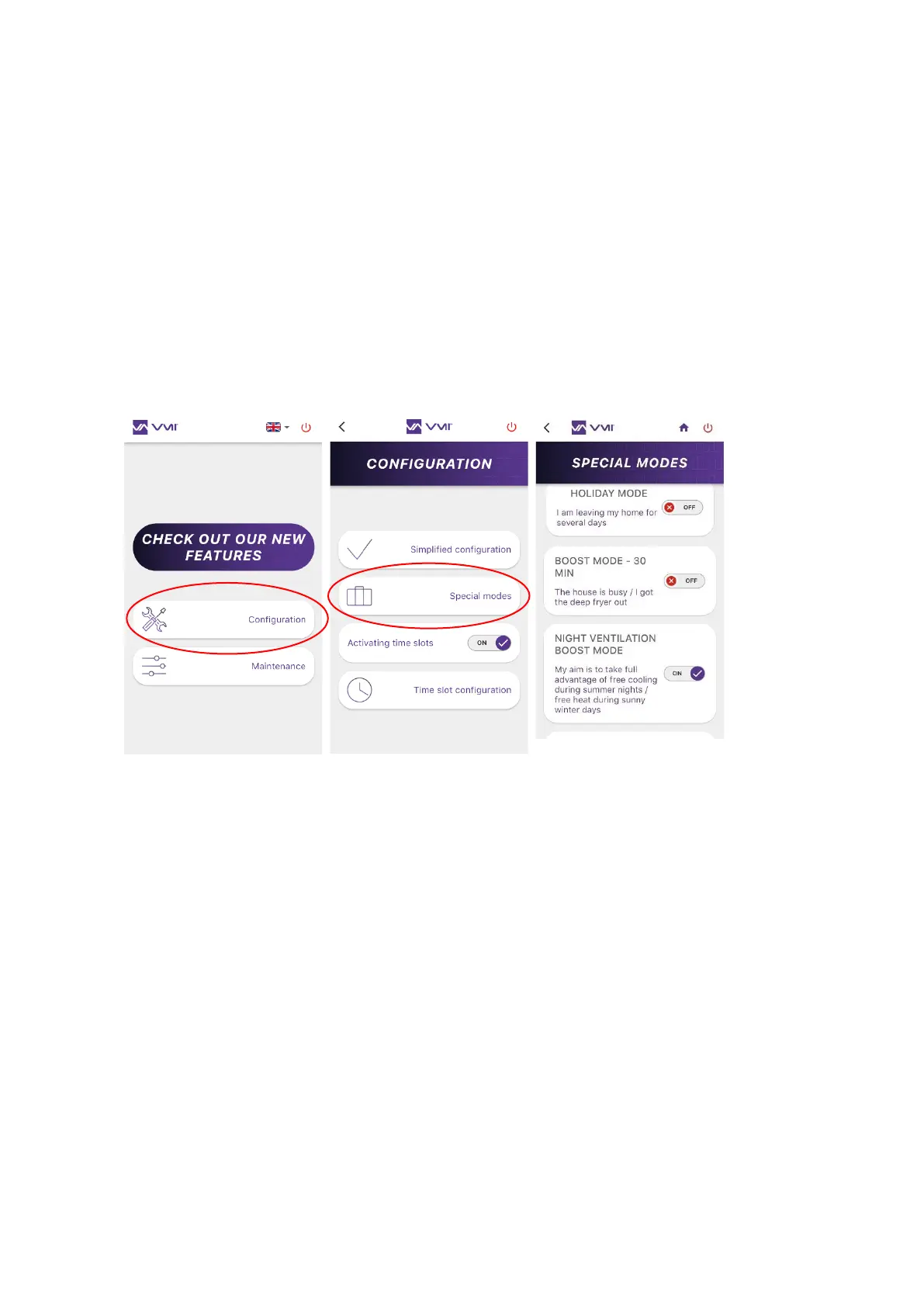
o HOLIDAY MODE = Minimum ventilation flow rate and activation of the freeze
protection system. Enter how long (number of days) the HOLIDAY MODE will be
activated (between 1 and 200 days).
o BOOST MODE FOR 30 MIN = Ventilation rate boost for 30 minutes. Once the time
is up: returns to the previous mode.
o VENTILATION BOOST MODE = The smart VMI
®
system will automatically
increase the ventilation flow if the outdoor conditions are suitable. E.g. during a
sunny winter day, to increase incoming hot air. Or during summer nights, to bring
in cool air.
o FIXED AIR FLOW MODE = The smart air flow control function for the ventilation
system is stopped/activated.
2. Activating/deactivating the special modes using the control unit
You can activate/deactivate some special modes from your control unit:
• HOLIDAY MODE = Minimum ventilation flow rate and activation of the freeze protection
system.
• BOOST MODE FOR 30 MIN = Ventilation rate boost for 30 minutes. Once the time is up:
returns to the previous mode.
Simply open the control unit menu and access the INFORMATION menu.
• Press the button twice (press and release twice).
• Choose the desired mode using the selector.


 To Next Page