2550 Video Phone User Manual IMT
Page - 29 -
2-5 VOIP Setup (Web Interface)
Please refer to section 2-3 to connect to the IP phone by web browser, login
onto web interface, and then follow the following instructions to configure VoIP
setting:
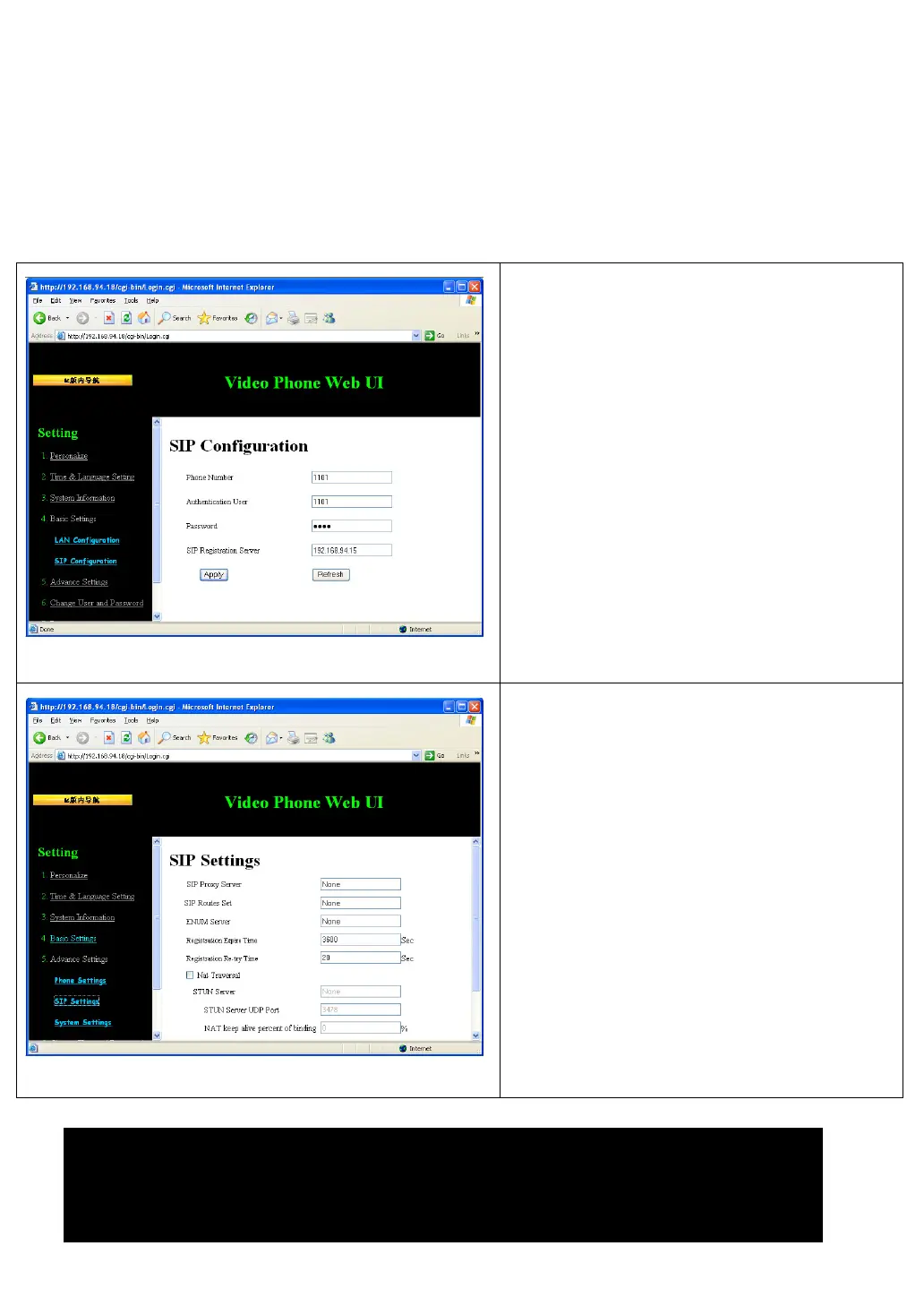
Click “Basic Setting” link on the left,
then click “SIP Configuration”. Please
input the phone number, user name,
password, and the IP address / host
name of SIP registration server, then
click “Apply” button to save changes.
If the use of SIP proxy server and STUN
server is required in your LAN or
requested by service provider, please
click “Advance Settings” link on the left,
and then click “SIP Settings”. All
advanced settings about SIP proxy
server and STUN server can be found
here.
Please fill all fields in this page, and then
click “Apply” button to save changes.
’t understand the meaning of certain field (like “Registration
expiry time” and “NAT keep alive percent SIP”), please do not modify default
value, unless requested by service provider or network administrator.



 To Next Page