20
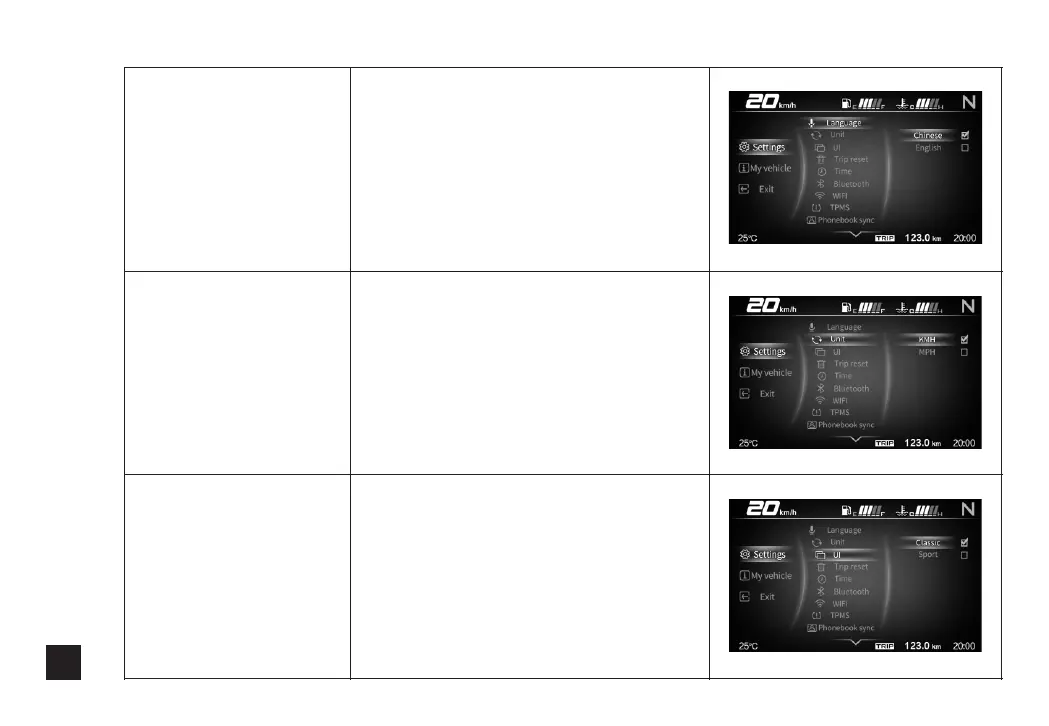
Language selection
Press Up and Down to select
Language selection, and then press
Confirm to enter.Use Up and Down
button to switch between Chinese
and English, and short press Confirm
button to select.Then long press
Confirm button to confirm and return
to the level2 menu.
metric/inch switch
Press Up and Down to select Metric/
Inch switch, and then press Confirm
to enter. Use Up and Down button to
switch between Metric and Inch, and
short press Confirm button to select.
Then long press Confirm button to
confirm and return to the level 2
menu.
Interface switch
Press Up and Down to select Interface
switch, and then press Confirm to
enter. Use Up and Down button to
switch between Classic and Sport,
and short press Confirm button to
select. Then long press Confirm
button to confirm and return to the
level 2 menu.



 To Next Page