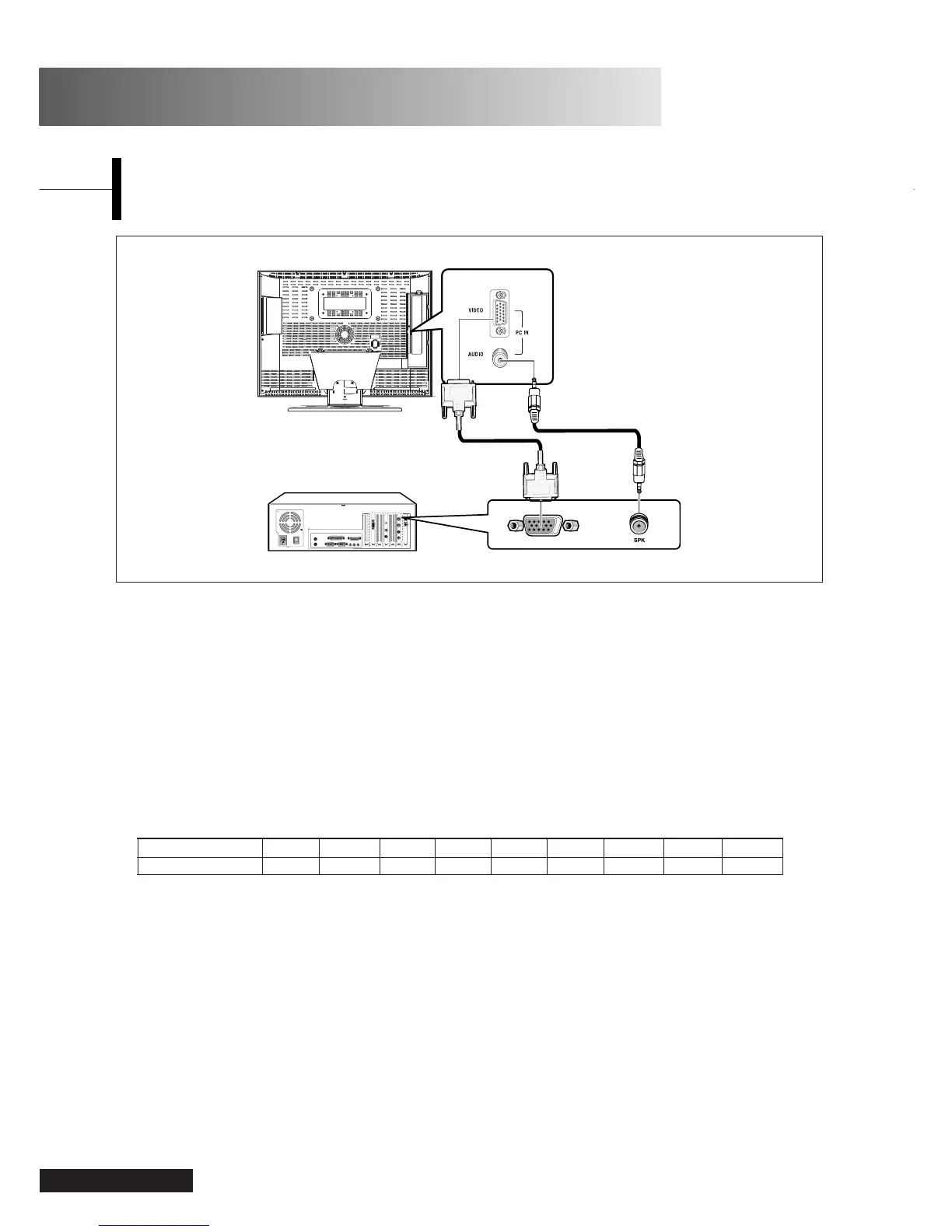
Connection Procedures
ΠConnect the PC D-SUB INPUT jack of the TV and
the monitor output jack of the PC using the D-Sub
cable.
´ Connect the PC AUDIO jack of the TV and the
audio output jack of the PC with the audio cable.
(This can only be applied when the PC actually has
an audio output jack.)
Procedures for viewing the PC screen through
the TV
ΠTurn the PC on and check that the PC settings are
correct.
• If the PC settings are incorrect, the screen may
display a duplicated or distorted picture.
• For PC configuration procedures, refer to page 36.
´ Press the LINE button and select PC INPUT mode.
ˇ Adjust the PC screen.
(For adjustment procedures, refer to page 23.)
Eng - 22
PC Function
VESA Standard Mode
Resolution 640x480 640x480 640x480 800x600 800x600 800x600 1024x768 1024x768 1280x768
Vertical Frequency 60.0Hz 72.0Hz 75.0Hz 60.0Hz 72.0Hz 75.0Hz 60.0Hz 70.1Hz 60Hz



 To Next Page