Eng - 6
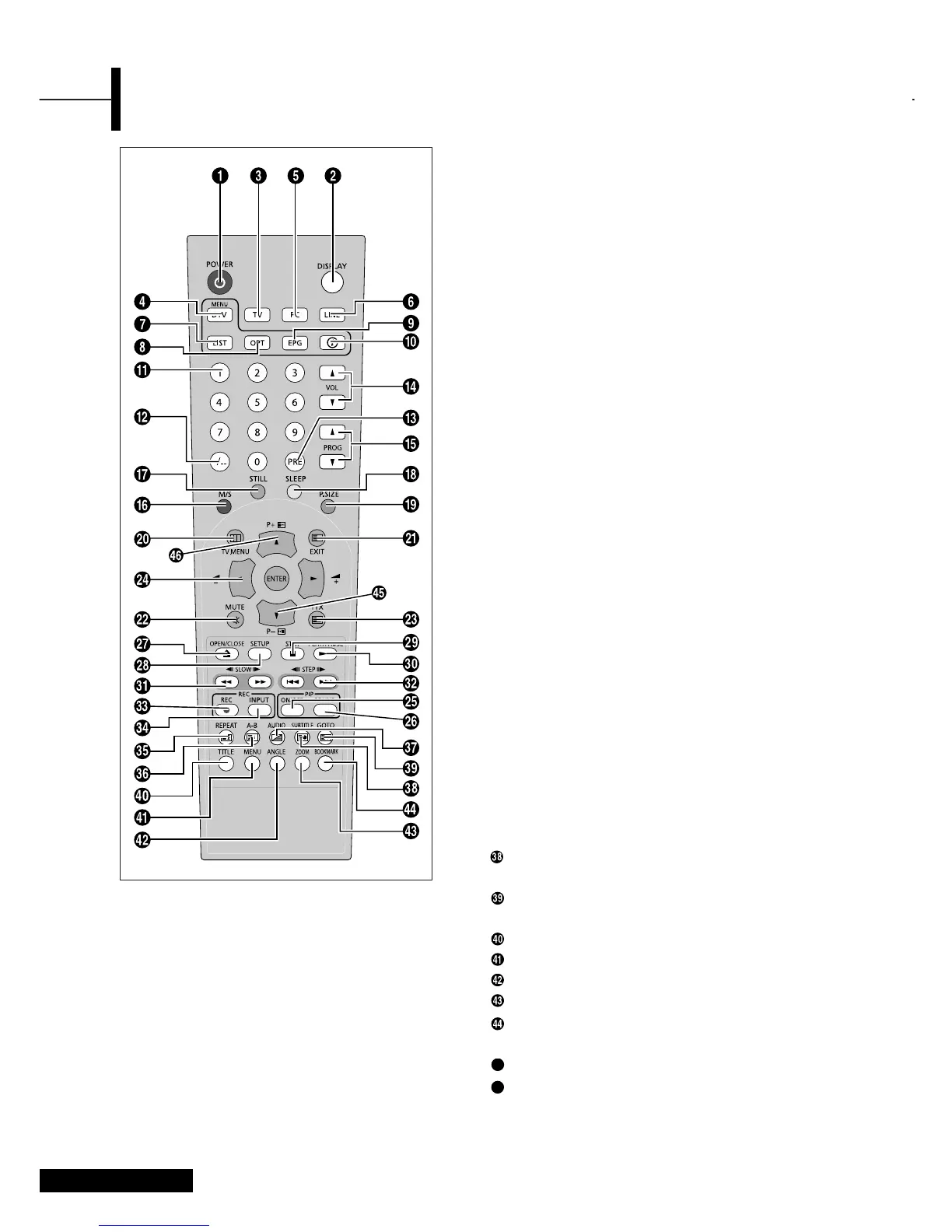
Remote Control
ΠPOWER: Turns the TV on and off.
´ DISPLAY: Displays the current channel and the audio-
video settings.
ˇ TV: Switches to TV mode.
¨ DVB-T/MENU: Switches to DVB-T mode /
Opens the main menu.
ˆ PC: Switches to PC mode.
Ø LINE: External input selection.
∏ LIST: Channel List.
” OPT: Configuration Menu.
’ EPG: Electronic program guide.
˝ i: Information.
Ô
NUMBER BUTTONS: Selects channels directly on the TV.
-/--: Selects channels over 10. For example, to select
channel 21, press “-/--” then press “2”, “1”.
Ò PRE: Moves to the previous channel.
Ú VOL: Increases or decreases the volume.
Æ PROG: Changes channels.
ı M/S: Sound mode selection.
˜ STILL(OPTION): Freezes a moving picture on the screen.
¯ SLEEP: Selects a preset time interval for automatic
shutoff.
˘ P.SIZE: Changes the screen size.
¿ TV.MENU: Displays the OSD menu.
¸ EXIT/CANCEL: Exit the current configuration /
To exit from the teletext display.
˛ MUTE: Temporarily mute the sound.
◊ TTX: Switches to Teletext mode.
± ARROW/ENTER:
Select an item of menu / Change confirmation/ VOL.
+,- / PROG up,down control.
≠ ON/OFF(OPTION): Turns PIP on or off.
– SOUND(OPTION): Changes the audio signal source
between the main screen and the PIP window.
<DVD & TTX> - Depend on the model
— OPEN/CLOSE: OPEN/CLOSE the DVD tray.
÷ SETUP: For initial DVD player settings.
® STOP: Stop the DVD playback.
∑ PLAY/PAUSE:
Play the DVD or temporarily stop playback.
µ SLOW: For fast and slow playback.
¥ STEP: For playing one frame at a time.
≥ REC: DVD R/W (option)
≤ INPUT: DVD R/W (option)
π HOLD/REPEAT: Teletext page / For specifying and
repeating playback of a segment.
æ INDEX/A-B: Programme selection by name /
For repeated playback of disc titles, chapters or sound.
ø MIX/AUDIO: Video & TTX MIX/
For selecting the audio language.
SUB PAGE/SUBTITLE: Teletext SUB-PAGE /
For selecting the SUBTITLE language.
REVEAL/GOTO: Teletext reveal/ For jumping to a
specified location.
TITLE: For selecting a title on the disc.
MENU: For displaying the menu contained in the disc.
ANGLE: For viewing scenes from different.
ZOOM: For magnifying the screen.
BOOK MARK: To SAVE a specific frame for later
viewing.
PRE PAGE: Teletext previous page.
NEXT PAGE: Teletext NEXTPAGE.



 To Next Page