English
9 - Eng
ΠPress the TV.MENU button. The OSD MENU will
be displayed.
´ Select FUNCTION using the œ/√ button.
ˇ LANGUAGE using the ▲/▼ button and then press
the
√ button.
¨ Select the desired menu language using the ▲/▼
button.
ˆ Press the EXIT button to exit the menu.
Selecting the Menu Language
Turning the TV On and OFF
Note.
when you power on this product in the first time, the product will ask you language and counrty selection on
the screen menu. Thus, you should select your own language and contry by
▲/▼ and ENTER button.
ΠPlug the mains lead into an appropriate socket.
´ Press the POWER switch on the bottom of the television toward “ON”(I) (Depend on the model).
ˇ Press the POWER button on the remote control (or on the front panel of the unit.)
You can also switch on by pressing the
PROG ▲/▼ buttons.
• When you turn the power ON, the screen appears and the POWER/STANDBY light is turned off.
• When you turn the power OFF, the screen goes blank, and the POWER/STANDBY light turns red.
• Do not leave your television in Standby mode for long periods of time (when you are away on holiday, for
example). Turn your television off by pressing the
POWER switch toward “OFF”(O)(Depend on the model).
It is best to unplug the set from the mains and aerial.
Watching TV
Press the DISPLAY button on the remote control. The TV will display the input source, the picture mode, the
sound mode, the STEREO mode, the sleep time, the current time, and the pip mode.
Viewing the Status Information
MENU
PICTURE
SIZE
PIP
TIME
MELODY
LANGUAGE
CHANGE PASSWORD
œ
WIDE
√
√
√
œ
OFF
√
œ
ENGLISH
√
√
TV Function
Please check the following check list before using the TV.
ΠIs the antenna cable connected properly?
´ Are the remote control batteries installed properly?
- Install two AAA size batteries according to the
correct polarity.
- The remote control works up to about 7~10m
from the TV, 3m to the left or right of the TV, and
to within 30 degrees from the remote control
sensor of the TV.
ˇ Have the receive channels been configured?
¨ Are the cables connected to any external devices
connected properly?
Check Before Using
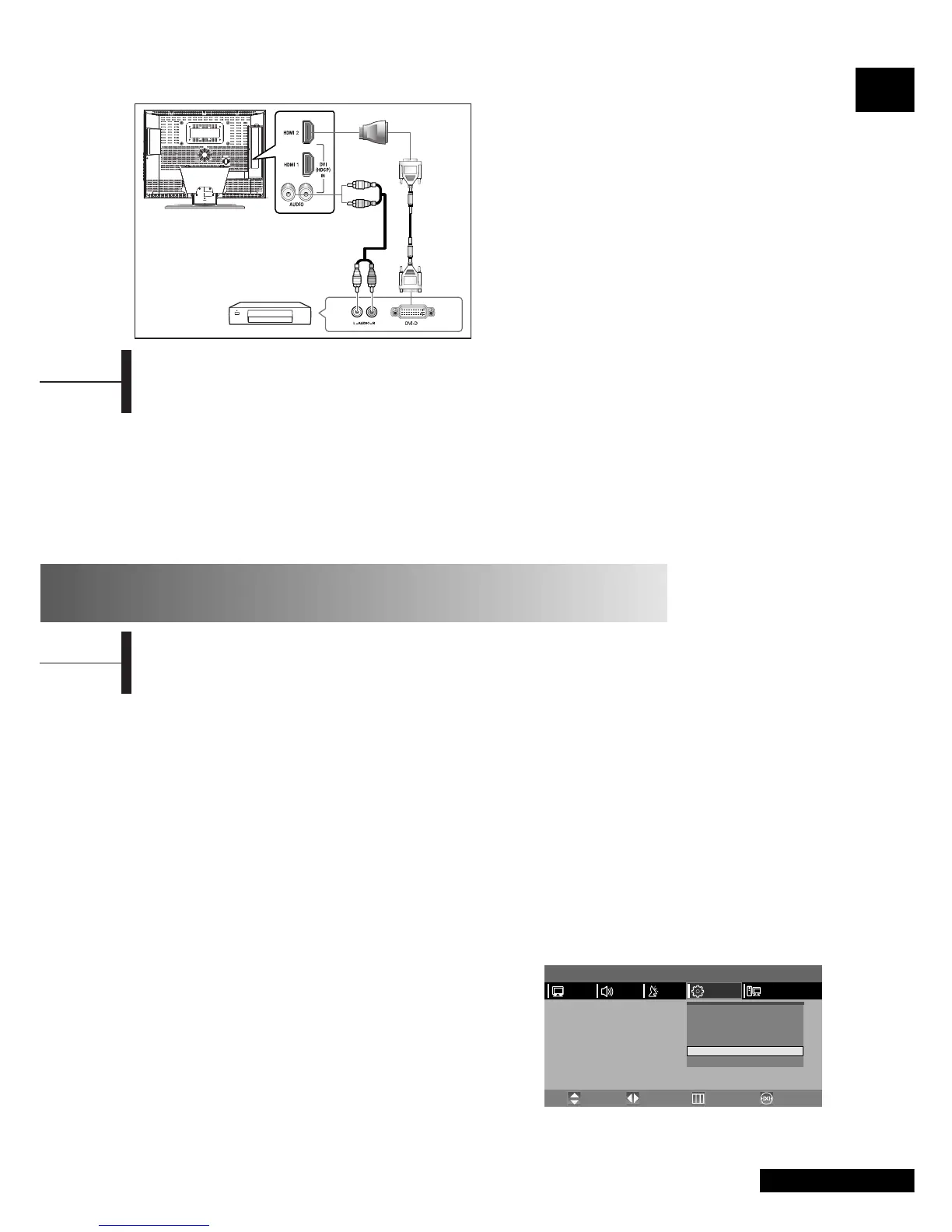
Connecting the HDMI JACK (USE DVI JACK)
Connection Procedures
ΠConnect the HDMI input jack of the TV and the DVI
output jack of your DTV Receiver (Using the adapter
or HDMI cable).
´ Connect the DVI audio input jacks of the TV and the
DVI audio output jacks of your DTV Receiver with
the audio cable (480p/60Hz, 576p/50Hz, 720p/50Hz,
720p/60Hz, 1080i/50Hz,1080i/60Hz).
ˇ
VESA Standard Mode (Resolution/Vertical Fraequency)
800x600/60Hz, 800x600/72Hz, 800x600/75Hz,
1024x768/60Hz, 1024x768/70.1Hz,1280x768/60Hz.
Audio Cable
DVI Cable
DVI to HDMI
adapter
DTV Receiver
PCFUNCTIONSETUPSOUND
Move PreviousAdjust Exit



 To Next Page