Eng - 8
Connection Procedures
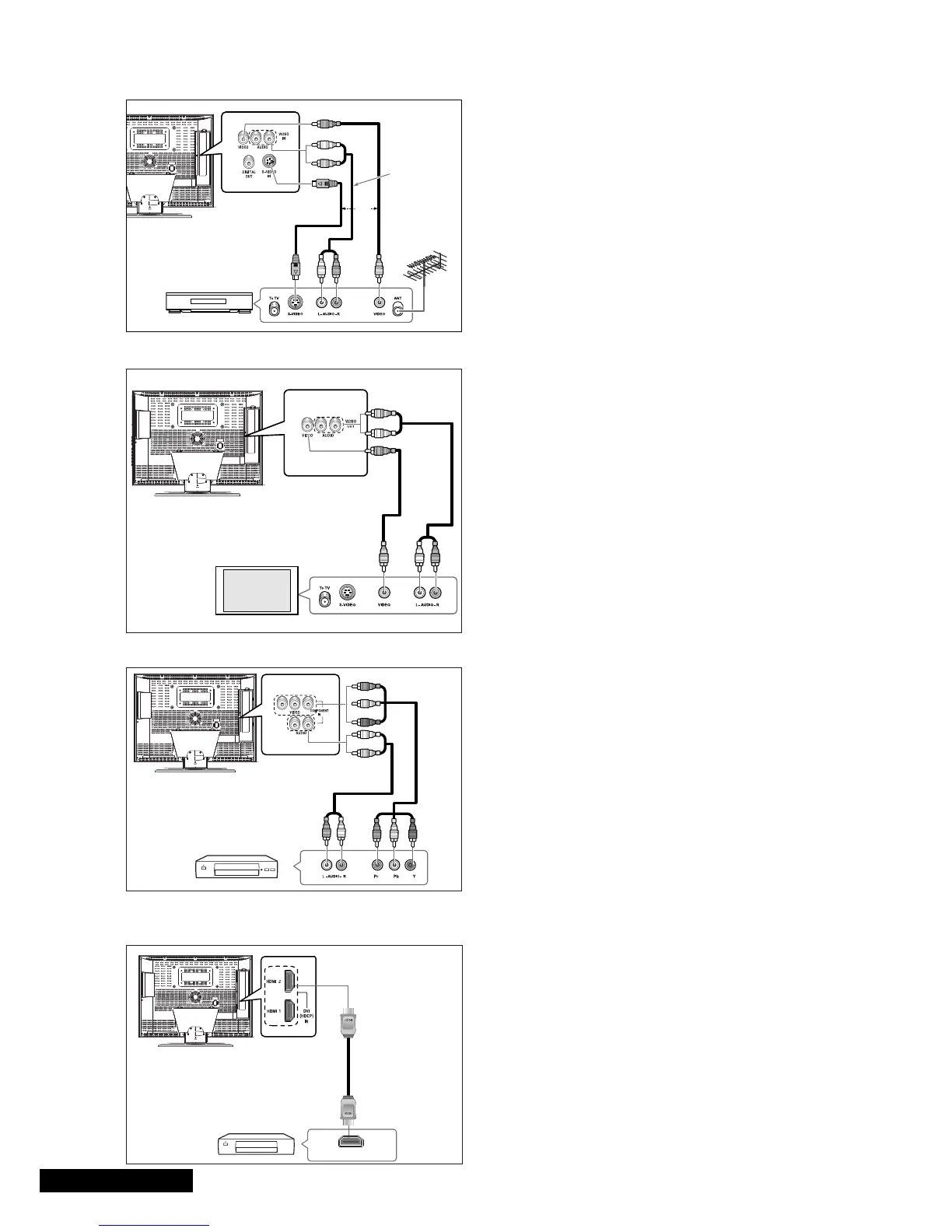
ΠConnect the antenna cable to the ANTENNA IN
terminal on the back of your VCR.
´ Connect the VIDEO/AUDIO INPUT jacks of the TV
and the video/audio output jacks of your VCR with
the video/audio cables. (Connect the cable to the
terminal of the same colour)
-You can use the S-Video cable to connect a VCR or
a DVD player for better video quality.
- If your VCR does not support stereo sound,
connect the mono audio out jack to the AUDIO
INPUT (left) jack.
Procedures for watching a video over a VCR
Turn the TV on, and select ‘VIDEO’ using the LINE
button on the remote control.
- If you have connected a S-Video cable, select
‘S-VIDEO’.
Connecting the Video or S-Video/Audio Jacks
VCR/DVD Player/STB
Video Cable
Audio Cable
OR
S-Video Cable
Connection Procedures
ΠConnect the AUDIO CABLES between the AUDIO
OUT L and R jacks on the back of your TV and the
corresponding AUDIO INPUT jacks on external TV.
´ Connect the VIDEO CABLE between the VIDEO OUT
jack on the back of your TV and the corresponding
VIDEO INPUT jack on external TV.
To watch the external TV
Œ Turn the external TV on and select ‘VIDEO’ using the
external input button.
´ Turn the your TV on.
Connecting a External TV
External TV
Video
Cable
Audio
Cable
Connection Procedures
ΠThe COMPONENT VIDEO IN and COMPONENT
AUDIO IN
connectors are used for equipment
with a DVD or DTV receiver out. (480i/60Hz,
480p/60Hz, 576i/50Hz, 576p/50Hz, 720p/50Hz,
720p/60Hz, 1080i/50Hz,1080i/60Hz)
To watch the DTV
Œ Turn the TV on, and select ‘COMPONENT’ using
the
LINE button on the remote control.
´ Turn the DTV Receiver on.
Connecting the DTV Receiver
DTV Receiver
DTV Receiver
Audio
Cable
Component
Cable
Connection Procedures
ΠConnect the HDMI input jack of the TV and the
HDMI output jack of your DTV Receiver (480p/60Hz,
576p/50Hz, 720p/50Hz, 720p/60Hz, 1080i/50Hz,
1080i/60Hz).
HDMI Cable
Connecting the HDMI JACK
•Warning : Do not Connect DVI audio cable.



 To Next Page