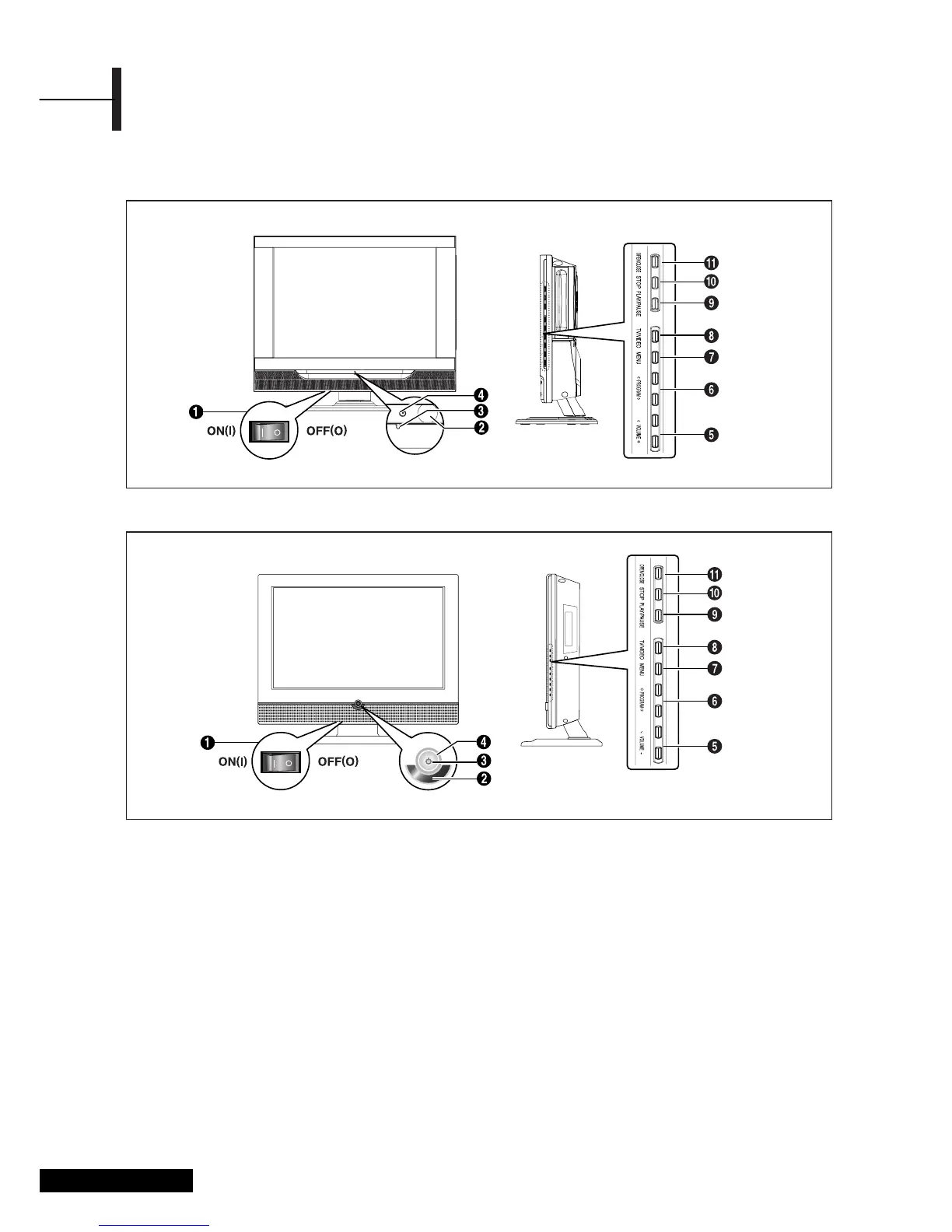
Front View
ΠMASTER SWITCH (Depend on the model)
´ Remote Control Sensor
ˇ POWER: Turns the TV on and off.
¨ LED Lights
ˆ VOLUME: Increases or decreases the volume.
This is also used to select the “MOVE&ADJUST”
item on the on-screen menu.
Ø PROGRAM: Changes channels or
“MOVE&ADJUST” to items on the on-screen
menu.
∏ MENU: To access or close menus, simultaneously.
” TV/VIDEO: Selects an external device connected
to the TV.
<DVD> - Depend on the model
’ PLAY/PAUSE: Play the DVD or temporarily stop
playback.
˝ STOP: Stop the DVD playback.
Ô OPEN/CLOSE: OPEN/CLOSE the DVD.
Overview
Eng - 4
• VLCD 42D
• VLCD 26D, VLCD 32D, VLCD 37D
Option
Option



 To Next Page