7 - Eng
English
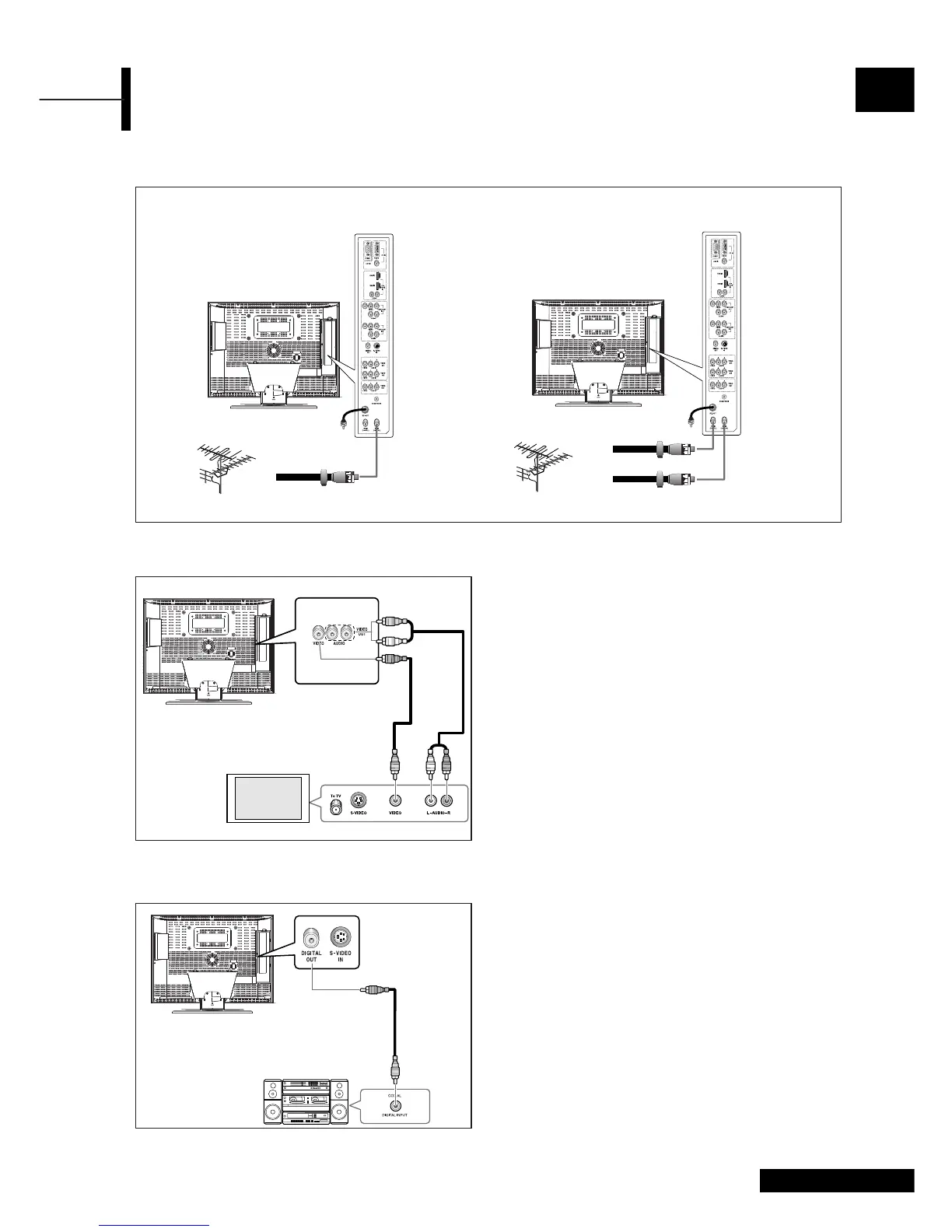
Connecting Your TV
Connecting an Antenna or Cable without a Decoder box
Connecting a Digital Audio System
Connection Procedures
ΠConnect the DIGITAL OUT jack on the back
of your TV to the DIGITAL IN jack of the Decoder
or AV amplifier.
´ Turn the digital amp on and select the external
input mode.
Audio System
Coaxial
Cable
VHF, UHF or Cable
VHF, UHF or Cable
• Analog and Digital TV signals provided on one antenna • Analog and Digital TV signals provided on two
separate antennas
75-ohm coaxial cable
75-ohm coaxial cable
Digital Antenna
Analog Antenna
Connection Procedures
ΠConnect the AUDIO CABLES between the AUDIO
OUT L and R jacks on the back of your TV and the
corresponding AUDIO INPUT jacks on external TV.
´ Connect the VIDEO CABLE between the VIDEO OUT
jack on the back of your TV and the corresponding
VIDEO INPUT jack on external TV.
To watch the external TV
Œ Turn the external TV on and select ‘VIDEO’ using the
external input button.
´ Turn the your TV on.
Connecting a External TV
External TV
Video
Cable
Audio
Cable



 To Next Page