4.7 Installing the Stereo Microscope
Installing the stereo microscope:
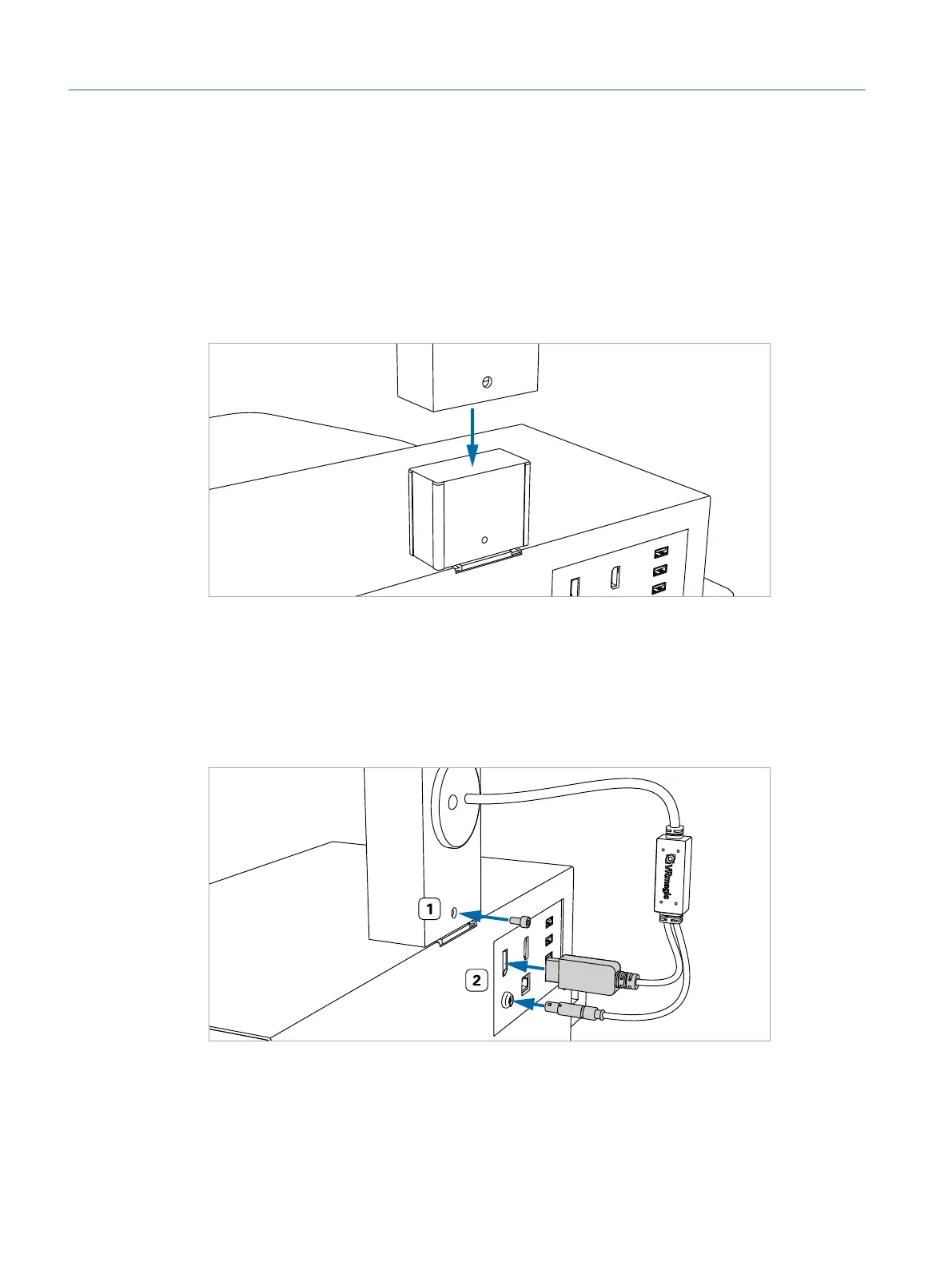
1. Standing at the rear of the operating table, position the microscope arm per-
pendicularly over the microscope mount on top of the simulator PC.
2. Slowly lower the microscope arm onto the microscope mount of the simulator
PC (ÂFig. 13 on page26).
Fig. 13: Lowering the microscope arm
3. Continue lowering the microscope arm until its base levels the top of the simu-
lator PC.
4. Make sure the arm stands firmly in an upright position. Insert the M5 x 15 mm
screw into the pre-drilled hole on the backside of the microscope arm (ÂFig.
14 on page26, #1). Tighten it using the 5 mm hexagon key.
Fig. 14: Inserting the screw and connecting DisplayPort and VRx plug
Eyesi Surgical Simulator – Installation and Operating Guide
26
Installation



 To Next Page