| Handling and control
42 | CO2 Incubator Basic VWR
Chapter 7
Operating panel
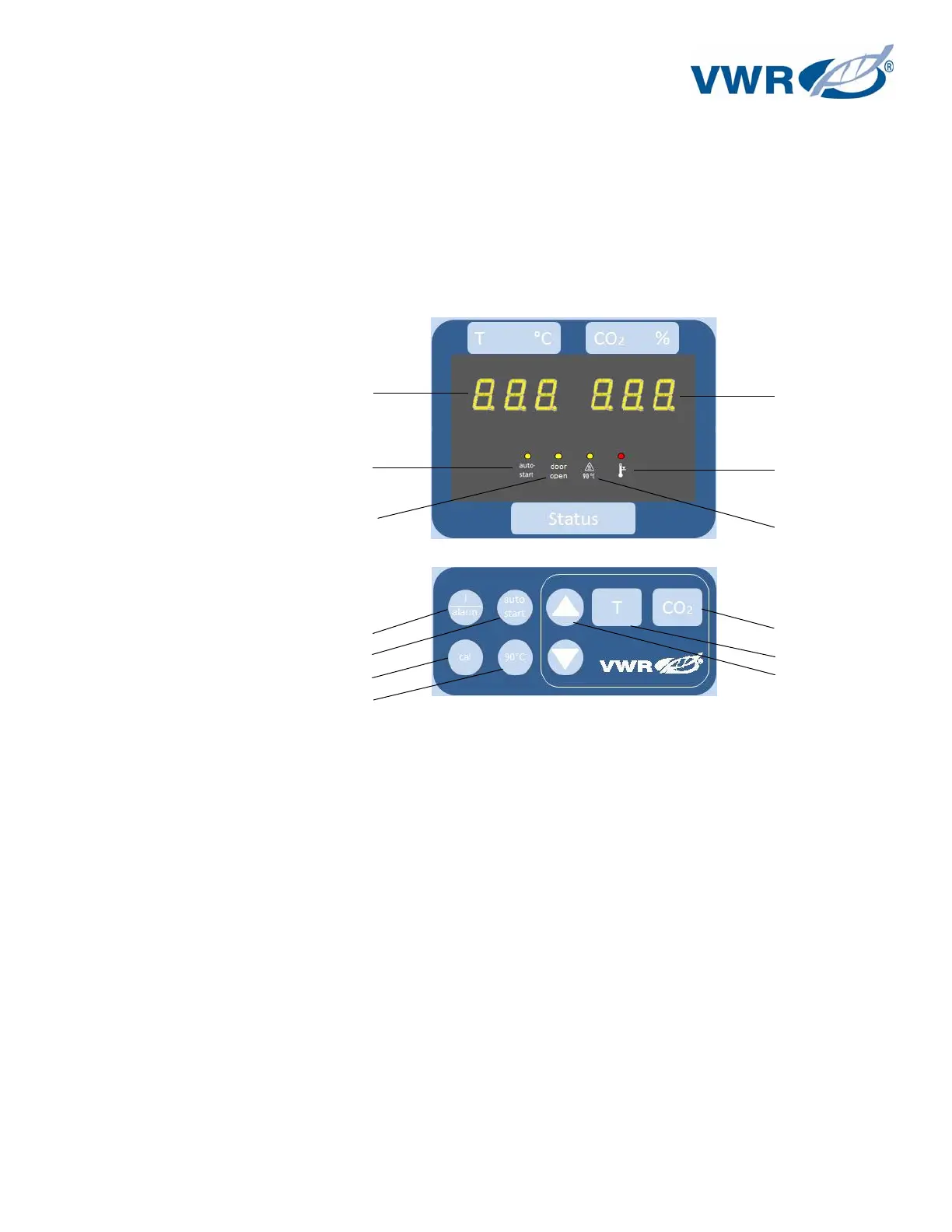
The operating panel is divided into three functional areas:
2 displays that show numeric values for temperature and CO
2
content
8 keys for selecting functions and for entering data
6 LEDs that show functions or operating states
Figure 17 – Operating panel
[3] Temperature display
[5] Key for setting temperature nominal value
[6] Key for increasing value
[7] Key for reading failure codes / stopping acoustic alarm
[8] Key for activating auto-start
[9] LED for indicating door (open door)
[10] LED for indicating active auto-start
[11] LED for indicating active over-temperature protection
[12] LED for indicating active optional 90 °C decontamination routine
[13] Key for starting optional decontamination routine
[14] Key for starting cal function
[15] Key for reducing value
[16] Key for setting CO
2
nominal value
[18] CO
2
display


 To Next Page