Mobile application is supported for Smart Phone (Android and iOS). It is
available to serach and install as free of charge in Apple App store & Google
Android Store. (Please refer 5 page to find out the name of application.)
Available to register up to 100 units
Supports multi-stream function
Able to search system and event logs.
Supports Digital Zoom, PTZ Control, Image saving, Image e-mail sending,
etc. in Single Monitoring Mode.
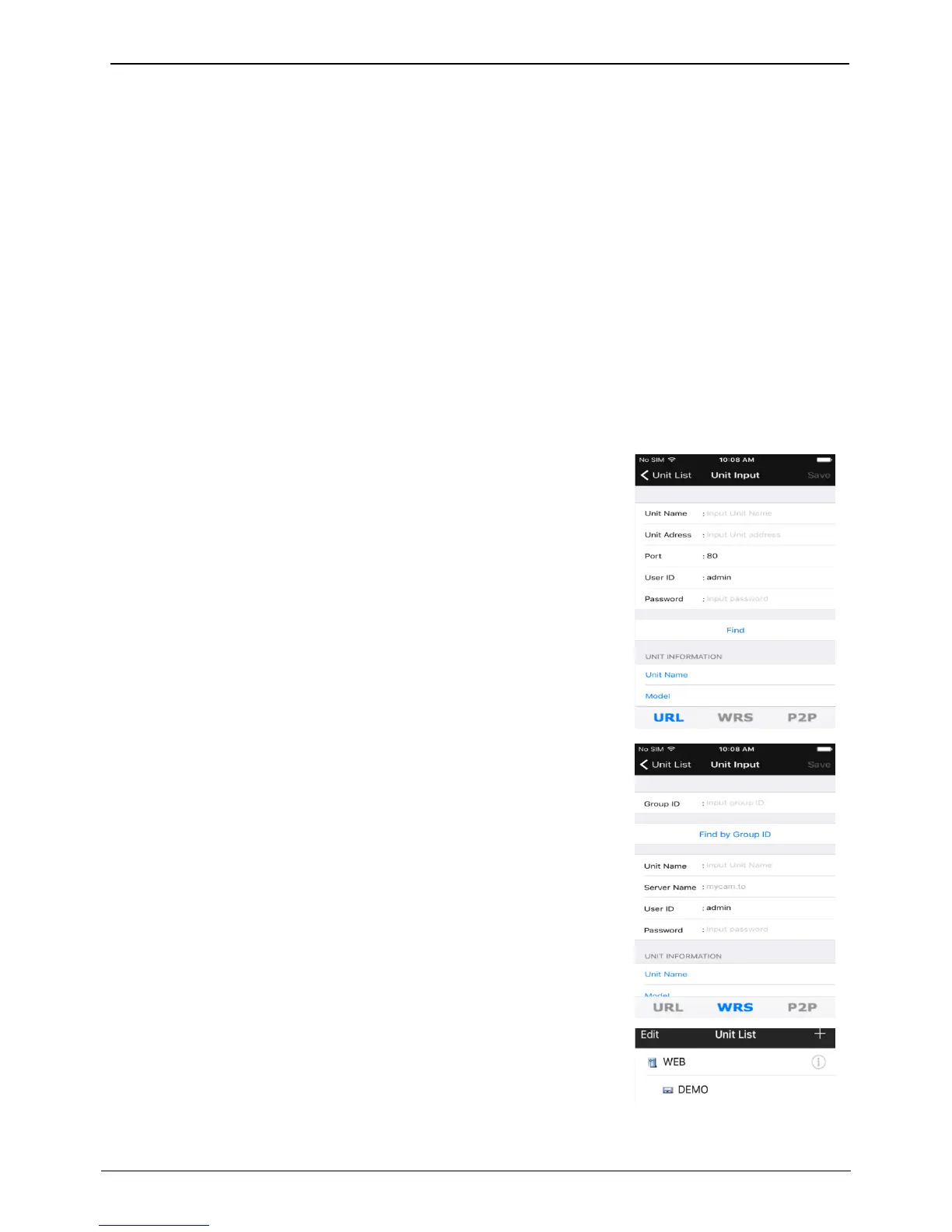
URL register
1. Touch “+” button after application installed.
2. Select URL in category.
3. Touch “Find” button then there’s unit name and IP address shown. Touch
save button to finish unit register.
4. Touch unit created to enter unit’s screen.
WRS register
1. Select WRS in category.
2. Enter group ID created in the NVR.
3. Click on “search by group ID”.
4. Touch “Find” button then there comes unit name of searched NVR and IP
address and touch save button to finalize unit register.
5. Touch unit created to enter unit’s screen.
<Note>
WRS of NVR and port forwarding must be enabled to register unit.
*P2P feature might not be included based on types of model.



 To Next Page