EasyManua.ls Logo

WEG ECW500 - Page 14

WEG ECW500
84 pages
Print Icon
To Next Page IconTo Next Page
To Previous Page IconTo Previous Page
Loading...
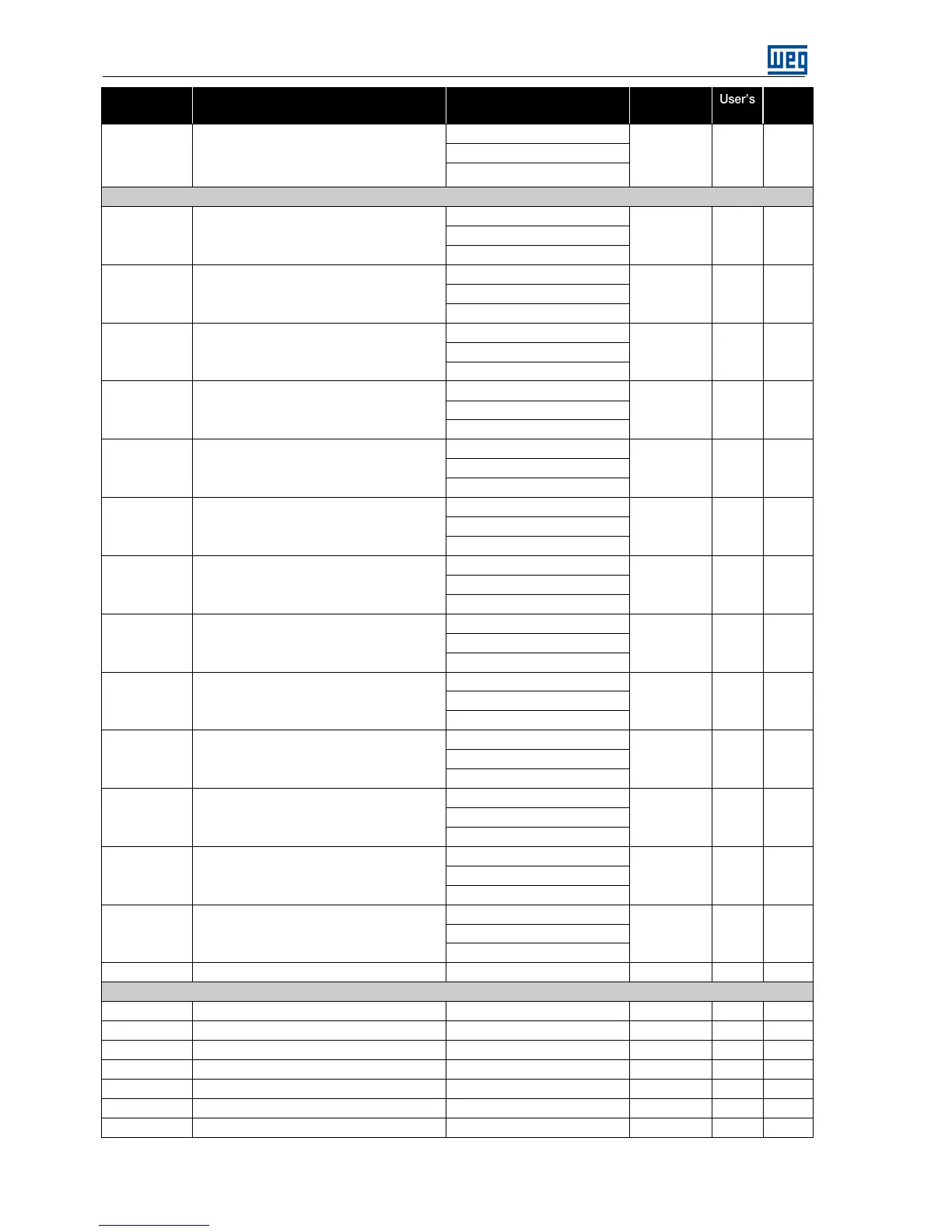
Quick Parameter Reference .
6 | ECW500
Modbus
Address
Description
Adjustable Range
Factory
Setting
Setting
Proper
.
4 = Active Power
5 = Excitation Current
6 = Reactive Power
DIGITAL INPUTS
30178
Start digital input type
0 = Button Released
1
1 = Button Pressed
2 = Button Hold
30180
Stop digital input type
0 = Button Released
1
1 = Button Pressed
2 = Button Hold
30182
Increment digital input
0 = Button Released
1
1 = Button Pressed
2 = Button Hold
30184
Decrement digital input
0 = Button Released
1
1 = Button Pressed
2 = Button Hold
30186
Automatic digital input
0 = Button Released
1
1 = Button Pressed
2 = Button Hold
30188
Manual digital input type
0 = Button Released
1
1 = Button Pressed
2 = Button Hold
30190
Enable online DI type
0 = Button Released
1
1 = Button Pressed
2 = Button Hold
30192
Disable online DI type
0 = Button Released
1
1 = Button Pressed
2 = Button Hold
30194
Enable parallel DI type
0 = Button Released
1
1 = Button Pressed
2 = Button Hold
30196
Disable parallel DI type
0 = Button Released
1
1 = Button Pressed
2 = Button Hold
30198
Alarm reset DI type
0 = Button Released
1
1 = Button Pressed
2 = Button Hold
30200
Preposition DI type
0 = Button Released
1
1 = Button Pressed
2 = Button Hold
30202
Backup Di type
0 = Button Released
1
1 = Button Pressed
2 = Button Hold
30204
DI increment multiplier
1 to 200
1
DIGITAL OUTPUTS
30298
Status Relay NC (Normally Closed)
0 = False, 1 = True
0
30300
Failure Relay NC
0 = False, 1 = True
0
30302
RL0 Relay NC
0 = False, 1 = True
0
30304
RL1 Relay NC
0 = False, 1 = True
0
30306
RL2 Relay NC
0 = False, 1 = True
0
30308
RL3 Relay NC
0 = False, 1 = True
0
30310
RL0 annunciation type
0 = Momentary
1

Table of Contents

Related product manuals