English-16
ENGLISH
Installation and Operation Manual - SSW-05 Plus
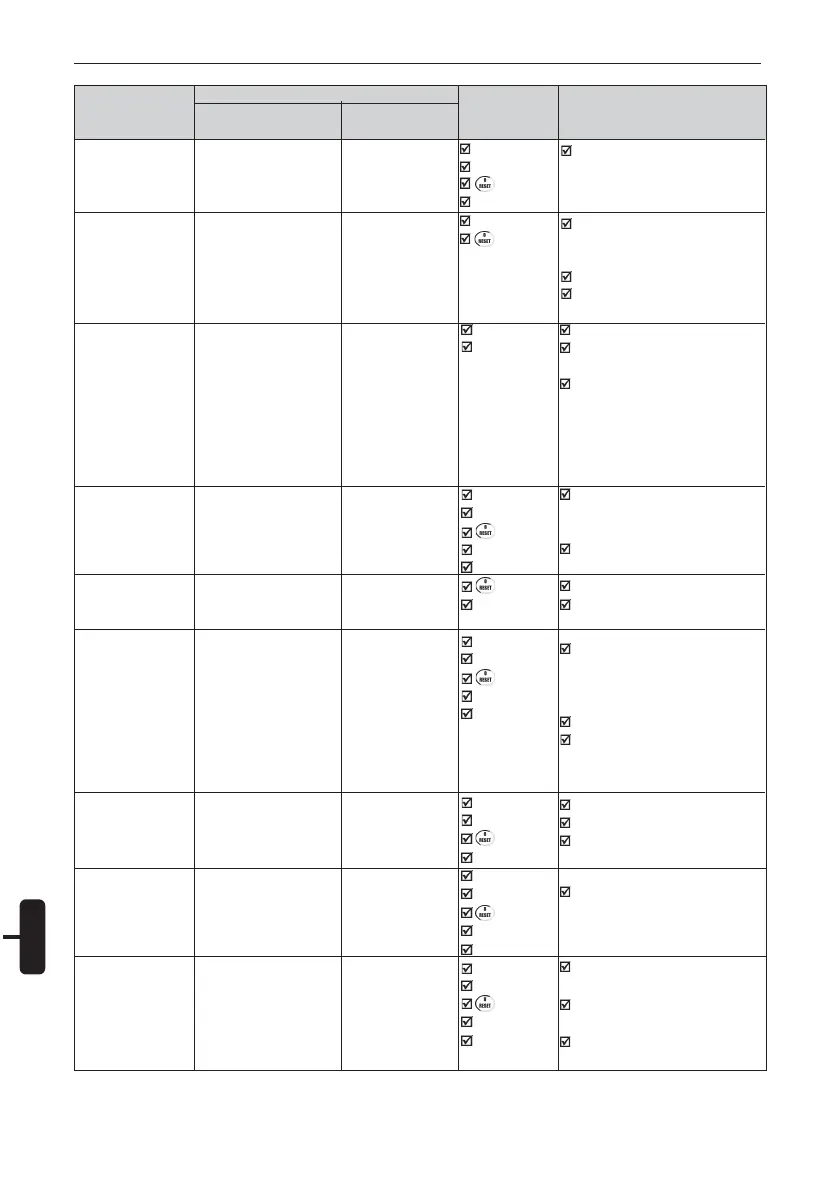
Protection
Description
External Fault
Error in the Copy
Function
Keypad HMI
Connection Fault
Locked Rotor
Thyristor overload
Undercurrent
Overcurrent
Incorrect phase
sequence
Undervoltage in the
Control Supply
SSW-05
Front Panel
LED
(Internal Fault)
flashes 7 times
Available only when
HMI-SSW05-RS is
used
(see chapter 19)
Available only when
HMI-SSW05-RS is
used
(see chapter 19)
LED
(Stall)
LED
(Internal Fault)
flashes 6 times
LED
(Internal Fault)
flashes 8 times
LED
(Overcurrent)
LED
(Phase Seq)
LED
(Internal Fault)
flashes 2 times
HMI-SSW05-RS
(see chapter 19.3)
E06
E10
E31
E63
E64
E65
E66
E67
E70
Possibles Causes
off return when switching on
again.
The wiring at DI1 is open (not
connected).
Attempt for copying HMI
Parameters to the Soft-Starters
with different software versions.
Keypad cable misconnected.
Electrical noise in the installation
(electromagnetic interference).
Keypad cable misconnected.
Electrical noise in the installation
(electromagnetic interference).
Reset is executed through DI2
or reset button.
The time programmed for the
acceleration ramp is shorter than
the actual acceleration time.
Motor shaft is locked.
Load on the motor shaft too high.
Too much successive starts.
Current value programmed in
P610 may be much higher than
the minimum motor operation
current.
Motor at no load.
In applications with hydraulic
pumps, the pump may be
operating at no load.
Short-circuit between phases.
Momentary motor overload.
Motor shaft is locked.
Network phase sequence
inverted at the input.
Electronics supply lower than the
required one.
Electronic power supply with bad
contact.
Fuse of the electronics power
supply is blown.
Fault Display
Reset
Power-on
Reset key
key
DI2.
Power-on
key
Power-on
This fault
disappears
automa-tically
when HMI
reestablishes
the communi-
cation with the
Soft-Starter.
Power-on
Reset key
key
Auto-reset
DI2.
key
Auto-reset
Power-on
Reset button
key
Auto-reset
DI2.
Power-on
Reset key
key
DI2.
Power-on
Reset key
key
Auto-reset
DI2.
Power-on
Reset key
key
Auto-reset
DI2.



 To Next Page