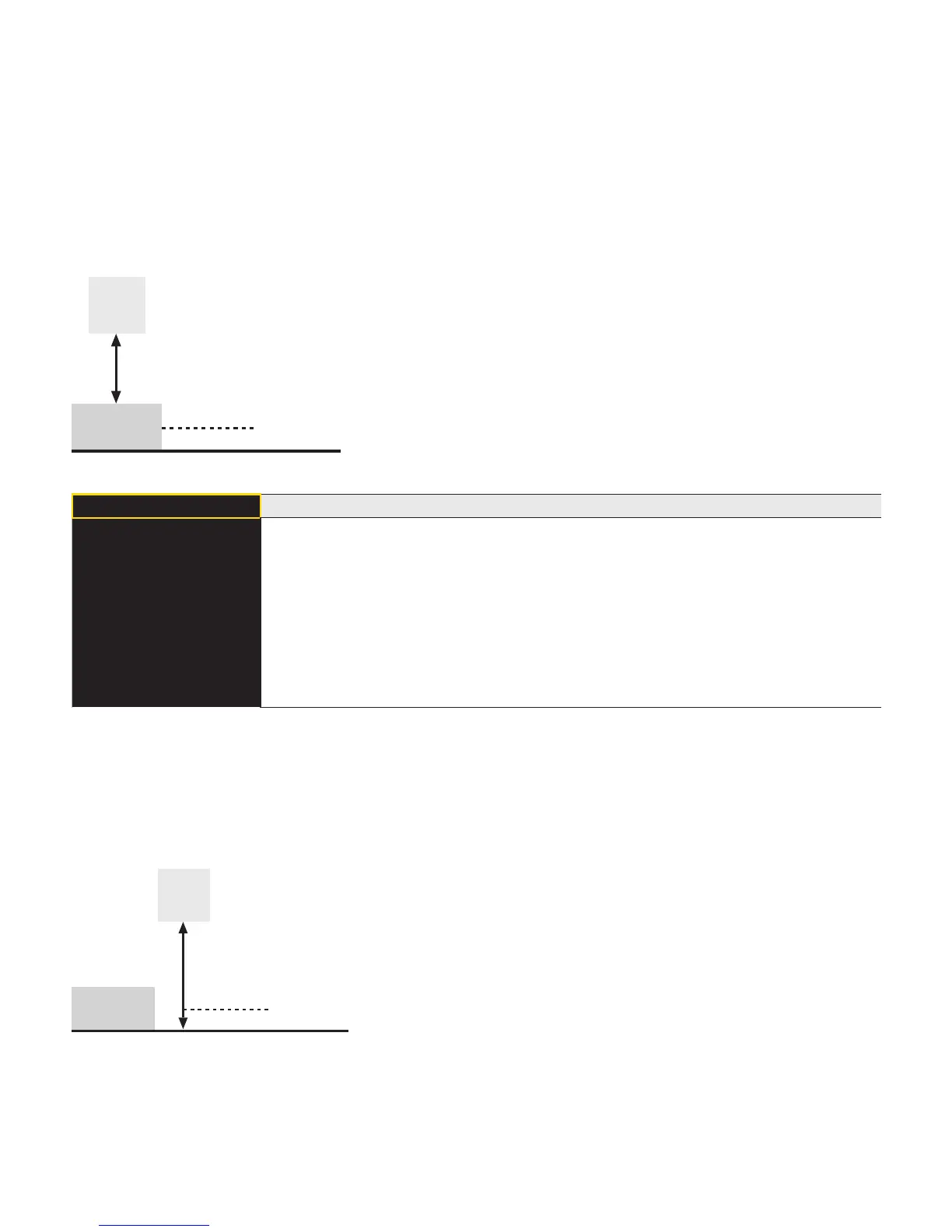
7.3.1. Switching Output Foreground Teach-In
Teach-In is performed while the sensor spot is aligned to the object. The switching distance is then automati-
cally set to a distance which is slightly greater than the clearance between the sensor and the object. The sen-
sor is thus activated for all objects whose distance to the sensor is equal to or less than the distance to the
object used for the Teach-In procedure.
Sensor
Object
Teach Distance
Switching Poin
T Foreground Foreground Teach-In
Press <T> for
Teach-In
Teach-In Foreground process
1) Align light spot to object.
2) Press “T” key. The switching point is learned.
Note:
• The switching point can be recalibrated in the menu item Poti (see chapter 7.3.4
if needed.
• The switching hysteresis can be modified in the menu item Hysteresis (see chap-
ter 7.3.5) if needed.
7.3.2. Switching Output Background Teach-In
Teach-In is performed while the sensor spot is aligned to the background. The switching distance is then au-
tomatically set to a distance which is slightly less than the clearance between the sensor and the background.
The sensor is thus activated whenever an object is located between the background and the sensor.
Sensor
Object
Teach Distance












 To Next Page