M101H Series User Guide 13
First-time Operation
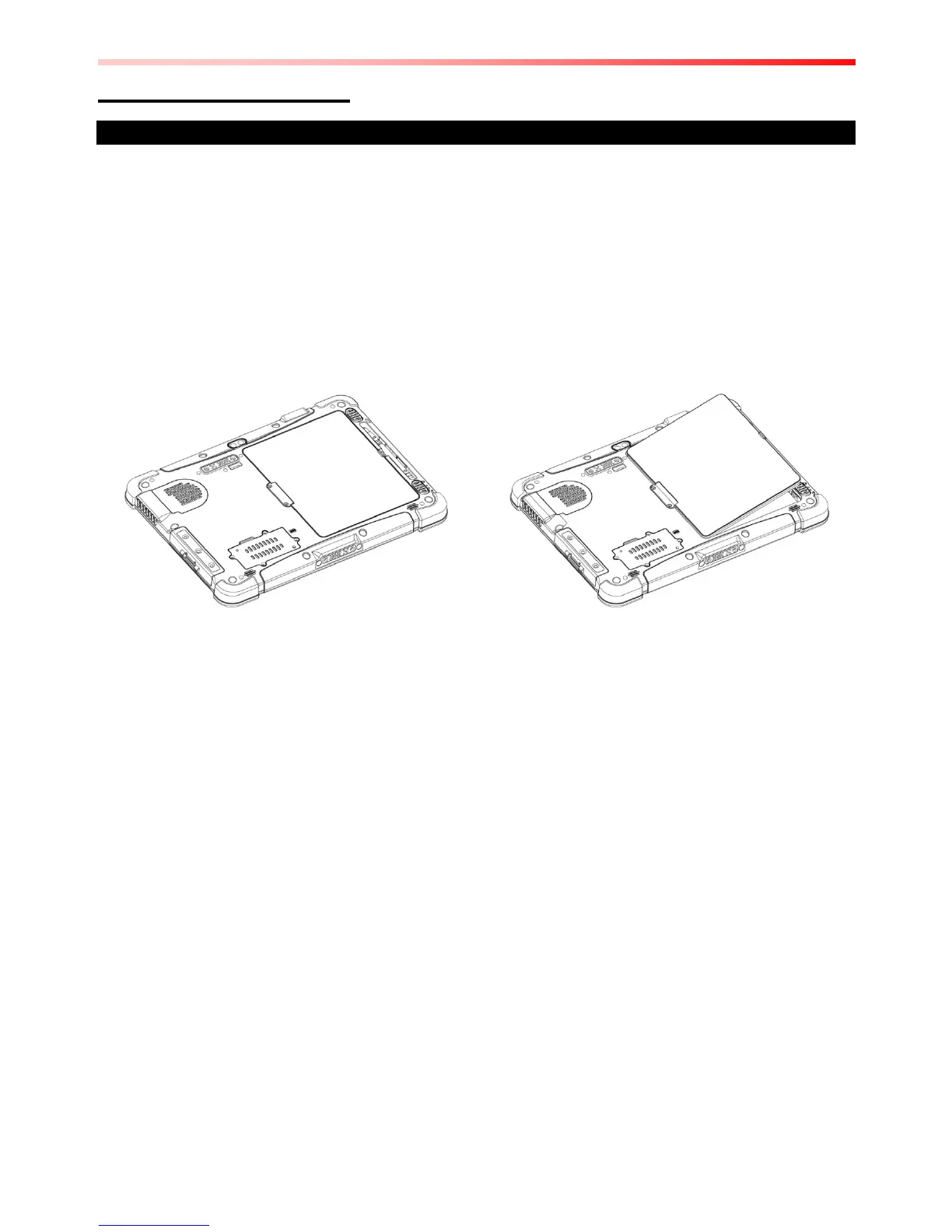
Inserting Battery Pack
To insert the standard battery pack into the Tablet Computer:
1. Disconnect AC adapter and power cord from the tablet computer.
2. Turn the tablet computer over, back facing up.
3. Locate the Battery Lock Latch and push it to the “Unlocked” position.
4. Locate the Battery Release Slider that is spring-loaded. Pull back and hold.
5. Insert the battery on the connector-pins side first, and then lower the battery into the
battery compartment. Continue to hold the Battery Release Slider before battery is fully
inserted.
6. Make sure the battery is completely lowered into the compartment before letting go the
Battery Release Slider. Battery will be flat against the housing once fully inserted
Removing the Battery Pack
1. Power off the tablet computer (or put it to sleep). Disconnect any cords connected to the
computer.
2. Turn the tablet computer over, back facing up.
3. Locate the Battery Lock Latch and push it to the “Unlocked” position.
4. Locate the Battery Release Slider that is spring-loaded. Pull back and hold.
5. Lift the battery out using the opening on side of battery compartment.


 To Next Page