M101H Series User Guide 41
8. Now wireless LAN connection is setup, try connection to the network with a internet
browser such as Internet Explorer.
Using the Wireless WAN (3G/LTE) feature
Insert SIM card (For Optional 3G/LTE equipped device)
The Tablet Computer supports data connection with 3G/LTE modules and fits Micro-SIM
card. (Note: 3G/LTE feature is optional). Before using the data connection program, please
perform the following procedures to insert the Micro-SIM card to your Tablet Computer:
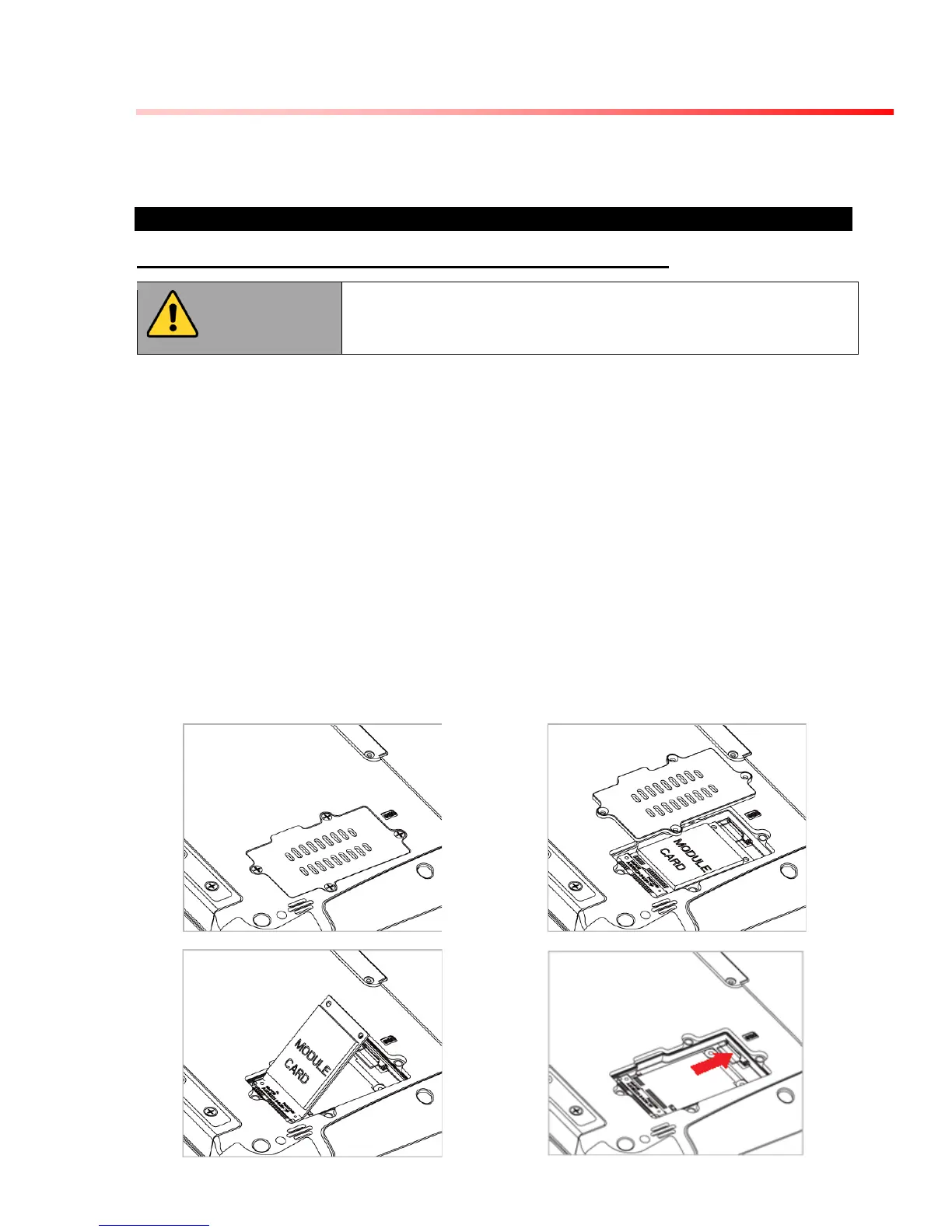
1. Power off the Tablet Computer.
2. Remove the service window in the rear by unscrewing four screws.
3. Remove the screw that is securing the 3G/LTE module.
4. Carefully lift the 3G wireless module up, and be cautious not to damage the
connected cable.
5. Make sure the SIM card IC contact patch is faced down, notch is in the direction of
insertion (towards right).
6. Insert the SIM card into the slot located near the right side of the service window.
7. Reposition the removed 3G/LTE module screw to secure the 3G/LTE module.
8. Reposition the removed service window screw to secure the service window.



 To Next Page