\Manuals\GettingStartedManual8500eRev2
10/02/08
11
MatDesigner™ - Getting Started Manual - Model 8500e
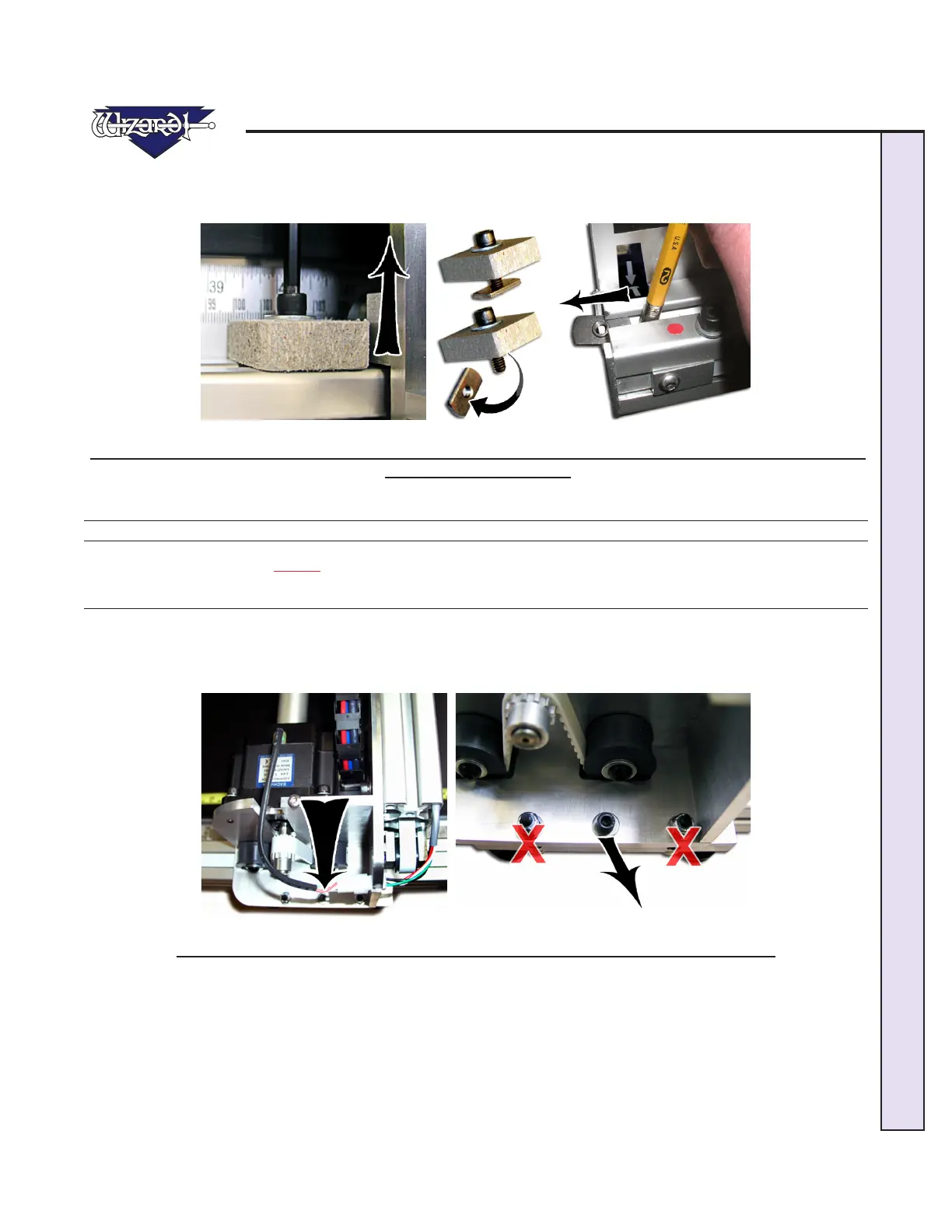
2. Remove the shipping blocks by loosening the 3/16” Allen screw from the T-Nut (Fig G-H). Remove the shipping blocks.
Slide the T-Nuts to the nearest end; a pencil eraser can make this easier (Fig I). Reattach the shipping blocks to the T-Nuts and
place in the shipping box for storage.
Fig G. Fig H. Fig I.
Fig G: Complete Shipping Block. Fig H: Remove 3/16" Allen screw from T-Nut. Fig I. A pencil eraser can be useful to
remove T-Nut from channel.
Unlock the Gantry Wheels
*IMPORTANT: DO NOT Operate the Wizard without first unlocking the
Gantry Wheels!*
1. The wheels on the Gantry are attached to a bar which is locked into place for shipping purposes. Locate the center Allen
Screw located at the bottom of the Gantry (Fig A); it is located between two other screws that will not be touched. Remove
the Allen Screw and the washer completely. DO NOT REMOVE THE OTHER SCREWS. You may hear/feel the Gantry
Wheels snap into place.
Fig A. Fig B.
Fig A: Locate Allen Screw at the bottom of the Gantry. Fig B: Do not touch the other screws.


 To Next Page