24
Wizard™ International, Inc., 4600 116th St. SW, PO Box 66, Mukilteo, WA 98275 888/855-3335 Fax: 425/551-4350 wizardint.com
Conguration Diskette
IfyourWizardarrivedwithaCongurationDiskette,placethedisketteintheA:\driveandfollowtheinstructionsonthela-
bel.
Design Your First Mat
Edit New Mat
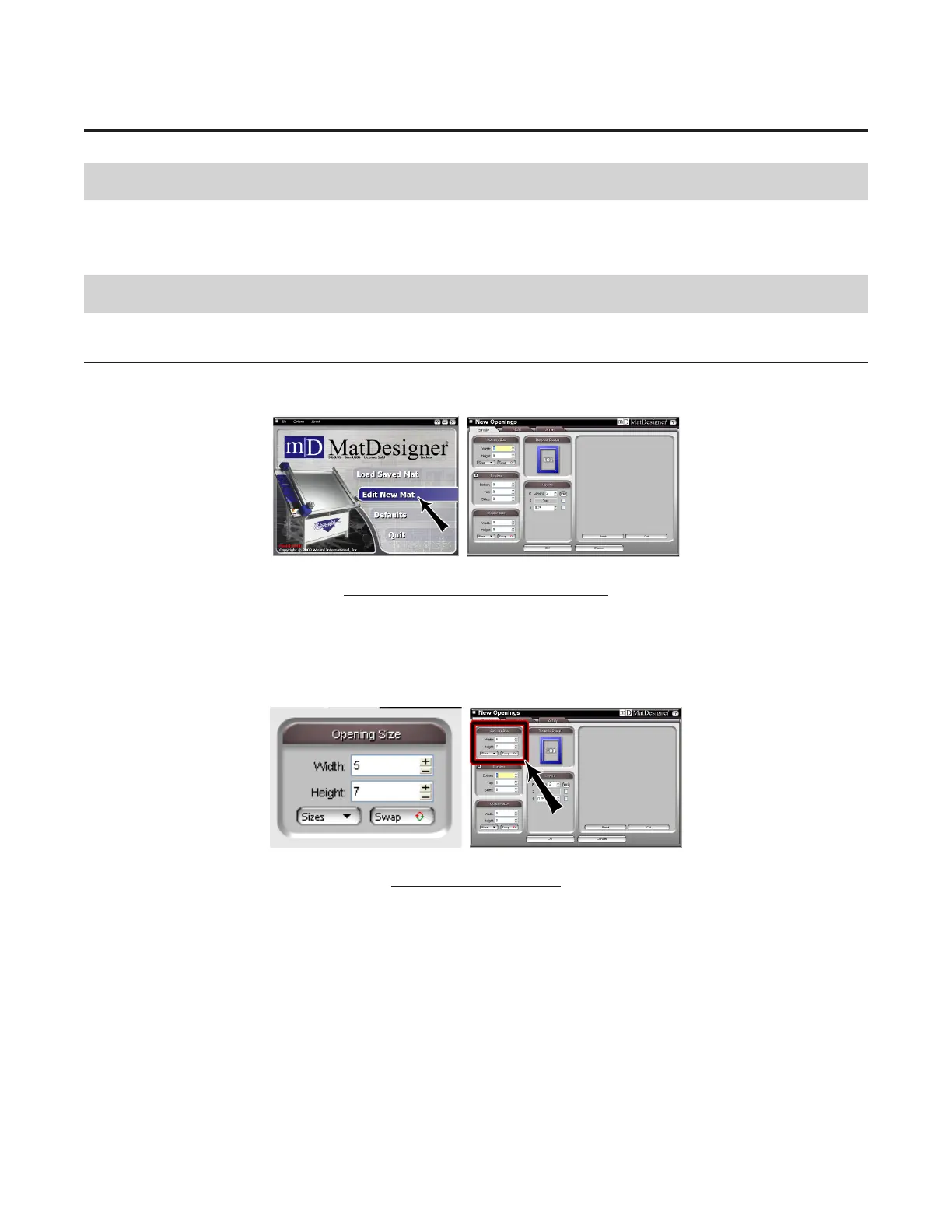
Click Edit New Mat (Fig A) from the Main Screen. Stay on the Single Tab (Fig B).
Note that you have three tabs to select from: Single, Multi, Array.
Fig A. Fig B.
Fig A: Edit New Mat. Fig B: Single Tab.
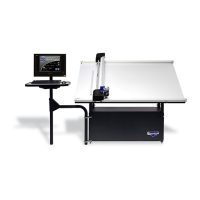
Opening Size
Enter 5x7 (13x18 cm) for width and height of the Opening (Fig C).
NOTE:If"OpeningSizeFirst"isuncheckedinDefaultsunderEditor,theOutsideSizeeldwillbedisplayedontop.
YoucanstartbyenteringdimensionsinOutsideSizeeldrstifyouprefer.
Fig C.
Fig C: Enter opening size.


 To Next Page