\Manuals\GettingStartedManual8500eRev2
10/02/08
29
MatDesigner™ - Getting Started Manual - Model 8500e
Using the 45º Cartridge
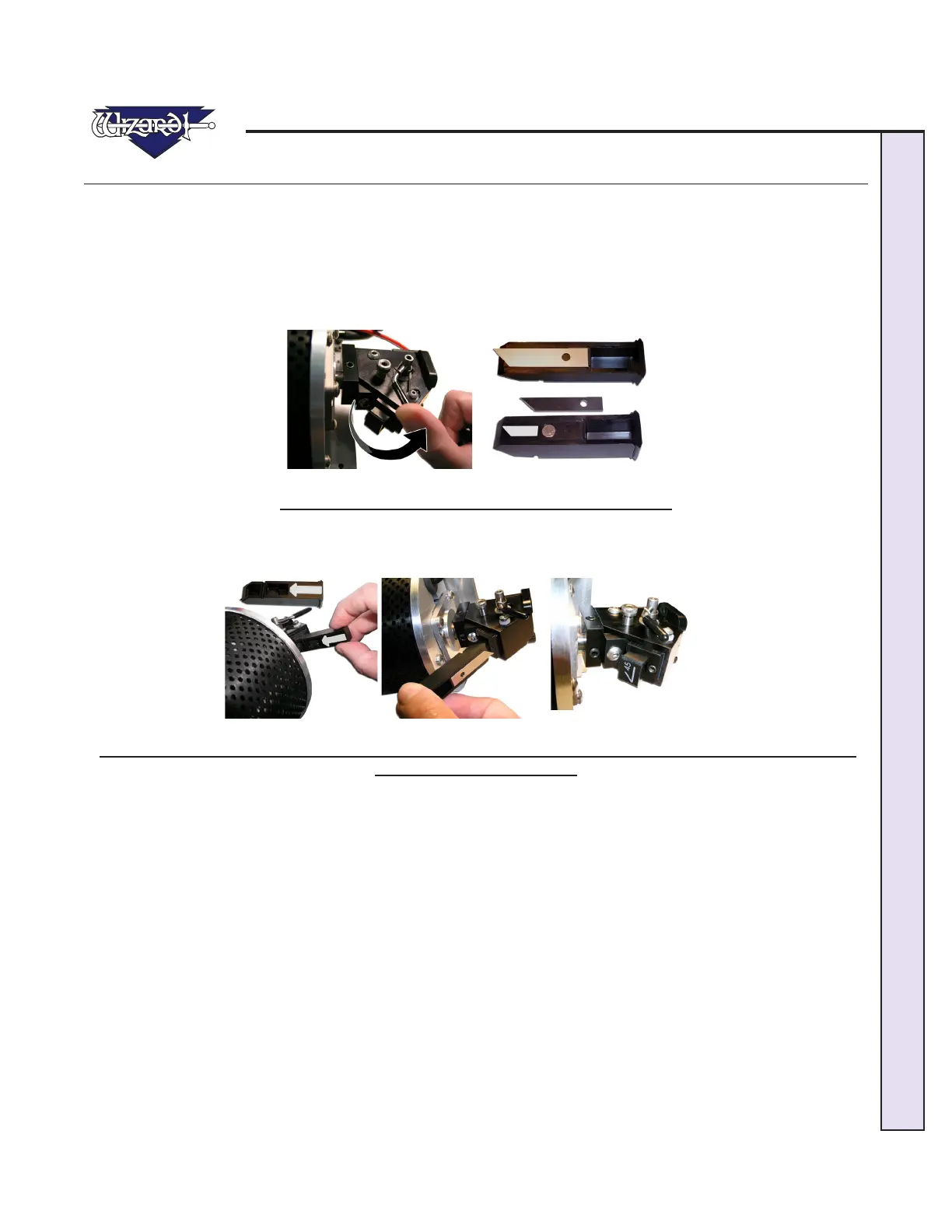
Changing the Blade
To change the Blade, push the Blade Cartridge Release down (Fig A). The Blade Cartridge will pop out.
Carefully pull the Blade out of the Blade Cartridge, taking care of the sharp edge (Fig B). Place the fresh Blade into the Blade
Cartridge with the longest straight side to the right and the bevel face down. Place the base of the Blade into the Cartridge and
let the magnet grab the Blade as you lower it. Make sure that the base of the Blade is even with the back of the Blade Cartridge
andthatthelengthoftheBladeisushwiththecartridge.
Fig A. Fig B.
Fig A: Press Blade Cartridge Release. Fig B: Replace Blade.
Turn the Blade Cartridge over and reinsert into the Head: Arrow on the back of the Cartridge faces away from the Board, and
the Blade faces foward the Board (Fig C-D). Press the Blade Cartridge until it clicks into place; it can only be inserted one way
(FigE).ArrowandBladeoutlineonBladeCartridgeisdisplayedincontrastforeaseofidentication.
Fig C. Fig D. Fig E.
Fig C: Arrow on back of Cartridge faces away from Board. Fig D: Insert Cartridge into Head with Blade facing the
Board. Fig E: Snap into Place.


 To Next Page