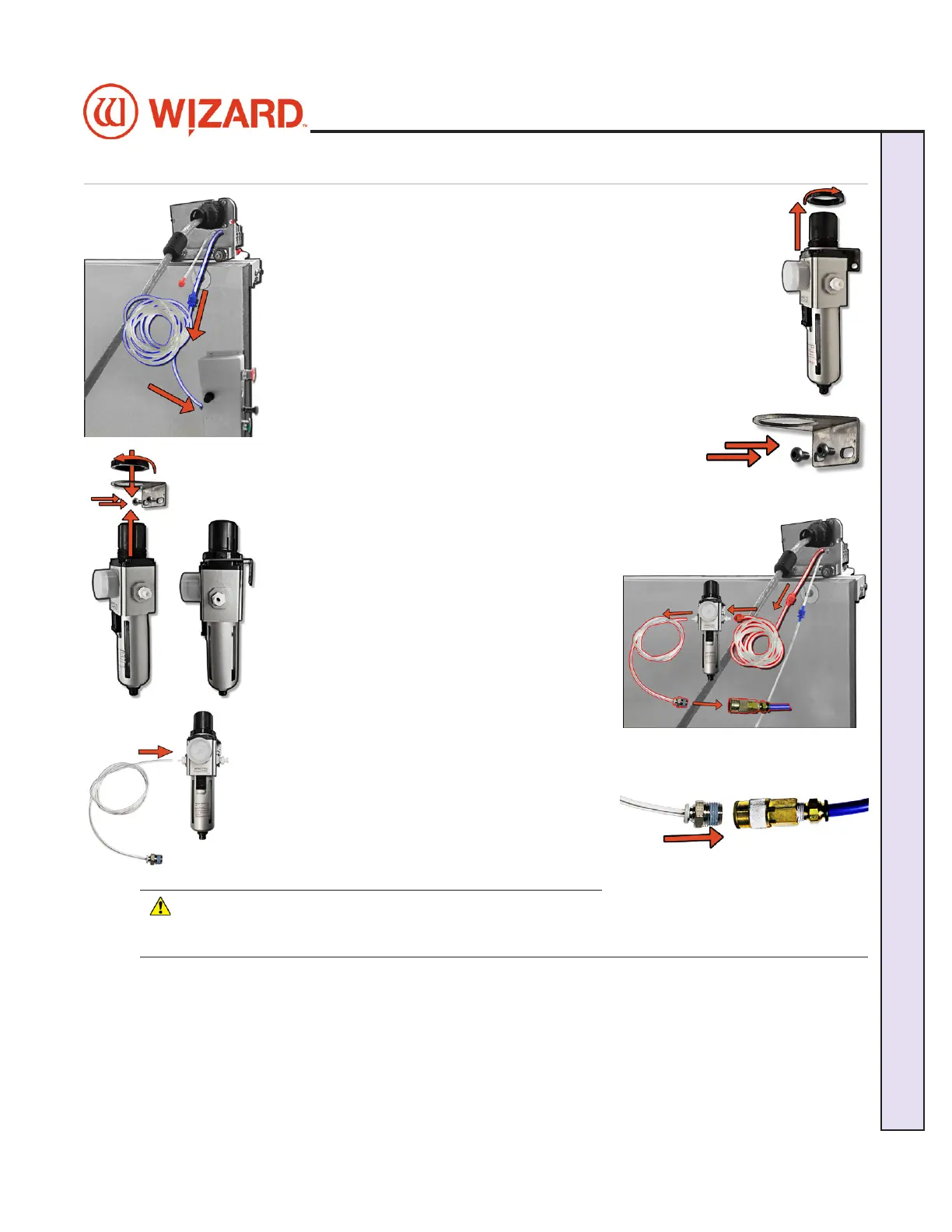
Attaching the Air Lines
1. Follow the air line with the blue connector from the top of the gantry. 1. Follow the air line with the blue connector from the top of the gantry.
Make sure that it is connected to the blue connector on the control Make sure that it is connected to the blue connector on the control
panel box on the back of the board, and that none of the air lines are panel box on the back of the board, and that none of the air lines are
crimped.crimped.
2. Unscrew the locking ring from the top of the air regulator and 2. Unscrew the locking ring from the top of the air regulator and
remove the air regulator bracket.remove the air regulator bracket.
3. Screw the air regulator bracket into the left large wall 3. Screw the air regulator bracket into the left large wall
bracket or the back left leg of the stand. Make sure the bracket or the back left leg of the stand. Make sure the
screws are positioned at the bottom of the bracket.screws are positioned at the bottom of the bracket.
4. Insert the air regulator up through the air regulator 4. Insert the air regulator up through the air regulator
bracket with the glass bowl down. Replace the locking ring bracket with the glass bowl down. Replace the locking ring
to the top of the air regulator to secure it into place, making sure not to crimp any air to the top of the air regulator to secure it into place, making sure not to crimp any air
lines. The hardware to connect the air regulator lines. The hardware to connect the air regulator
to the stand is included in the air regulator kit.to the stand is included in the air regulator kit.
5. Follow the air line with the red connector from 5. Follow the air line with the red connector from
the top of the gantry. Connect it to the right side the top of the gantry. Connect it to the right side
of the air regulator by inserting the red connector of the air regulator by inserting the red connector
on the end and twisting it into place.on the end and twisting it into place.
6. If it’s not already connected, insert the 6. If it’s not already connected, insert the
air regulator line (short air line with quick air regulator line (short air line with quick
disconnect) onto the left connector of the air disconnect) onto the left connector of the air
regulator. regulator.
7. Plug the quick disconnect located on the short air 7. Plug the quick disconnect located on the short air
line from the left side of the air regulator into the line from the left side of the air regulator into the
main air supply.main air supply.
8. The air compressor should supply at least 8. The air compressor should supply at least
100psi.100psi.
9. Turn on the air.9. Turn on the air.
* CAUTION: The air regulator is factory-
set. Do not make adjustments to it.*
20-36070-1 GettingStartedManualZ1-70FrameShop
04/03/24
11
Wizard CMC Model Z1: Hardware and Software Getting Started Manual
Wizard™ CMC Model Z1 Hardware and Software Getting Started Guide



 To Next Page