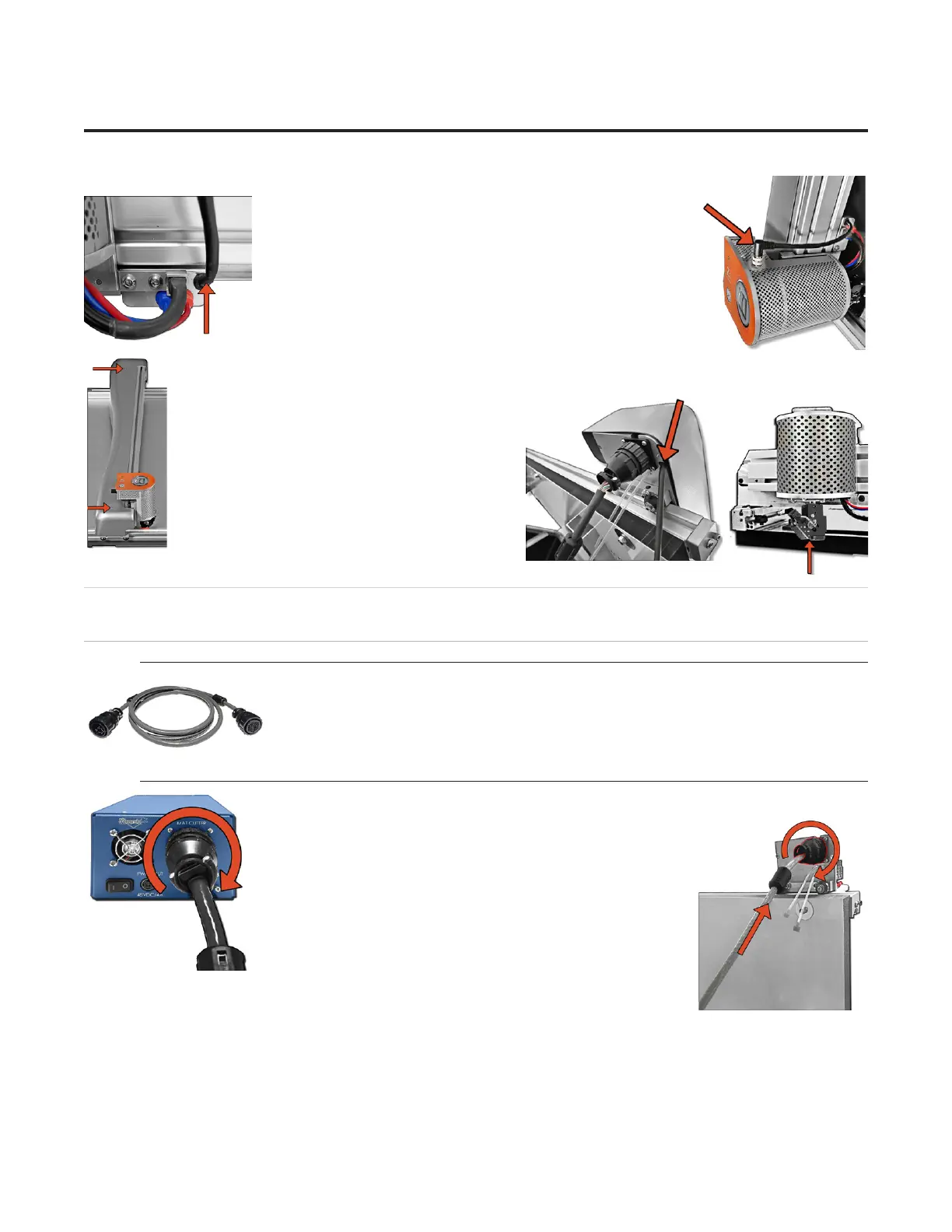
13. Locate the M12 cable that is attached to the grabber arm.13. Locate the M12 cable that is attached to the grabber arm.
14. Plug the other end of the M12 cable into the M12 port at 14. Plug the other end of the M12 cable into the M12 port at
the top of the head, twisting the thumbscrew to secure it.the top of the head, twisting the thumbscrew to secure it.
15. Reinstall the gantry cover using the two screws we removed earlier.15. Reinstall the gantry cover using the two screws we removed earlier.
16. Make sure that the M12 cable lies within 16. Make sure that the M12 cable lies within
the gantry channel so that it is not pinched in the gantry channel so that it is not pinched in
the gantry cover.the gantry cover.
17. Lift the head up so that the footblock does 17. Lift the head up so that the footblock does
not strike the side of the board and move the not strike the side of the board and move the
gantry to the left. gantry to the left.
18. The head is installed. 18. The head is installed.
Hooking up the Gantry and Air Lines
Connecting the Board Cable
*Carefully align the pins of the board cable before
applying pressure to plug it in. The connector is
keyed to avoid incorrect pin alignment. Forcing
the connector will result in damage.*
1. The board cable connects the gantry on the CMC to the ECU. Connect the male end 1. The board cable connects the gantry on the CMC to the ECU. Connect the male end
of the board cable to the back of the ECU by aligning the of the board cable to the back of the ECU by aligning the
pins and turning the locking ring until it seats itself and locks pins and turning the locking ring until it seats itself and locks
into place. into place.
2. Connect the female end of the board cable to the back of 2. Connect the female end of the board cable to the back of
the gantry in the same manner. the gantry in the same manner.
3. Move the gantry to the far right of the CMC and back to 3. Move the gantry to the far right of the CMC and back to
the left to make sure the board cable does not get caught on the left to make sure the board cable does not get caught on
anything. If the board cable is obstructed, this will aect the anything. If the board cable is obstructed, this will aect the
cuts.cuts.
10
Wizard™ International, Inc., 4600 116th St. SW, Mukilteo, WA 98275 888/855-3335 Wizard™ International, Inc., 4600 116th St. SW, Mukilteo, WA 98275 888/855-3335 wizardcutters.comwizardcutters.com
20-36070-1 GettingStartedManualZ1-70FrameShop
04/03/24
Wizard™ CMC Model Z1 Hardware and Software Getting Started Guide



 To Next Page