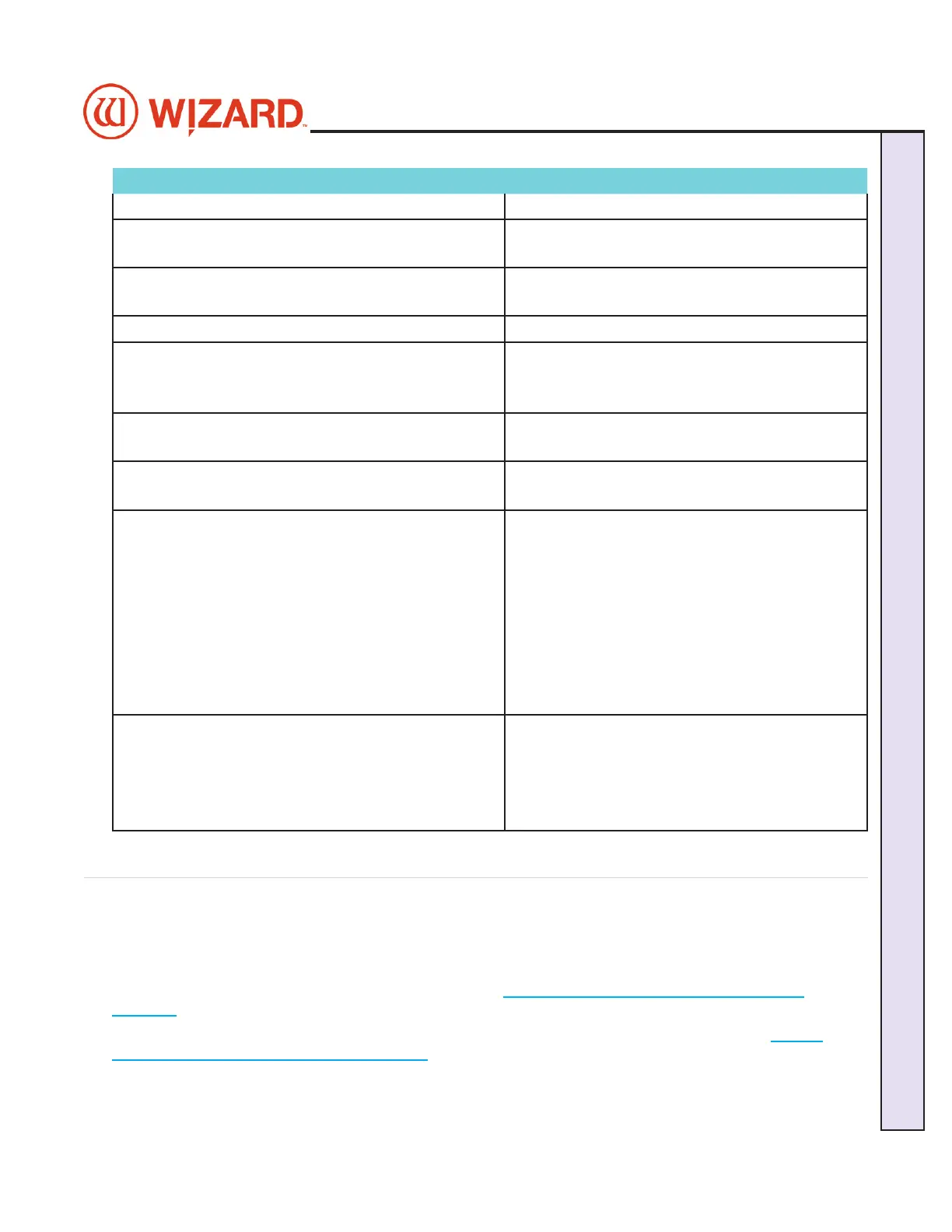
Circumstance Clamp Color and Behavior
After cutting the mat. The clamp LEDs will stay green.
Aborting a cut. If the user aborts the cut, the
LEDs will stay green.
User cancels/exits the Cut Preview
screen.
The LEDs will be set to green.
User cancels the cut during the cut. The LEDs will be set to green.
User clicks Cut and a clamp is not
engaged.
If the user hits cut and a clamp
is not engaged and it should be,
the clamp LED will flash green.
User hits Emergency Stop. If the user hits the Emergency
Stop, all Clamp LEDs blink red.
Clearing Emergency Stop. The clamp LEDs go back to the
state it was.
Clicking Continue for flashing Red/
Green clamps.
If any LEDs are flashing, the
clamps are disengaged and
the user has the opportunity
to rotate the clamp. The dialog
box will not allow the user to
continue if the flashing LED is
red, however, it will allow the
user to continue if the flashing
LED is green.
Diagnostic Screen Diagnostic screen will need
to add a feature to allow the
customer to disable the input of
a clamp. If a clamp is disabled,
the LED should be off.
Troubleshooting
Cuts Look Wavy
Check for squareness. See Check for squareness. See “Check Squareness” page 8“Check Squareness” page 8..
Make sure the board cable is unobstructed. See Make sure the board cable is unobstructed. See “Connecting the Board Cable” page 10“Connecting the Board Cable” page 10..
Check the head wheels. See Head Wheel Adjustment at Check the head wheels. See Head Wheel Adjustment at https://wizardcutters.atlassian.net/wiki/x/https://wizardcutters.atlassian.net/wiki/x/
YYDHFwYYDHFw. .
Check the blade depth - See Check the blade depth - See “Blade Depth Settings” page 22“Blade Depth Settings” page 22 and Blade Depth Adjustment at and Blade Depth Adjustment at https://https://
wizardcutters.atlassian.net/wiki/x/XDQnYwwizardcutters.atlassian.net/wiki/x/XDQnYw. .
20-36070-1 GettingStartedManualZ1-70FrameShop
04/03/24
29
Wizard CMC Model Z1: Hardware and Software Getting Started Manual
Wizard™ CMC Model Z1 Hardware and Software Getting Started Guide



 To Next Page