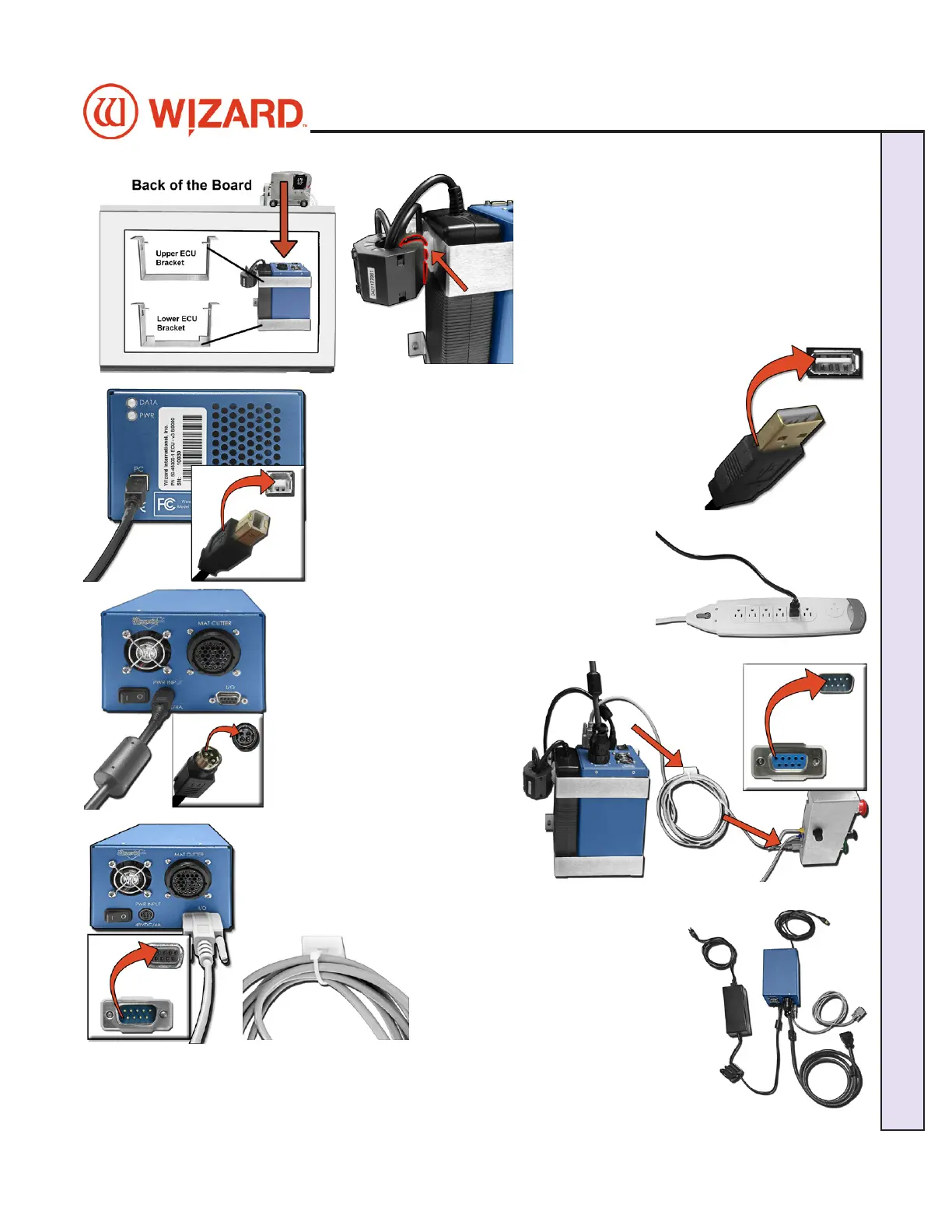
2. Place the ECU and its power supply into the 2. Place the ECU and its power supply into the
ECU bracket on the back of the board.ECU bracket on the back of the board.
3. Locate one of the zip ties. Slip it through the 3. Locate one of the zip ties. Slip it through the
plastic mount on the side of the ECU bracket and plastic mount on the side of the ECU bracket and
attach it to the Ferrite on the output cable of the attach it to the Ferrite on the output cable of the
power supply then secure it in place. power supply then secure it in place.
4. Connect ECU USB cable to the matching port on
the front of the ECU.
5. Plug the other end of the USB cable into the USB
port on the computer.
6. Connect the power output cable to the back of the
ECU.
7. Connect the ECU power supply to the surge
protector.
8. Connect the DB9 cable to the
ECU.
9. Connect the other end of the
DB9 cable to the control panel
box on the back of the board.
10. Locate the zip tie and slip it
through the plastic mount attached to
the back of the board.
11. Take the excess DB9 cable and
loop it around a couple of times
then use the zip tie to attach it to
the plastic mount on the back of the
board.
12. The ECU is now connected. 12. The ECU is now connected.
20-36070-1 GettingStartedManualZ1-70FrameShop
04/03/24
13
Wizard CMC Model Z1: Hardware and Software Getting Started Manual
Wizard™ CMC Model Z1 Hardware and Software Getting Started Guide



 To Next Page