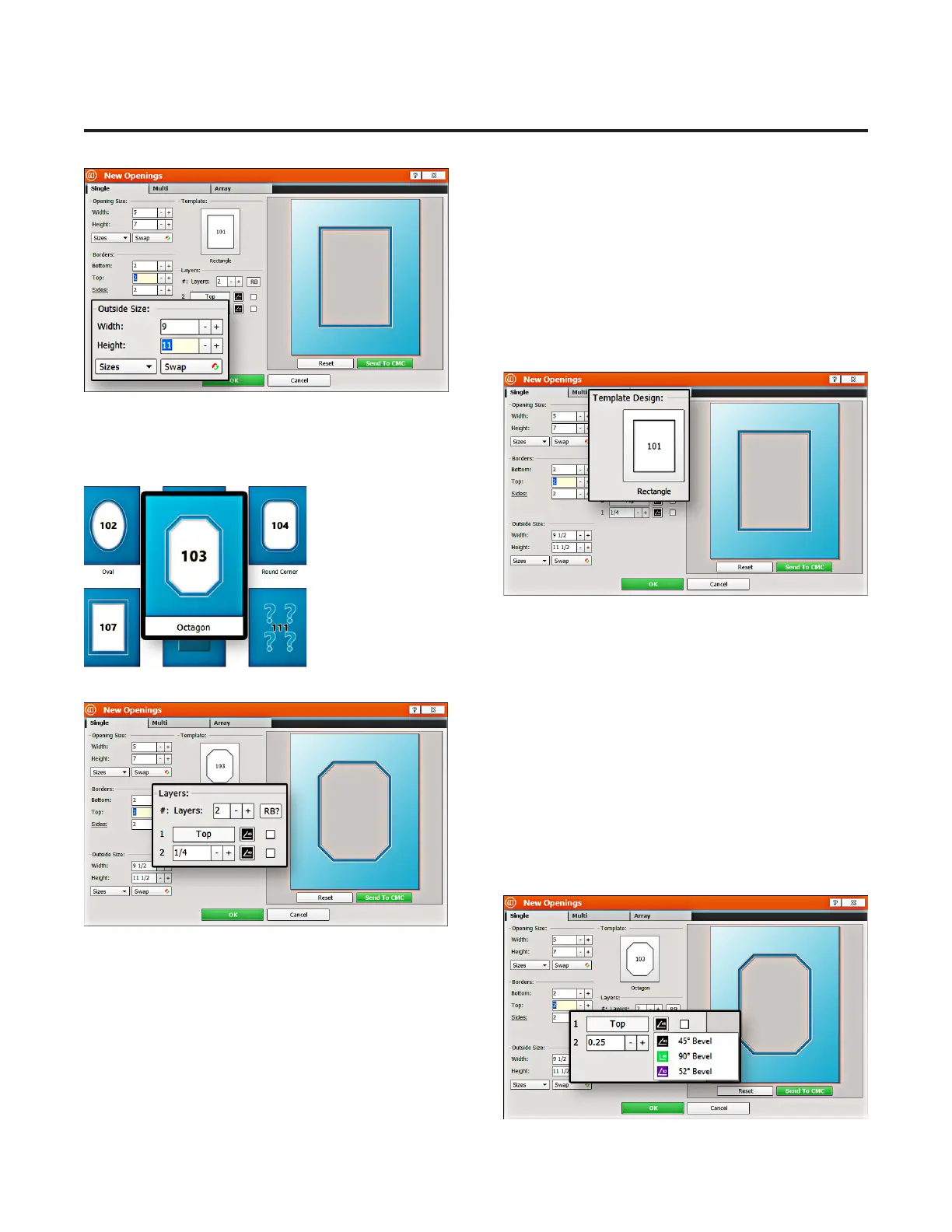
Outside Size
1. Make sure outside size is 9x11 (approx.1. Make sure outside size is 9x11 (approx.
23x28 cm). 23x28 cm).
Don’t Click Don’t Click OKOK yet. yet.
If the opening size and borders are entered rst, the If the opening size and borders are entered rst, the
program automatically calculates the outside size when program automatically calculates the outside size when
tabbing out of the borders eld. tabbing out of the borders eld.
Select Template
1. Click on the template thumbnail under template 1. Click on the template thumbnail under template
design. design.
2. The 2. The Template LibraryTemplate Library
opens.opens.
Note:Note: There are several pages of templates you can scroll through. There are several pages of templates you can scroll through.
3. Click on any template thumbnail to select it. 3. Click on any template thumbnail to select it.
4. The new template is displayed.4. The new template is displayed.
Layers
1. Select the number of matboard layers desired. For this 1. Select the number of matboard layers desired. For this
project, leave it at the default of 2 layers. project, leave it at the default of 2 layers.
Cartridge Selection
1. Click on the cartridge icon and select the desired 1. Click on the cartridge icon and select the desired
cartridge for this layer. For this project, leave it at the cartridge for this layer. For this project, leave it at the
default cartridge, which is the 45° bevel cartridge.default cartridge, which is the 45° bevel cartridge.
16
Wizard™ International, Inc., 4600 116th St. SW, Mukilteo, WA 98275 888/855-3335 Wizard™ International, Inc., 4600 116th St. SW, Mukilteo, WA 98275 888/855-3335 wizardcutters.comwizardcutters.com
20-36070-1 GettingStartedManualZ1-70FrameShop
04/03/24
Wizard™ CMC Model Z1 Hardware and Software Getting Started Guide



 To Next Page