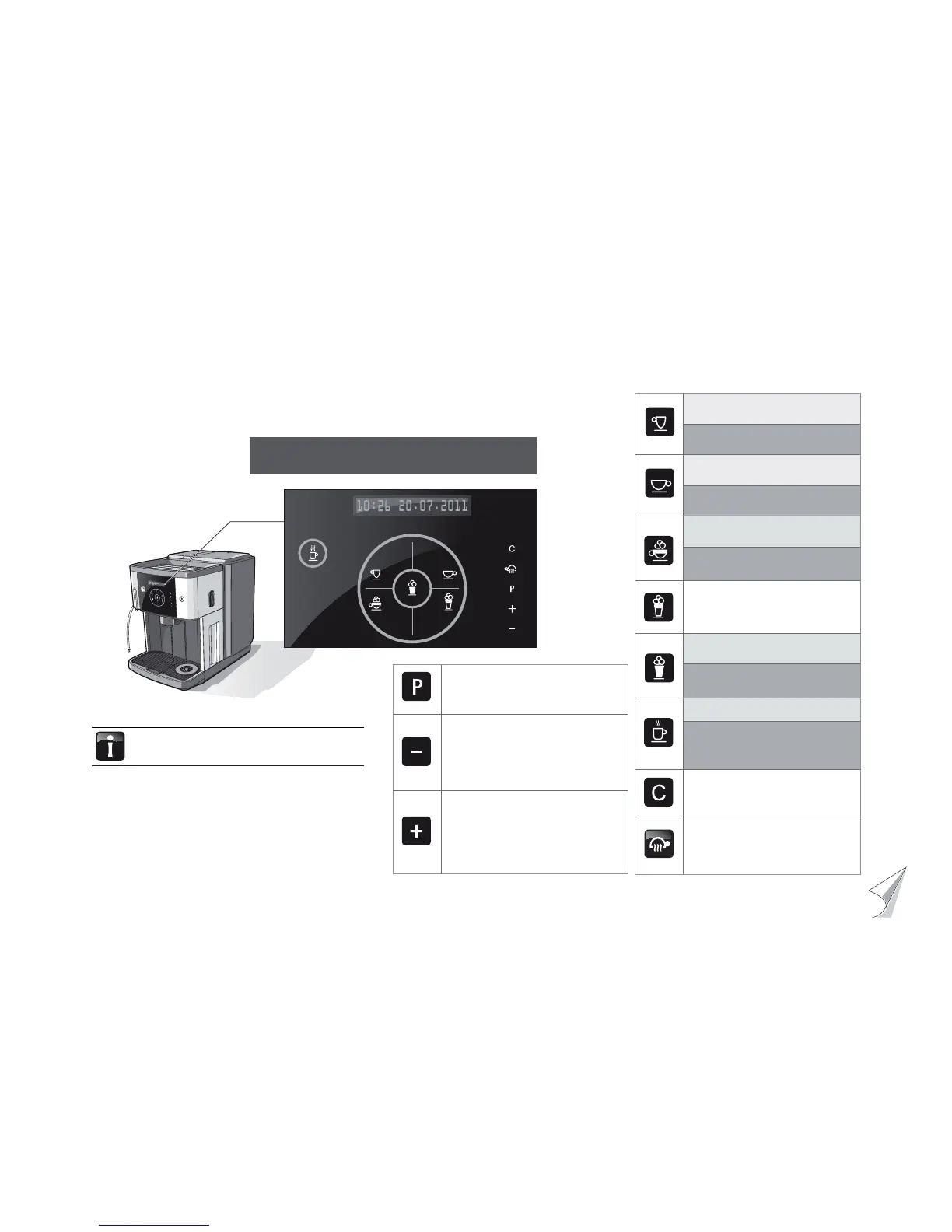
Press briefl y: 1x Espresso
Keep pressed down: 2x Espresso
Press briefl y: 1x Café Crème
Keep pressed down: 2x Café Crème
Press briefl y: 1x Cappuccino
Keep pressed down:
2x Cappuccino
Press briefl y: 1x Latte Macchiato
Press briefl y: 1 Mug of milk
Press and hold, till the desired
quantity of milk foam is obtained
Press briefl y: 1 glass of hot water
Press and hold, until the desired
quantity of water is obtained
C-button
Stop the procedure
Back without change
Steam Jet
press for at least 2 seconds:
-warm-up rinsing
Ready to operate display
The descriptions in this user manual always assume
that coffee-machine is ready to operate.
Your selection pls.
08:15 01.03.2010
P-button
Call up programmes
Confi rm selection
Minus button
Browse backwards
Reduce value
Reduce strength of coffee
Reduce the volume fi lled in the cup
Plus button
Browse forwards
Increase value
Increase strength of coffee
Increase the volume fi lled in the cup
Pot function
The design in the displays can vary
slightly from one version to another.



 To Next Page