Electric Cooktop -2
Electronic Control
3-5
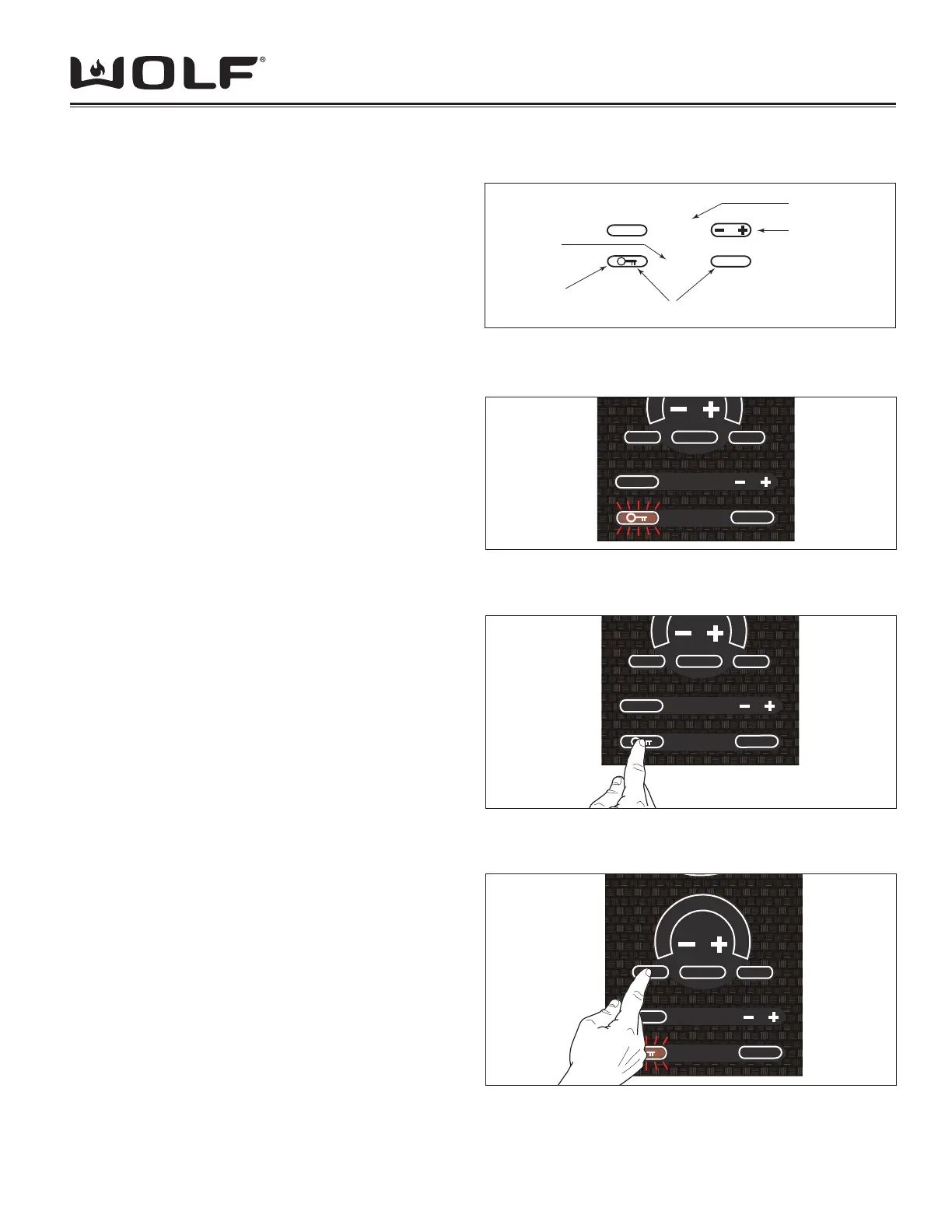
Hot Surface Indicator
As an added safety precaution, the “HOT” surface
indicator will remain on for a period of time after the
elements are turned off. This indicator serves as a
reminder of the potential for warm surfaces. (See Figure
3-4)
Universal [OFF] Key
In an emergency situation where there is a need to turn
off all heating elements, press the universal [OFF] touch
pad to turn the entire unit off. (See Figure 3-4).
MODES OF OPERATION
LOCK MODE: All keypad operation on the control
panel is disabled and all of the heating elements are de-
energized. A steady glowing light within the [Key] symbol
indicates the unit is locked. (See Figure 3-5)
To unlock the control, touch and hold the [Key] symbol for
3 seconds (See Figure 3-6). The unit will beep twice and
the light with-in the [Key] symbol will go out. The control
unit is now in the idle mode.
To lock the control, touch and hold the [Key] symbol for
three seconds (See Figure 3-6). The unit will beep three
times and the light within the [Key] symbol will illuminate.
NOTE: The unit cannot enter LOCK mode while
elements are active. An error tone shall sound if this is
attempted.
NOTE: When the unit is powered up for the fi rst time or
if there was a power outage, the unit will default to this
mode.
IDLE MODE: After unlocking the control panel as
described in Lock Mode, the unit enters the idle mode
of operation. The only valid keypad operations are the
[OFF ON] for each cooking zone, the [Key] symbol, and
the timer.
SHOWROOM MODE:
NOTE: If there is a power loss, the unit shall start up in
normal operational mode.
NOTE: 120 VAC operation of showroom mode requires a
Showroom Kit w/transformer.
This mode is to de-activate the heating elements while
still giving the user complete functionality of the controls.
Activating Showroom Mode:
From LOCK MODE Press and hold the front element
[MELT] keypad for 5 seconds. The control will enter the
showroom mode. (See Figure 3-7)
If any other keypad sensor detects another input signal,
the showroom mode will not engage.
ELECTRIC COOKTOP OPERATION
Figure 3-6 Unlocking Control Panel
CLEAR
OFF
HOT
OFF ON
MELT HIGH
H
I
CLEAR
OFF
888
HOT
Lock
Pad
Universal Touch Pads
Hot Surface
LED
Timer Touch Pads
Timer Display
Figure 3-4 Global Controls
CLEAR
OFF
HOT
OFF ON
MELT
HIGH
Figure 3-5 Control Panel Locked
CLEAR
OFF
HOT
OFF ON
MELT
HIGH
Shr
H
I
Figure 3-7 Activating Showroom Mode



 To Next Page