Electric Cooktop -2
Electronic Control
3-6
Activating Showroom Mode (continued)
If the [MELT] keypad is not released after 7 seconds, the
showroom mode will be cancelled and not engage. The unit
will return to the LOCK mode.
Upon entering the showroom mode, all LED indicators will
illuminate (no blinking) for a period of 5 seconds.
After this time period, the unit will remain in the LOCK
mode with the LOCK LED illuminated as normal. And “Shr”
displayed in the custom display.
Exiting Showroom Mode:
From LOCK MODE Press and hold the front element
[MELT] keypad for 5 seconds. The control will exit the
showroom mode.
When exiting the showroom mode, the control should reset
itself and go through the normal power up cycle as if power
were interrupted.
OPERATION MODE:
Activating and Temperature Setting for a Heating Zone:
Press individual [OFF ON] pad to enable element control
and light LED
Press Local [+], [-], [SIM], [MELT] or [HIGH] pad for
individual heating zone operation
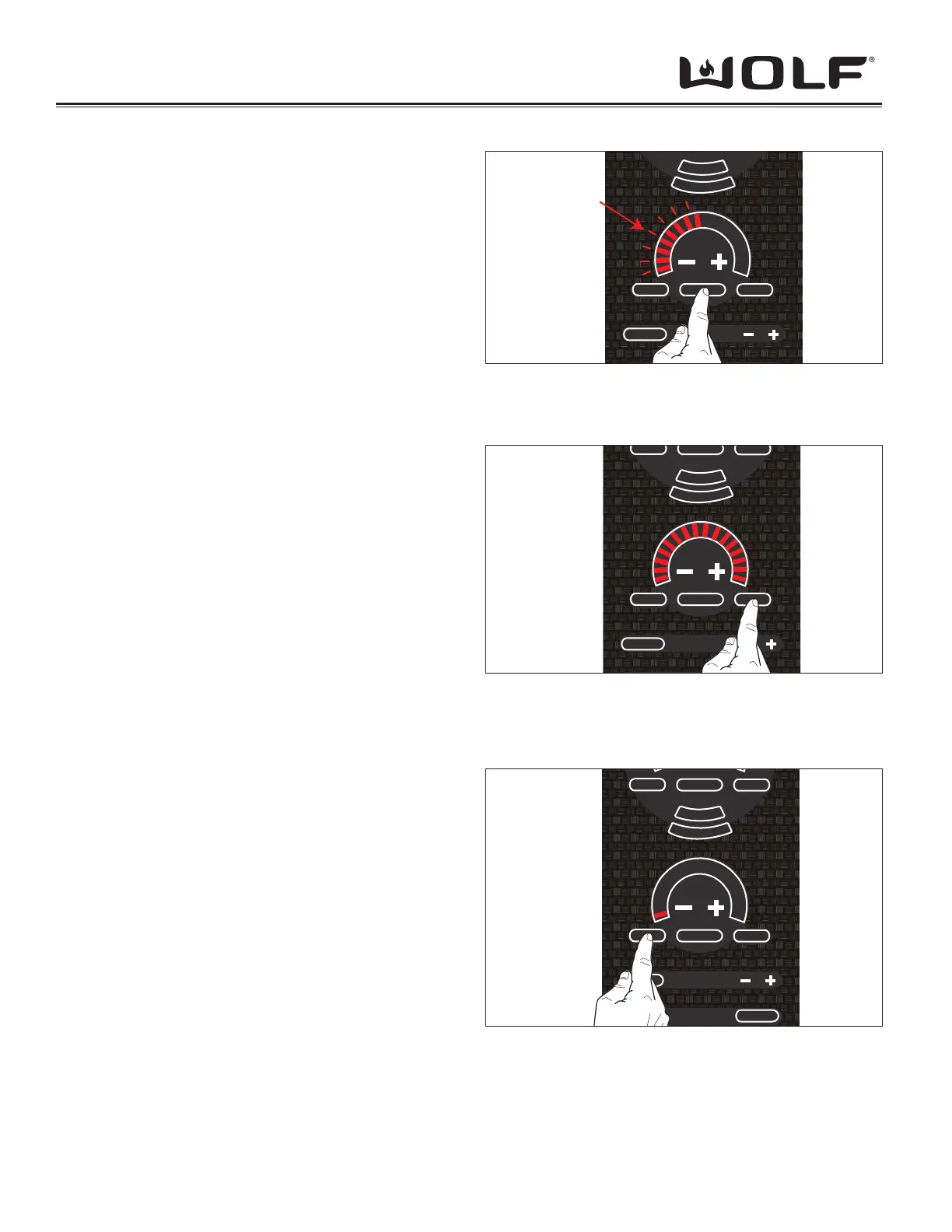
8 LEDs fl ash initially upon heating zone activation (See
Figure 3-8); if no further action taken within 10 seconds,
element control reverts to Idle Mode.
If another [OFF ON] key is touched before the second
action of the heating zone that was activated fi rst, the fi rst
heating zone will immediately turn off (stop blinking) and
the second heating zone will wait for a second action to
start heating.
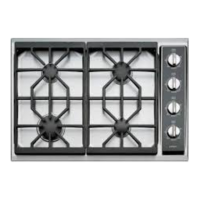
Press [HIGH] pad for individual Heating Zone
Power level jumps to 10 (See Figure 3-9)•
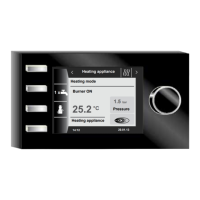
Press [SIM] pad for individual Heating Zone
Power level jumps to 1 (See Figure 3-10)•
Press [MELT] pad for individual Heating Zone
Power level jumps to 1 (See Figure 3-10)•
Press & Hold [+] pad for individual Heating Zone
After .5 seconds 10 LEDs light up and power level rises •
to 6
After 1 seconds 12 LEDs light up and power level rises •
to 7
After 1.5 seconds 14 LEDs light up and power level •
rises to 8
After 2 seconds 15 LEDs light up and power level rises •
to 9
After 2.5 seconds 16 LEDs light up and power level •
rises to 10
Z
O
N
E
2
Z
O
N
E
3
CLEAR
OFF ON
MELT HIGH
Flashing
H
I
Figure 3-8 Element On
OFF ONSIM HIGH
Z
O
N
E
2
Z
O
N
E
3
CLEAR
OFF
HOT
OFF ON
MELT HIGH
H
I
Figure 3-10 “SIM” or “MELT” pressed
OFF ONSIM HIGH
Z
O
N
E
2
Z
O
N
E
3
CLEAR
OFF ON
MELT HIGH
H
I
Figure 3-9 “HIGH” pressed



 To Next Page