Electric Cooktop -2
Electronic Control
3-7
Operation Mode (continued)
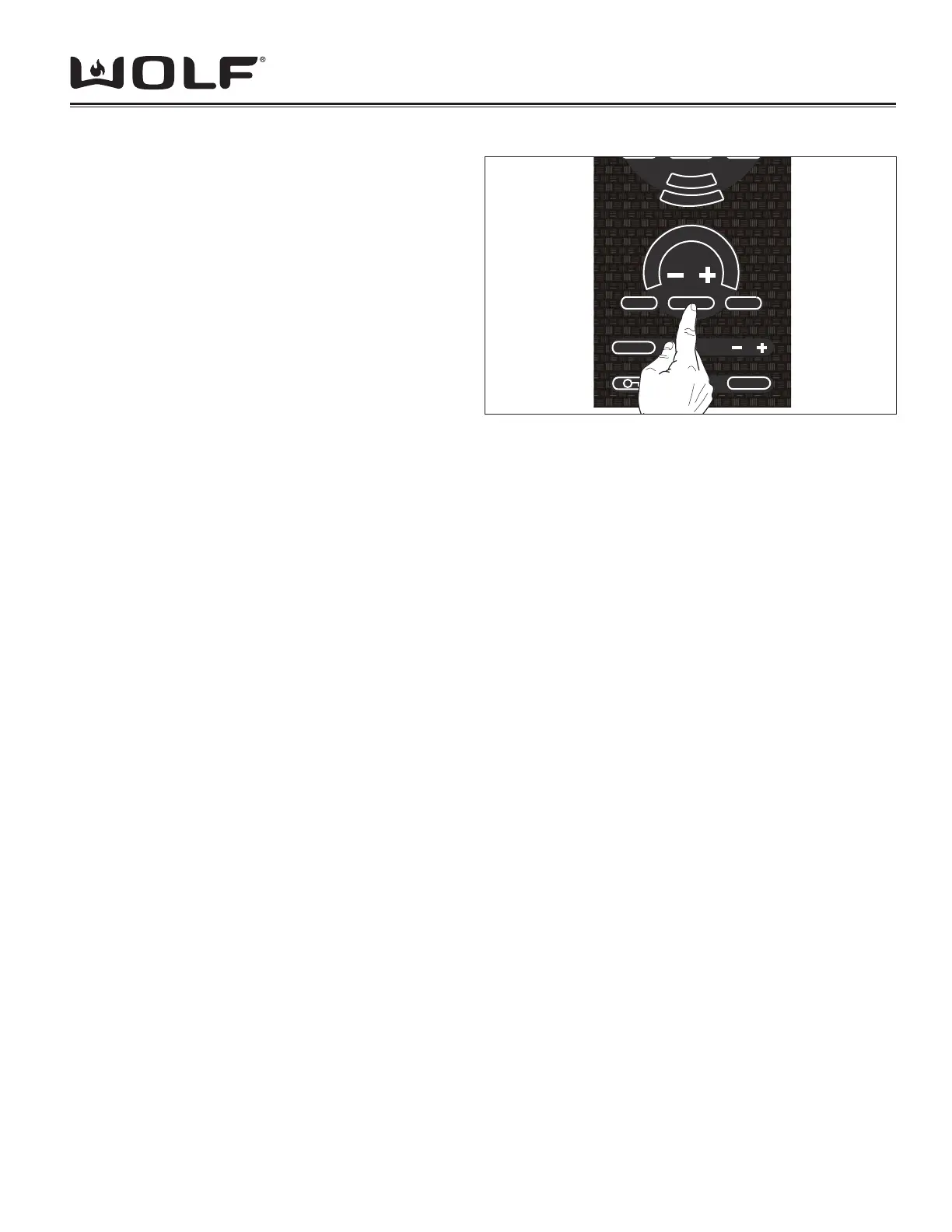
Press & Hold [-] pad for individual Heating Zone
After .5 sec -6 LEDs light up and power level lowers •
to 4
After 1 sec. -4 LEDs light up and power level lowers •
to 3
After 1.5 sec -2 LEDs light up and power level lowers •
to 2
After 2 sec -1 LEDs light up and power level lowers •
to 1
Press & Release [+] pad for individual Heating Zone
8 Flashing LEDs light up and power level goes to 5 •
Any addition presses of the [+] key will result in •
stepping up a level and the corresponding LEDs
lighting up.
Figure 3-11 Deactivating a heating zone.
Z
O
N
E
2
Z
O
N
E
3
CLEAR
OFF
HOT
OFF ON
MELT HIGH
H
I
Press & Release [-] pad for individual Heating Zone
8 fl ashing LEDs light up and power level goes to 5.•
Any additional presses of the [-] key will result in stepping down a level and the corresponding LEDs deactivated.•
Deactivating a Heating Zone.
Press [OFF ON] on active Heating Zone
Sets Power level of that heating zone to 0 and turns off all the LEDs. (See Figure 3-11)•
ELEMENT OPERATION: (with hob’s inner element already active)
Dual Element Operation
Action: Press [ZONE 2] pad to activate outer element Hob•
Result: Power will be applied to outer element at same level as inner zone and [ZONE 2] LED goes ON.•
Action: Press [ZONE 2] pad again for the same Hob•
Result: Power removed from dual element (power remains ON for Single element) and [ZONE 2] LED goes OFF.•
NOTE: Inner Zone may dim when outer Zone is activated due to limits on the maximum output of element.
Triple Element Operation
Action: Press [ZONE 2] pad for Triple Element individual hob•
Result: Power will be applied to center element at same level as inner zone and [ZONE 2] LED goes ON•
Action: Press [ZONE 2] pad again for same Hob•
Result: Power removed from center element (power remains ON for single element) and Zone LED goes OFF.•
Action: Press [ZONE 3] pad for Triple Element individual Hob•
Result: Power will be applied to center and outer elements and Zone 2 and 3 LEDs go ON•
Action: Press [ZONE 3] pad again for same Hob•
Result: Power removed from outer element (but power remains ON for Single and Dual Elements) and Zone 3 LED •
goes OFF (Zone 2 LED remains ON)
Action: Press [ZONE 2] pad for same Hob.•
Result: Power removed from center element (Power remains ON for single element) and Zone 2 LED goes OFF.•
NOTE: Inner Zones may dim when outer Zone is activated due to limits on the maximum output of element.
Bridge Element Operation
Action: Press [BRIDGE] pad for Bridge Element (one or both bridge linked hobs is currently on, if neither hob is on, •
unit will provide an error tone and no further action will be taken)
Result: Power applied to Bridge element BRIDGE LED goes ON; both front and rear hobs will automatically take •
on the current lowest hob setting. (i.e. if both hobs are on, the rear is on high, the front is on medium, a press of
the [BRIDGE] key will turn on the bridge elements and the system (all three elements) will take on the medium
setting. If both hobs are on high and the [BRIDGE] key is touched, the system will take on the high setting).



 To Next Page