Electric Cooktop -2
Electronic Control
3-9
CLEAR
OFF
HOT
UOL
OFF ON
MELT HIGH
H
I
Timer Operation (continued)
Upon activation the timer display will display “01” (one
minute).
The unit will increment/decrement with the touch of the
[-] / [+] 1 count every .5 seconds.
If the [-] / [+] key is held down for more the 3 intervals
continuously and the count is divisible by 5, the display
will increment/decrement at a rate of 5 count per every .5
seconds.
Likewise, if the [-] / [+] key is held down for more than
3 intervals and the count is divisible by 10, the rate of
change will become 10 count per interval (i.e. 0, 1, 2, 3,
4, 5, 10, 15, 20, 30, 40, 50, …).
The timer is paused while entering the time and will
start 3 seconds after the last change in value. Editing a
running timer causes the seconds to be reset so that the
displayed time is what will be counted down. As a result,
if the minute time is counting down seconds, the [-] key
will stop the timer without an alarm.
Countdown: When the timer reaches 1 minute during
countdown the display will then switch to read 59, 58, ...
until 0 seconds is reached.
When the timer counts down to 0 sec. the unit will beep
once every 5 sec. and the display will fl ash “00” until
[CLEAR] is pressed to stop the beep and clear the
display.
Annunciator
The Annunciator is volume adjustable. The volume is
adjusted through the timer controls as a User Option.
The cooktop must be in Idle Mode in order to adjust
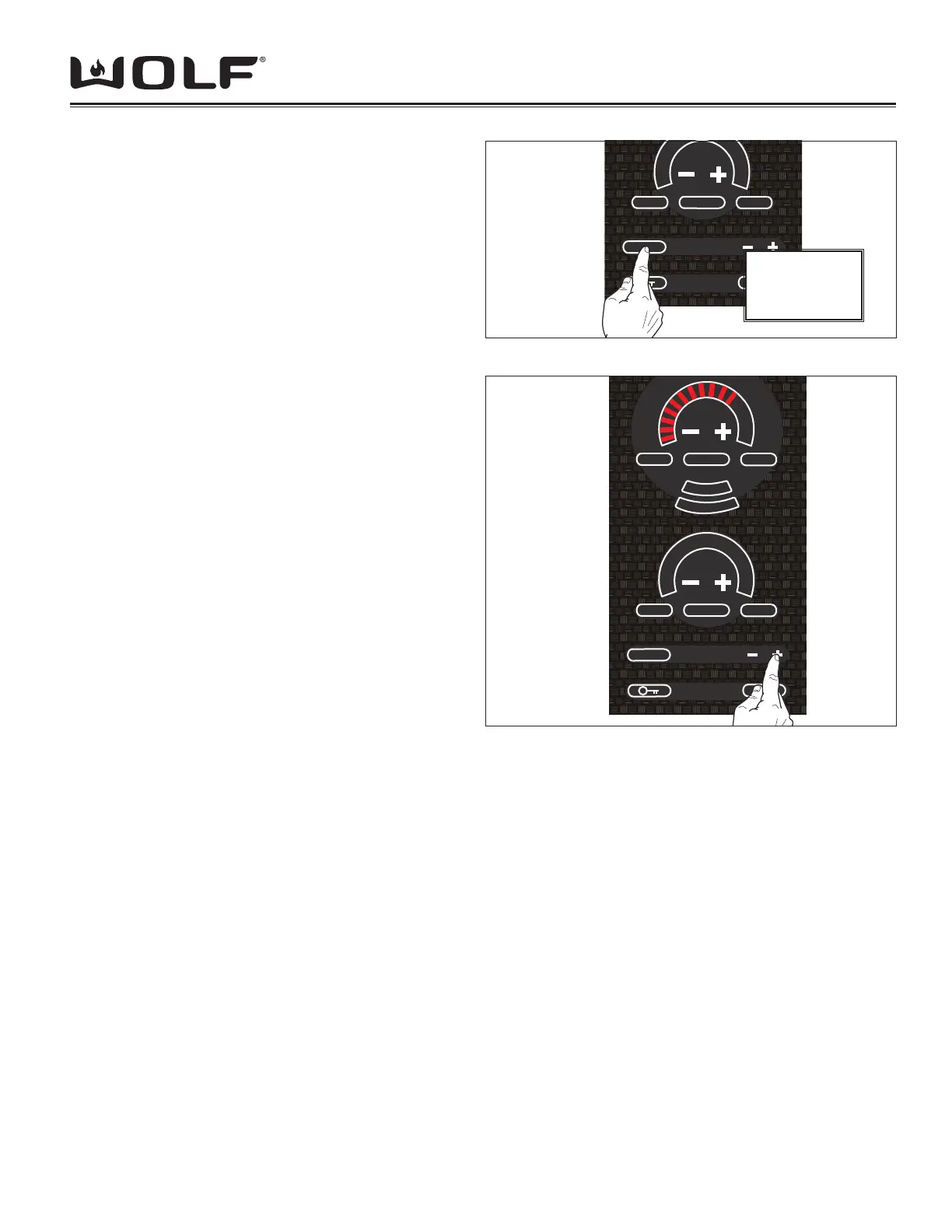
Figure 3-14 Entering User Options - Volume
Touch and
Hold [CLEAR]
Key for 3 Sec.
Figure 3-14 Entering User Options - Volume
OFF ONSIM HIGH
Z
O
N
E
2
Z
O
N
E
3
CLEAR
OFF
HOT
UOL
OFF ON
MELT HIGH
H
I
either the volume or frequency.
To enter User Options,
1. Touch and hold [CLEAR] pad for 3 seconds will activate the Volume adjustment. The 3-digit display will show “Uol”.
(See Figure 3-14)
2. Touch and hold [CLEAR] pad for more than 5 seconds will activate the Frequency adjustment. The 3-digit display will
show “FRE”.
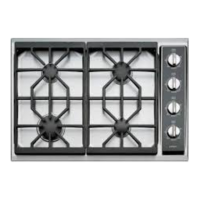
3. Both the Volume and Frequency are adjusted using the timer [-] and [+] keys. 1 touch equals 1 step up/down in
volume or frequency. Power Level Indicator - LEDs will show the current status of the volume/frequency and
change with the user’s input. (1 LED = Low, 8 LEDs = Med. and 16 LEDs = High). (See Figure 3-2)
As the volume/frequency is adjusted, the annunciator will beep with each change. The beep will represent the
volume/frequency level that is currently displayed by the Power Level Indicator - LEDs.
4. The change will be accepted if you touch the clear key for 3 seconds or if no keys are touched for more than 10
seconds.
NOTE: Touch and hold [CLEAR] pad for more than 7 seconds will deactivate User Options and return cooktop to idle
mode.



 To Next Page