Chapter 5
Entering Control Set Points
Introduction
Because of the variety of installations, plus system and component tolerances, set points
input to two 721 controls could not be identical even if these 721 controls are installed in
same engine control systems. Therefore, the 721 control must be tuned to each system for
optimum performance.
This chapter contains information on how to enter control set points through the control's
menu system using the Hand Held Programmer. See the next chapter for prestart- up and
start-up settings and adjustments.
WARNING
An improperly calibrated control could cause an engine overspeed
or other damage to the engine. To prevent possible serious injury
from an overspeeding engine, read this entire procedure before
starting the engine.
Hand Held Programmer and Menus
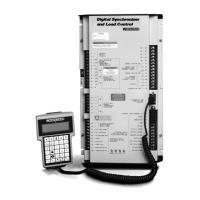
The Hand Held Programmer is a hand-held computer terminal that gets its power from the
721 control. The terminal connects to the RS-422 communication serial port on the control
(terminal J1). To connect the terminal, slightly loosen the right-hand screw in the cover over
J1 and rotate the cover clockwise to expose the 9-pin connector. Then firmly seat the
connector on the terminal into J1.
The programmer does a power-up self-test whenever it is plugged into the control. When the
self-test is complete, the screen will display two lines of information. This is information
relating to the application. If it does not appear, press the ESC key. Pressing the 'ID' key will
change the display to show the software part number and the revision level of the control.
Please record this software part number and revision level because Woodward will need
these if you ever need factory service for any control problem.
The programmer screen is a four-line, backlighted LCD display. The display permits you to
look at two separate functions or menu items at the same time. Use the Ú“Up/Down Arrow”
key to toggle between the two displayed items. An “@” mark will be displayed at the left side
of the active line. The operator can change the set point only in the active line. The BKSP
and SPACE keys will scroll through the display to show the remainder of a prompt if it is
longer than the display screen's 18 characters.





 To Next Page