Hand Held Programmer Keys
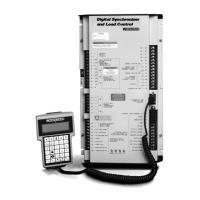
The programmer keys do the following functions (see Figure 5-1):
(left arrow) Moves backward through Configure or Service, one menu at a time.
(right arrow) Advances through Configure or Service, one menu at a time.
(up/down arrow) Toggles between the two displayed items.
(up arrow) Moves backward through each menu, one step at a time.
(down arrow) Advances through each menu, one step at a time. Selects Service from
Master Screen.
(turtle up) Increases the displayed set point value slowly.
(turtle down) Decreases the displayed set point value slowly.
(rabbit up) Increases the displayed set point value quickly (about 10 times faster
than the turtle keys).
(rabbit down) Decreases the displayed set point value quickly (about 10 times faster
than the turtle keys).
– (minus) Increases set point values by one step at a time.
+ (plus) Decreases set point values by one step at a time.
(solid square) Not used.
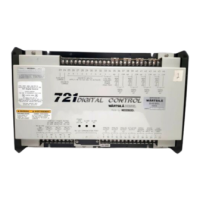
ID Displays the 721 control part number and software revision level.
ESC To return to menu header or to main screen.
SAVE Saves entered values (set points).
BKSP Scrolls left through line of display.
SPACE Scrolls right through line of display.
ENTER Used when entering exact values and accessing Configure.
= (equals) For entering exact values (within 10%).
y
(decimal) To select Configure.






 To Next Page