Satellite Upconverter Manual WORK Microwave
43 / 49 V151207
4.6 Firmware Updates
Within the device there are various modules with firmware. Every firmware version can easily be upgraded
with the communication module. The device needs to be rebooted after every firmware update.
4.6.1 Local Firmware Update
The firmware of the all modules including the communication controller can be updated locally with the USB
interface of the device. A flash disk with the new firmware container file has to be attached to the device.
Please ensure, the file “converter.update” is located in the root directory of the flash disk. Now the firmware
update can be initialized with the front panel menu (see section 3.5.3.18).
4.6.2 Remote Firmware Update
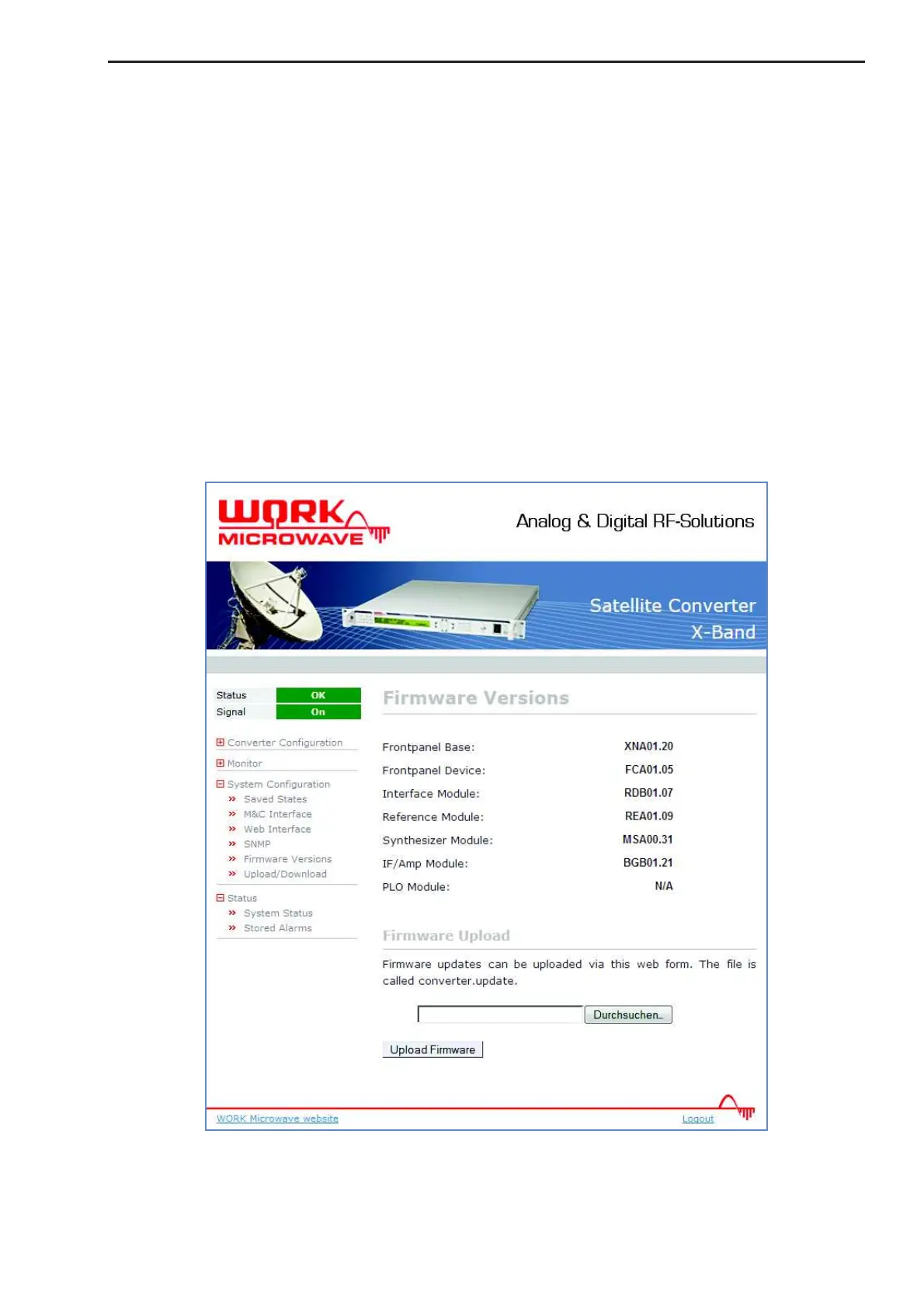
Below the currently installed firmware versions in the “System Configuration” – “Firmware Versions” Menu
there is the option “Upload Firmware”. The file “converter.update” can be uploaded directly.
Figure 22: Firmware Versions page


 To Next Page